


Hacker
Professional
- Messages
- 1,041
- Reaction score
- 857
- Points
- 113
Let's remember and accept the fact that everything else requires many hours of bullying your psyche and marking "confident PC user" in the resume from the job that you finally quit. Or, believe me, you'll soon quit. In the meantime, be patient and make some tea. I don't offer coffee, you know.The most popular electrical appliance in my home is not a working PC. This is a coffee grinder. An old bosh coffee grinder with no fancy flourishes, which had been running out of steam until yesterday and only worked after a special ritual of turning the blades clockwise. It broke down completely a couple of days ago. And it was the only thing that worked online that didn't have to dance with a tambourine to make it work the way it should... Well, after the curling iron of course
Configuring the system for operation
Since all the efforts on hardware and software poking around in the hardware of your PC are mostly aimed at disguising yourself as cardholder (or the owner of the money we want to dispose of), we don't have to torment your computer. After all, you can hack someone else's account on someone else's computer and get full access to it. And if you don't know how, buy one that's already hacked.
So, I present the most ancient development of hackers of all times and peoples - dedicated server or dedic (RDP), in a simple way. Remote computer. Remote for thousands and thousands of kilometers, accessible via a virtual connection via rdp-the same protocol as your Samsung or acer. VDS (remote servers) work on a similar principle, but they are not suitable for us, since no American will buy a coffee grinder from a server configured as corporate network node, and even with the appropriate IP address. We are interested in the so-called home dedic (RDP). If his IP address is in the range of addresses of the cardholder ZIP code, then we don't need anything else (if not, a sock is pulled on the dedic to fit the desired ZIP code or as close as possible to the desired ZIP code).
We go to dedic via the utility built into any Windows: Start-Run => mstsc. In the window that opens, enter the IP address and username of your account. Before connecting, be sure to enable a vpn-based service. And then let us clean up the registry after ourselves, you don't need to go to your grandfather from your IP, it's better to get drunk right away.
I will not describe the details of working with dedic, but rather go to the parameters that you need to be able to set up with your eyes closed if you want to do carding.
Everything described below applies only to working from the base, that is, your PC and your axis.
DNS
First and foremost, it should not leak. If you don't understand what I'm talking about at all, I'll explain: the main purpose of DNS servers is to convert domain names of sites into IP addresses of servers where these sites are located. Well, or lie down if someone got to ddos. Not the point. In simple words, by entering the domain in the browser Google.com, The DNS server looks at which IP address this domain is assigned to, and the site page loads via IP addresses. While mere mortal users see only the domain name, as always, all the most interesting things happen in the" background".
Fat minus DNS: all DNS traffic (your requests and server responses) goes over the network in clear text and is available for listening by third parties. These logs are primarily used by system administrators and many other people (providers, authorities)to analyze network traffic. Also, in some cases, it is possible to pass DNS requests through the VPN in unencrypted form, which reduces our efforts to remain anonymous to almost nothing.
This is the leak. To prevent it, we will encrypt requests so that the curious provider knows little and sleeps soundly. To do this, do the following:
- Download the Simple DNSCrypt program: https://simplednscrypt.org
- Install and run the software. In the window that opens, set all parameters and select the connections that you want to encrypt.
- Open the tab "Резольверы" and set automatic mode. If you are a professional or you need a specific resolver, that is, you can choose manually, choose yourself.
Ipv6 is generally cut down to hell, this muck uses its own identifier generated using the mac address, which is distributed to the right and left.
WebRTC
The most painful part of working with clients. Originally developed as a technology that allows you to establish p2p video and audio communication, but with good intentions, as you know... In short, webrts merges the real IP address despite any anonymization tools stretched from above. Even though the double vpn + sox + tunnel, the king is still naked, because the peer-to-peer connection is established directly, through all the barricades and barriers. Another problem: manually changing the webrts takes longer than I make make-up. solution for the base, launch and change the IP address to the desired one (tunnel or sock IP address). Don't forget that the program requires a php compiler and a raised apache.
Ports
According to their idea, they are also harmless unicorns. All Internet connections are addressed by the {IP address, port} pair, so you can theoretically create 65535 connections from one computer, which is the number of ports. A small remark: the USB connectors on your system unit are not ports, they do not have a physical embodiment at all. The port is a sick geek fantasy. It has a purely virtual nature.
Why do I focus on them? A thoughtful reader noticed that I mentioned setting up connections via ports, which means that to connect to a vpn, dedic, or tunnel, the port responsible for connecting using this protocol must be open on end devices. That's the first problem. Open ports are detected by anti-fraud, so he sees that John went to the shop for a rubber duck with a VPN, which means that this is not John at all, but Vasya from the third entrance, who thinks he is a megacarder.
MAC address
A MAC address is essentially a unique number-an alphabetic number assigned to any network device by the manufacturer. It consists of 12 characters, most often separated by a colon. The symbols used are numbers from 0 to 9 and the first six letters of the Latin alphabet from A to F. In order to raise the horns of the anti-fraud, you will have to dig through the registry. To get there, run the utility as an administrator regedit.exe and go to the adapter settings:
HKEY_LOCAL_MACHINE -> SYSTEM - > > CurrentControlSet - > > > Class - > > > 4D36E972... - > > > > 0011 (don't go deeper). The DriverData line should display the name of the adapter you are using.
We create a string parameter, call it NetworkAdress, and specify which mac we want. (do not change the DriverDataData parameter in any case, this is not the case). To return to the stock mac, you don't need to remember anything, just delete what you created.
There is one tricky point:
Windows developers have limited the flight of our imagination at the level of Windows itself: the 2nd digit letter must be either "2", or "6", or "A", or "E". for example 0A-00-00-00-00-00. this is done so that Wi-Fi networks can fully implement mac address filtering.
However, as you know, everything that one created can break the other. If you change the mac in this way on the XP installed on the virtual machine, then by some miracle it will have to change to the main win7.
The success or failure of the operation is checked by the getmac command in the command line terminal. Oh, and just in case: whatever network or usb network adapters you install, they are always displayed in the registry at the following path: HKEY_LOCAL_MACHINE - > SYSTEM - > CurrentControlSet - > > Class - > > > 4D36E972... so as not to get lost in the variety of letters and numbers in this folder (as in the registry in general) - in the device manager, open the necessary hardware- >>>>details - > > > > properties and see its ID. DeviceInstanceID.
Audio Fingerprint
Generated by the presence, number, and ID of audio devices (microphone, speakers, and speaker). That on the basis that on the virtual machine they are the same. That's where der hund ist begraben comes in.
An audio fingerprint can really hurt you in 2 cases:
1) Deanon. Let's say that you go to the website of a business owner and they take an audio fingerprint from you. Then, after a successful case, you turn off the virtual machine and go to youtube or, even worse, to social networks. And all these sites are also not far behind and take the imprint of audio. Deanonymization will roughly look like this: "20: 00 fingerprint 2a3b4c5e went to the PP under the ip 192.168.0.1, 20: 30 fingerprint 2a3b4c5e went to YouTube under the ip 192.168.1.100”
2) PP or other sites can use this fingerprint to see that you have already visited them and behaved uncultivated.
In anti-detection, fingerprint substitution is implemented with a bang, it is no longer relevant to use expired plugins with the base, but there is still a way out. This batch file changes 30 (!) system parameters in three seconds.
Uptime and OS fingerprint
You can determine that you are really you by the hash that is generated from a number of browser parameters (fonts, timezone, headers, javascript internals, and much more). Use your Firefox account to https://panopticlick.eff.org
The point is that all bits of identifying information should be less than 20. Otherwise, you can be identified and changing your IP address is like a dead poultice.
And there is also such a non-standard feature as two-way ping. Detects tunnels, VPNs, and sockets based on the ping and time difference received in the ICMP packet feedback loop. But it's not so bad, at my dacha Yandex also opens for 5 minutes. You can't trample on the network coverage that is not developed by the provider in remote city, antifraud is not stupid, it understands everything.
Tab history and refer
Used by antifraud to detect recently visited sites. Refer-determines which site we came from, so we go like all people, from Google or through ads. Currently open tabs for are also not a secret for af. So live with it now.
In order not to get burned at this point, check all the settings in another browser, and from the desktop walk only on the resources that are familiar to amers - Google, fb, pornhub and Twitter.
All settings are checked at
browserleaks.com
f.vision
whatleaks.com
ip-score.com
audiofingerprint.openwpm.com
Antispyware
On the anniversary Windows, contraceptives are required to protect against the endless drain of traffic to Microsoft, Google and other instances. This one the program disables rules in the scheduler, some services, and makes changes to the registry. Firewall rules are created based on the selected privacy mode: Spy and Extra. When you select the latter, OneDrive, Skype, Live, and the like are blocked (the program warns you about this). We install it and are not afraid that the system will not work correctly - the utility has proven itself to be the best in its segment. Tested by me and my students. We will return to the topic of configuring win10 later, but this will be an in-depth knowledge for those who are serious in their intentions ?
In the next part, we will analyze the means of changing the IP address and anti-detection. In the meantime, I'll get myself a coffee grinder. Although no, perhaps a coffee machine.
Part 2. IP
I will start, perhaps, not quite with the ip, but I will tell you about a more global one and draw an analogy:
In order for your girlfriend not to fuck around with a bunch of pans and pans while cooking dinner for you, a multi-cooker was invented that allows you to cook borscht, chicken and cake at the touch of a button. In order for the carder not to mess with a bunch of programs and applications, configuring the system for driving, an anti-detection was invented. A kind of multi-cooker that combines all the necessary functions in one assembly.
VM anti-detection from Vektor T13.
The free solution is suitable for working with medium-level anti-fraud systems and for anonymous surfing. Judging by the reviews, it successfully copes with the antifrauds of well-known poker and BC offices, forging almost all the parameters of the hardware. There are certainly holes in the anonymity of the free solution. This is stated by the author himself. But this is quite enough for correct operation. The public solution is free of charge. You can download it and read the instructions here. In the same way, as for private software, the queue for Vector as a good plastic surgeon is scheduled for months ahead, and the price of a personal build, depending on the functionality, varies from one to several thousand$.
Vectors on YouTube channel. Main Videos:
Anti-detection view:
installation
Spoofing OS parameters
Vector also sometimes has interesting partner collaborations with the site Openssource.bizwhich we recommend that you keep track of.
Linken Sphere
More than a serious browser-antidect from a team of professional developers who have eaten more than one herd of dogs in their business. Sphere is a four-wheel-drive all-terrain vehicle that plows the expanses of the darknet and leaves no chance for the coolest anti-fraud systems. The free version is provided for maximum anonymous movement on the network, and the paid version is provided for work.
The prices are not childish, but they are quite appropriate for the product:
$ 30-a week
$ 100-month
$ 500 - six months + access to photoshop
Shop with private configs - the most interesting thing that is in the browser. All the casts in it are unique, and this is what allows you to work with PayPal from the outside. Automatically generated configs are not suitable for self-regs.
Official website - https://ls.tenebris.cc/
Chat where developers answer all questions - https://t.me/spherechat
Well, now with a clear conscience I turn to the methods of spoofing the IP address.Of course, in addition to vm-antique and sphere, there are other solutions with similar functionality, but all of them are somehow inferior to them in terms of convenience and quality of implementation. Alternatively, you can pay attention to the product from antidetect.org
VPN
A logical network on top of the Internet that allows you to connect to your servers, get their IP addresses, encrypt traffic, and link the necessary DNS servers. Doublevpn-connect to a server, and from it to another server. In the logs of the provider and the vpn provider, only the connection to the first address (From the first address for the vpn provider) will be visible, which adds a plus sign to karma and anonymity.
Disadvantages: price, logs, limited choice of servers, and in webrtc, the local IP subnet is often burned, which allows antifraud to detect the use of vpn.
SOCKS4 / 5 (proxy, socks)
This is a network protocol that allows you to redirect traffic to the destination server through a special proxy server, whereas for the final resource, the request comes not from you,but from a proxy. Accordingly, without a sock your ip, with a sock your ipishnik and DNS address is displayed, for example, as YUSA Brighton Beach.
The main disadvantage: the traffic is not encrypted, and the provider watches your adventures and eats popcorn.
Minus number two: the sock usually does not live longer than a day.
Tunnels
SSH tunneling is a method of transporting arbitrary network data over an encrypted SSH connection. If you're not an under-brand, just imagine the obvious difference: a proxy doesn't encrypt requests, while a tunnel does. It can live for several months.
Minus: it is more expensive than a sock and is less common, so it is quite difficult to choose a spare part for a spare part.
Bundle 1. Bitvise + Proxifier
Proxying when connecting to a tunnel is necessary to block traffic (including system traffic) to the ssh server.
1) Download the proxy server
http://www.proxifier.com/download/

2) Install
Activation keys:
PLZ92-LYS8J-ANV3S-SZRQ7-GPG3F
5JZ6S-B3FKJ-49YYP-HCCQN-3JVHX
TQZVQ-X36SC-SFZYC-TAC7E-BQF9S
2VZ8M-BYC2A-A3Y3P-6LQQ5-HNDN8
CJZXN-BWFDK-Q2Y2M-VSFCT-E7YLW
6KZ2V-A2UXK-YAWWC-YJ9QG-MW4RG
RSZXG-M2YDB-R5SWQ-3XR7Z-L42PN
ULZCW-2YQNG-FL83G-9DGLR-9TFQA
Portable Serial:
2TCKX-TYQHL-NFN33-3YEDY-QW65D
Starting the setup process.
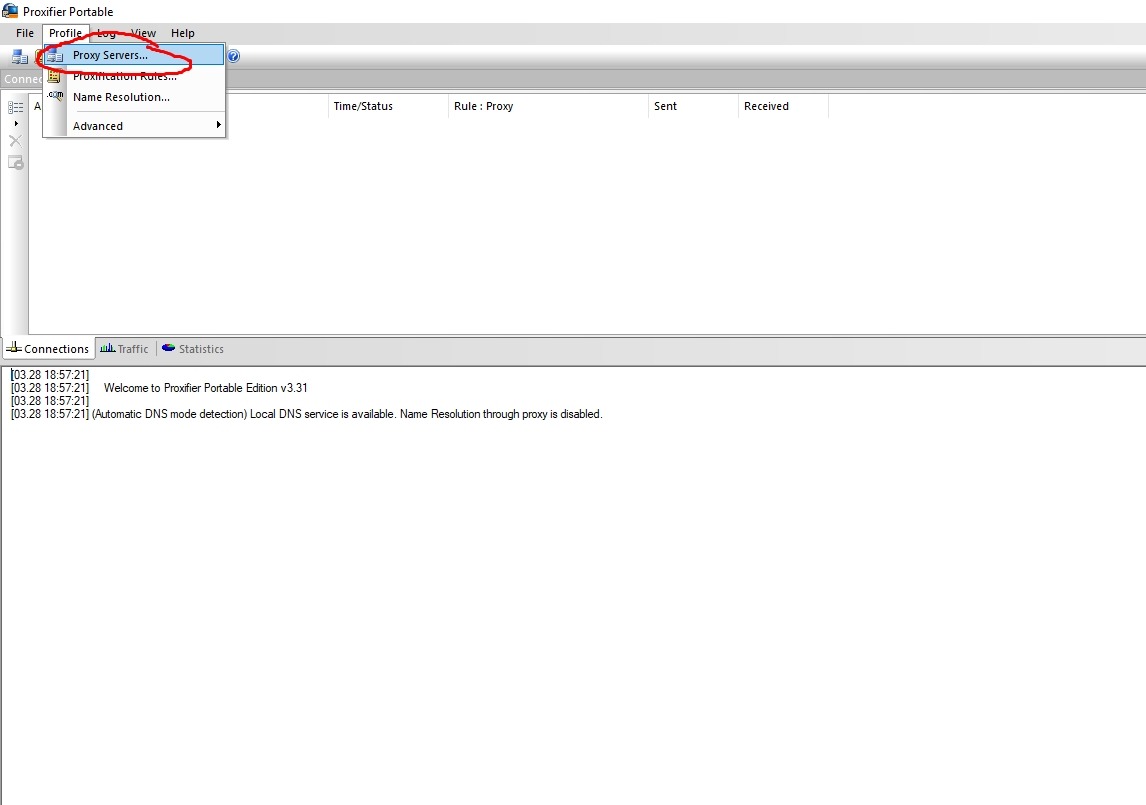
Click Add
Fill it out like this:
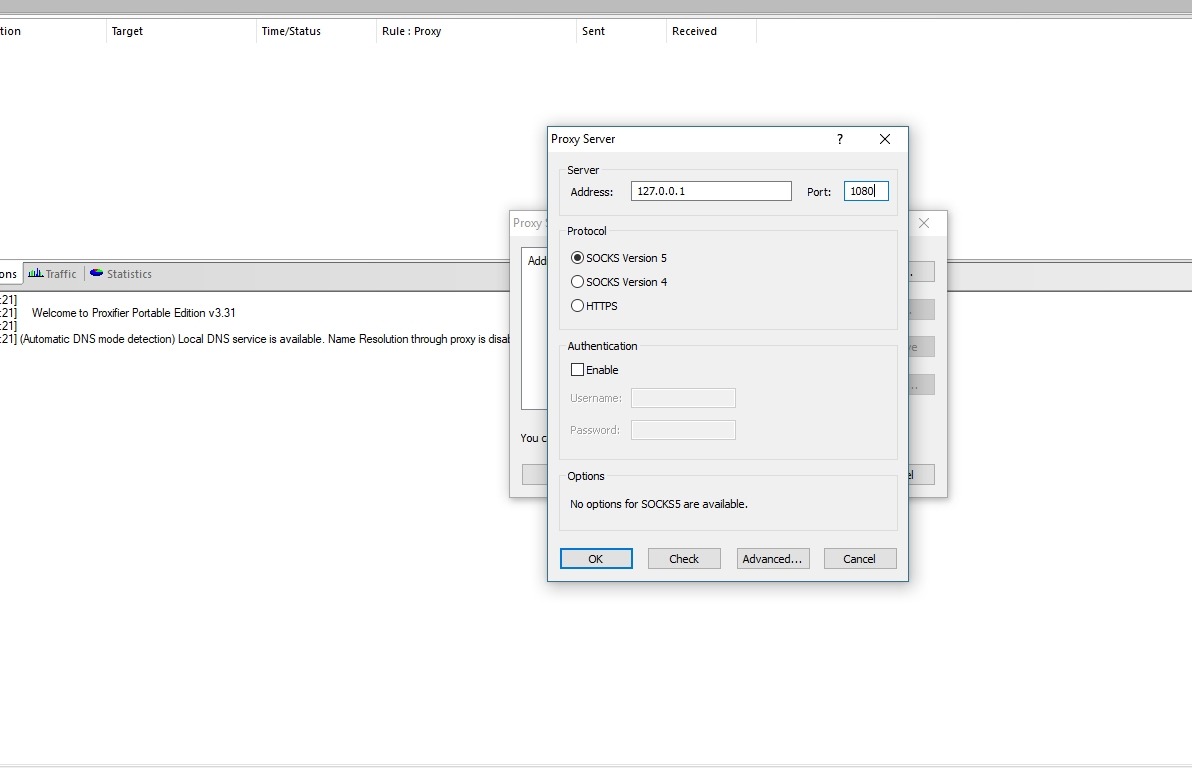
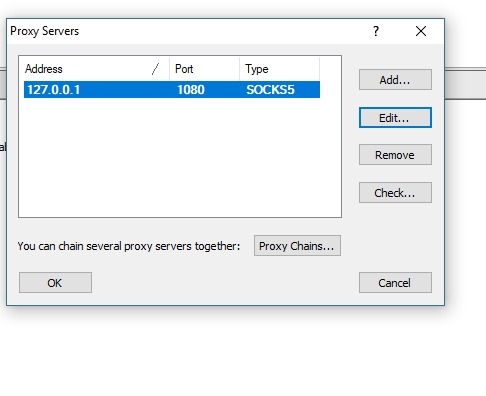
We confirm the settings and get:
Go to name resolution to set dns
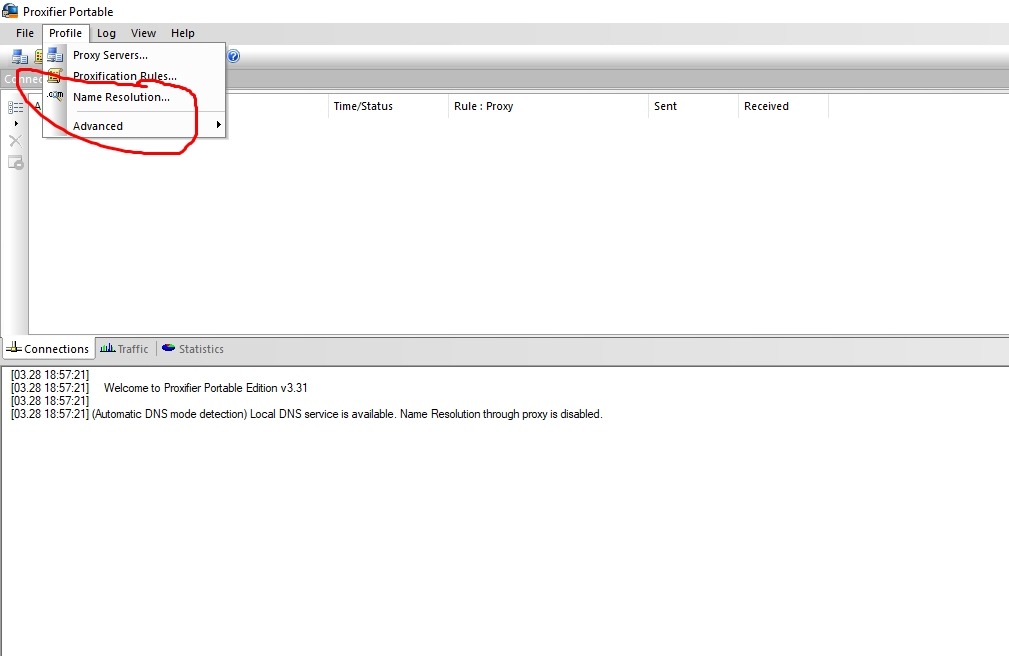
We hook the DNS from the tunnel.

If the test shows more than 2 dns servers (depending on the settings on the ssh server, it sometimes catches 30 dns servers), change the check mark to detect automatically and download dns-jumper.

Changes the DNS in one touch and clears the dns cache. The main thing is not to forget to use dnscrypt, which I described in the previous article.
Video instructions[/URL] for the proxy server.
2) Setting up bitwise
Let's go here and download it https://www.bitvise.com/download-area
Download exactly Download Bitvise SSH Client (Tunnelier)
Downloaded and launched
We went to the SSH section, click exchange key, check all the boxes, and do the same in host key, encryption, so that there are no errors when connecting.
In this tab, we set the values that we wrote in proxy:
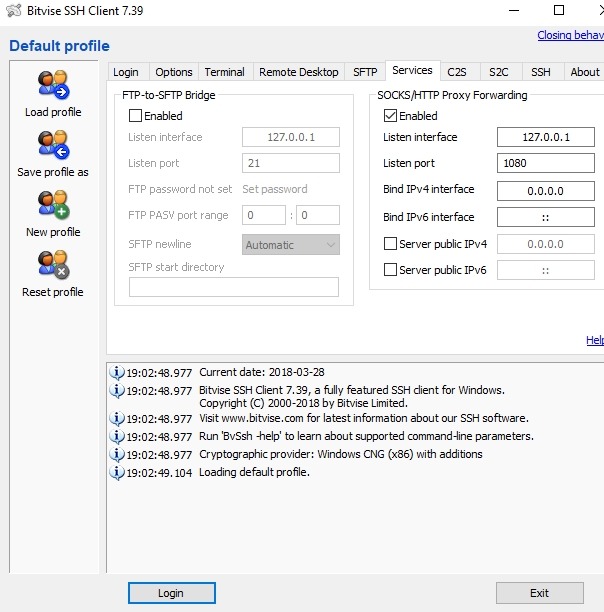
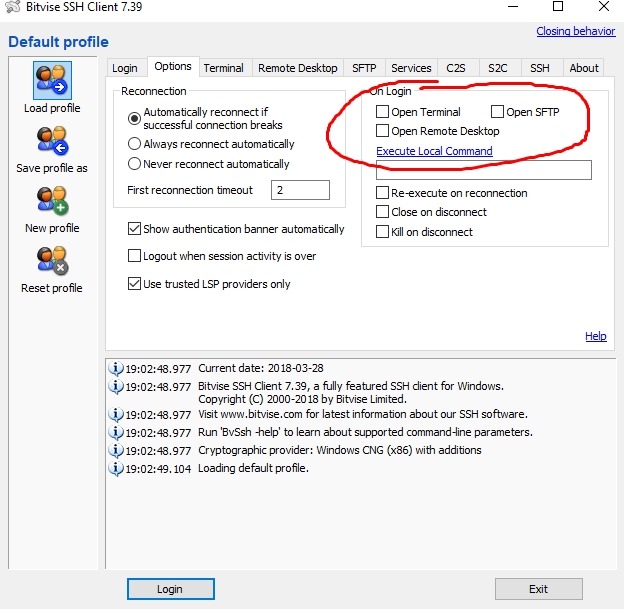
Here we remove all unnecessary ticks
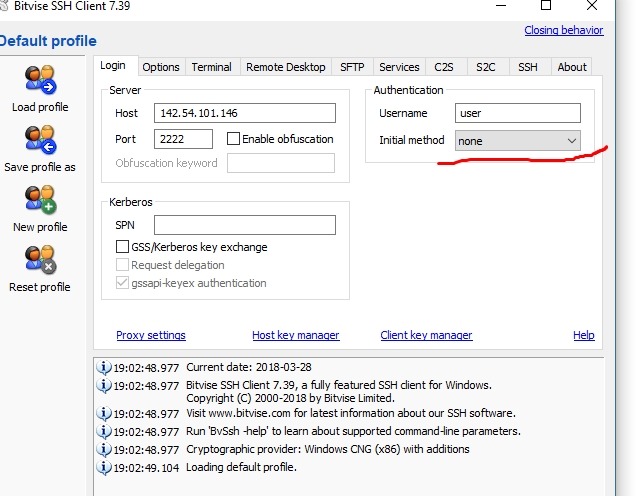
Here we write all the data from your tun

If you don't have a password, do this:
This completes the settings.
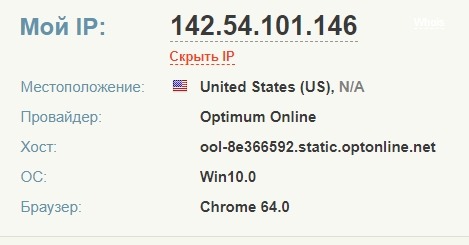
Next, we launch our proxy and that's it, the tun works. Go to http://whoer.net/ and check
If you are going to use only a proxy, then just enter the data from your SOC in the proxy server and select the desired protocol.
To summarize:
Bitvise for tones (SSH)
Proxifaer for SOCKS)
Bundle 2. Plink+proxy
A very simple program for launching SSH tunnels. The model of working with it looks like this:we hook the tunnel through changing a plain text file (we enter the tunnel data there), launch a batch file that redirects our traffic to the proxy. Important! Run a batch file only in conjunction with a proxy server! Download+instructions.

Bundle 3. Double SSH Tunnel Manager + proxy Server
Usually, the antivirus program is not happy with this program, but there is nothing to fear. After downloading, add the main program files to the antivirus exceptions. Previously, dsshtm was free, but everything good ends sometime and now the program costs $ 80 per month. But it is more convenient and much more functional than bitwise and plink. Here you can decide for yourself. Of. the program's website.
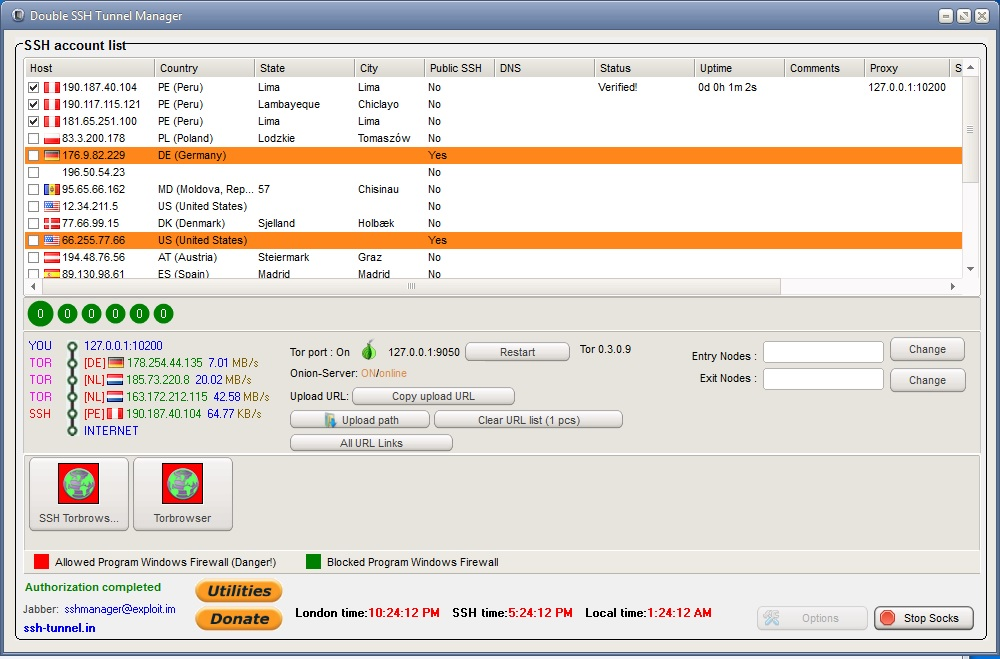
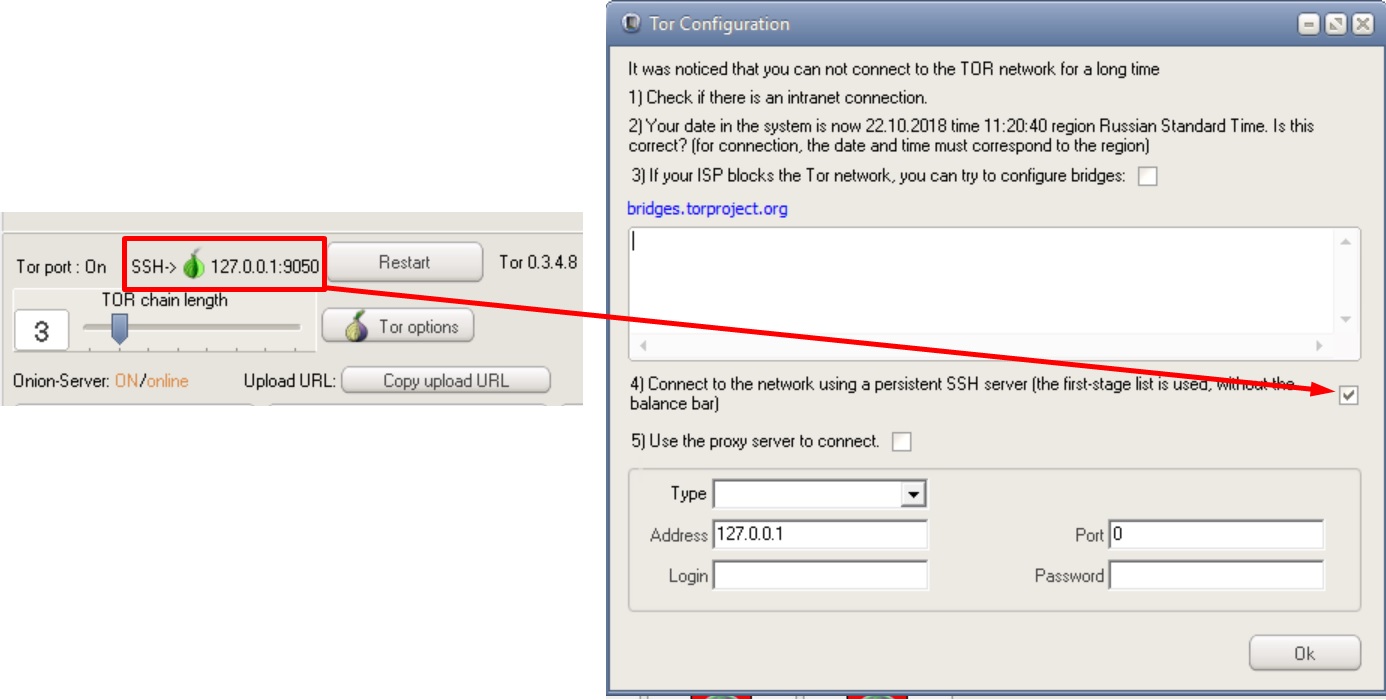
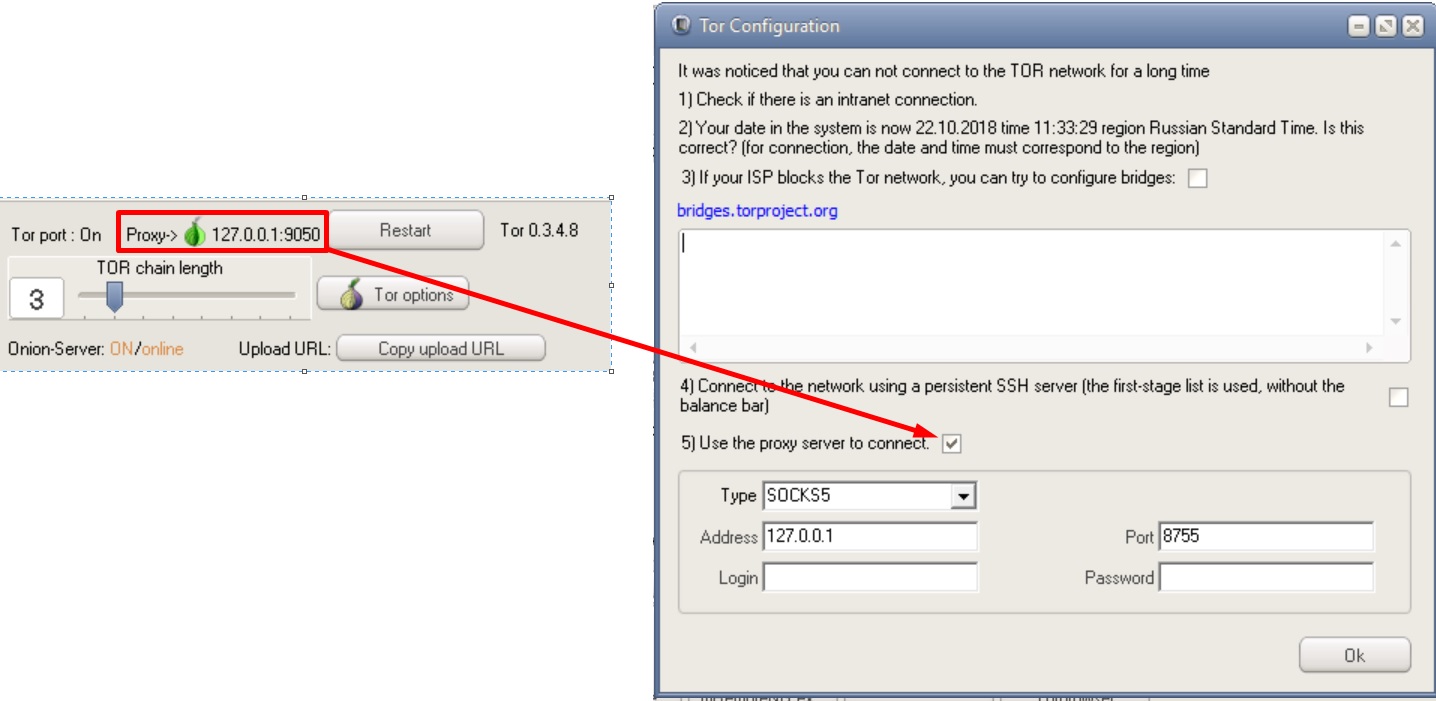
Possible DSSHTM connection chains
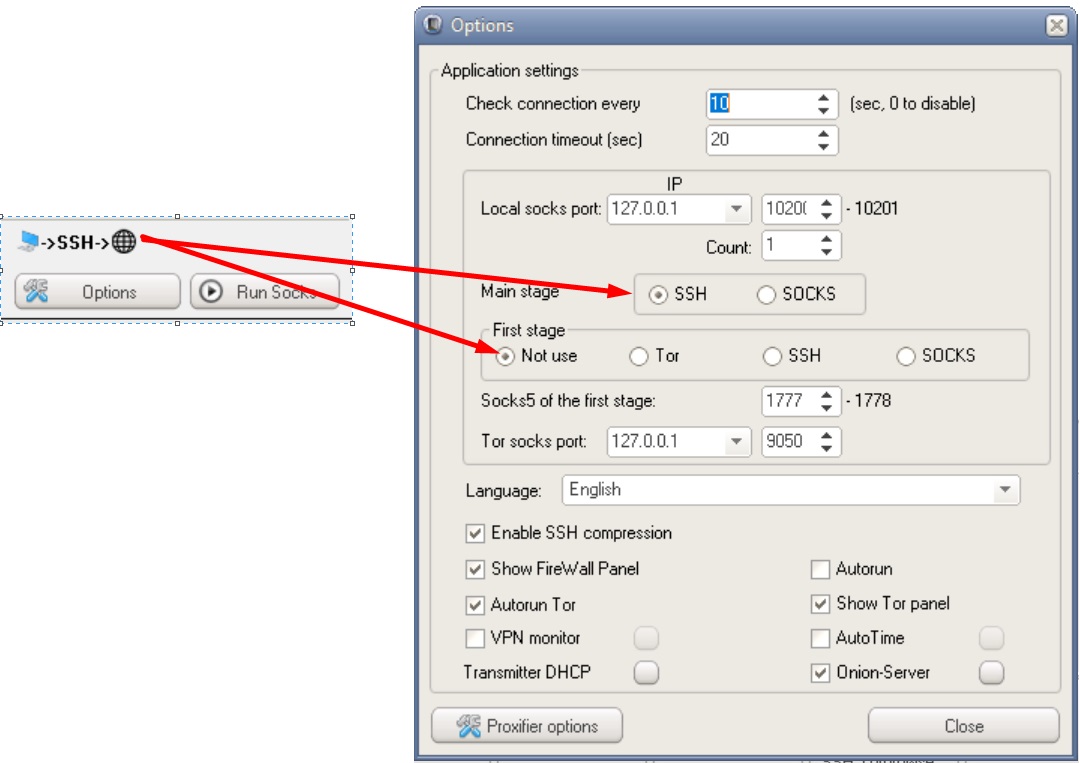
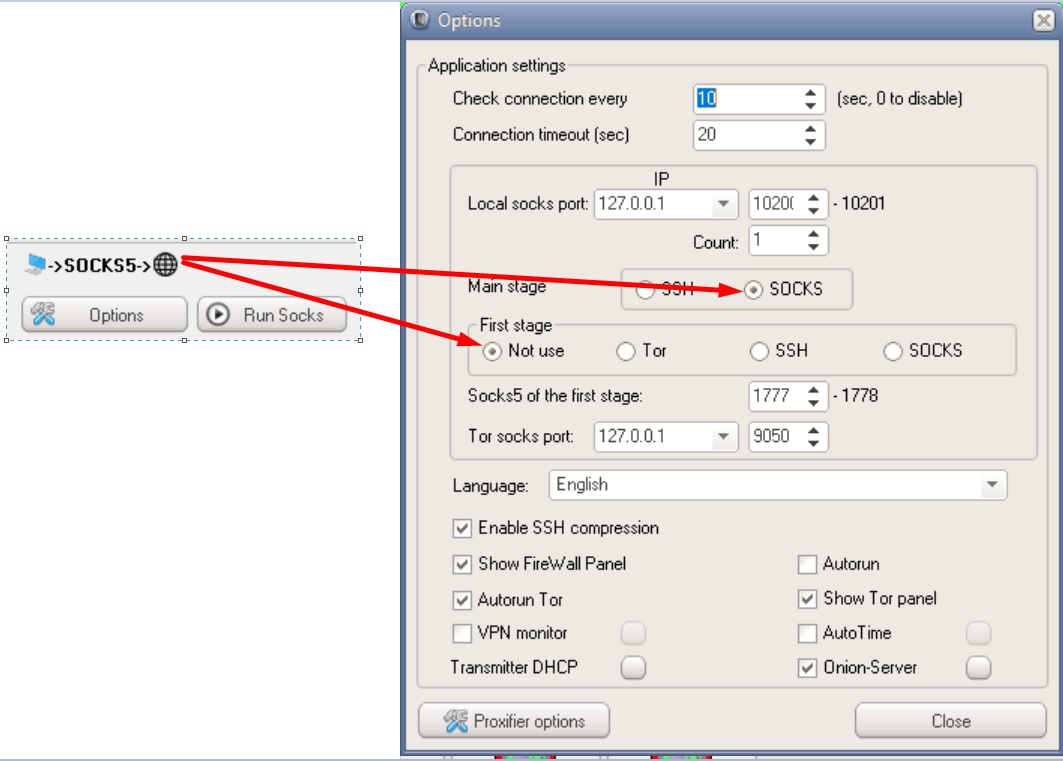
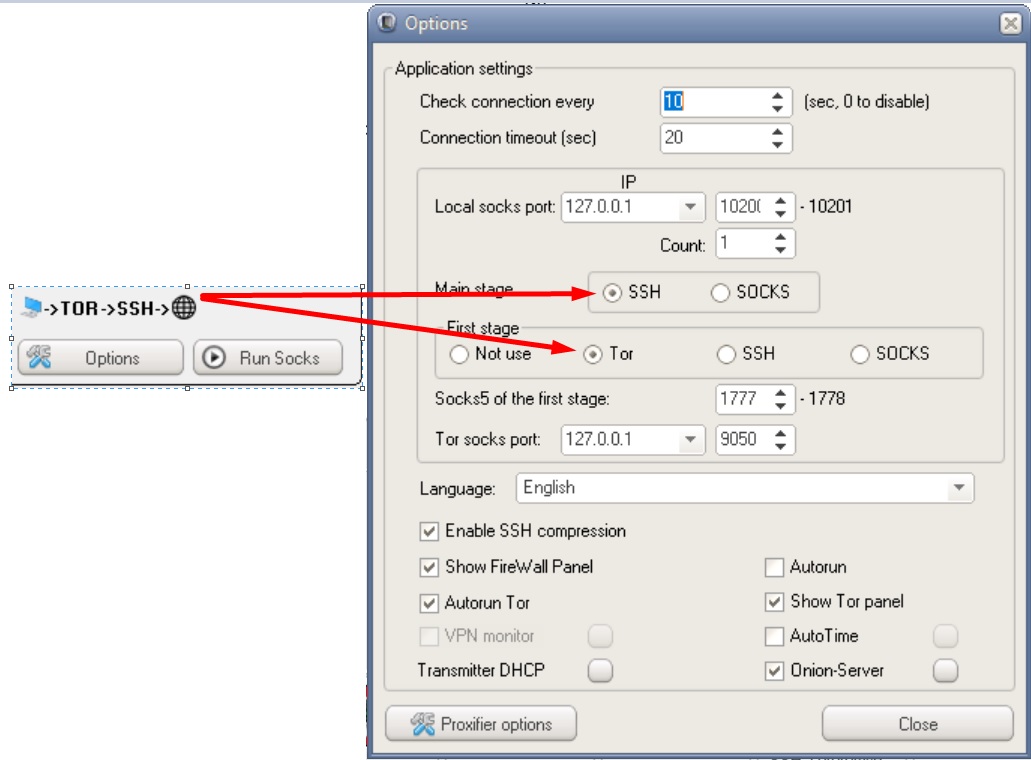
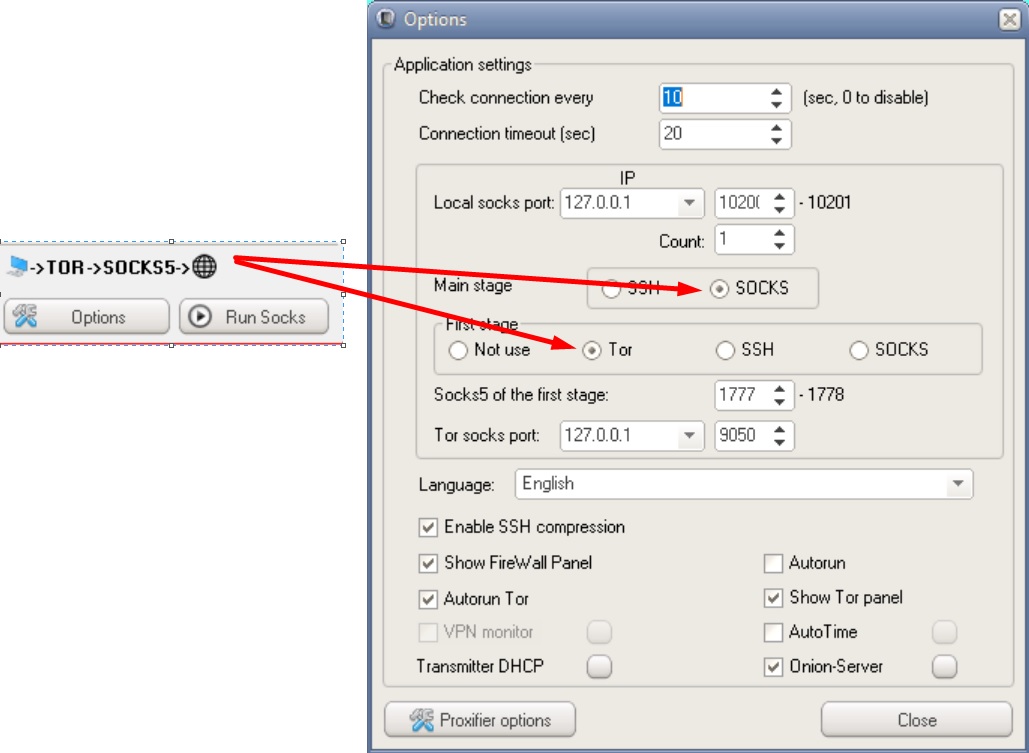
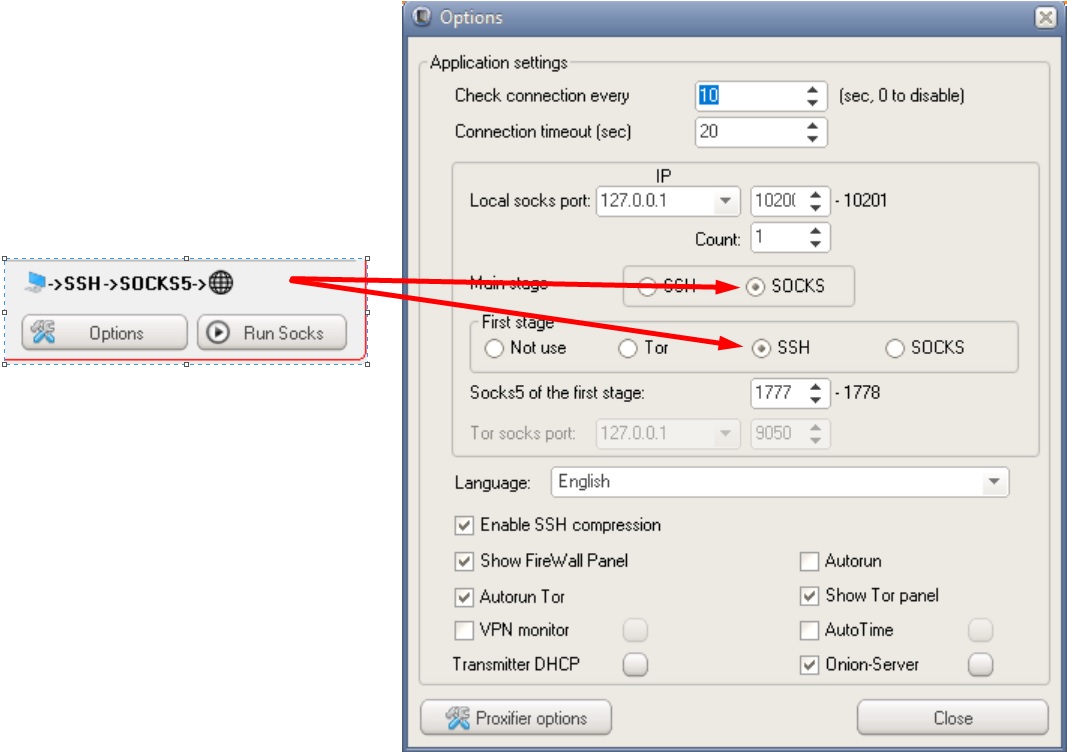
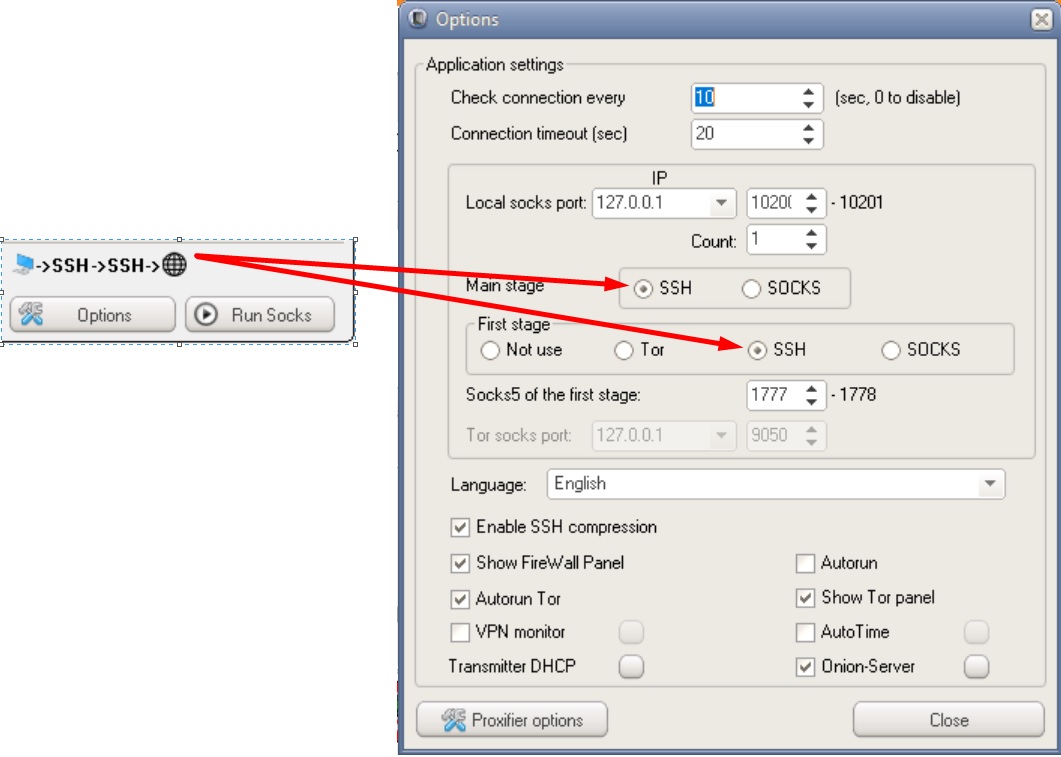

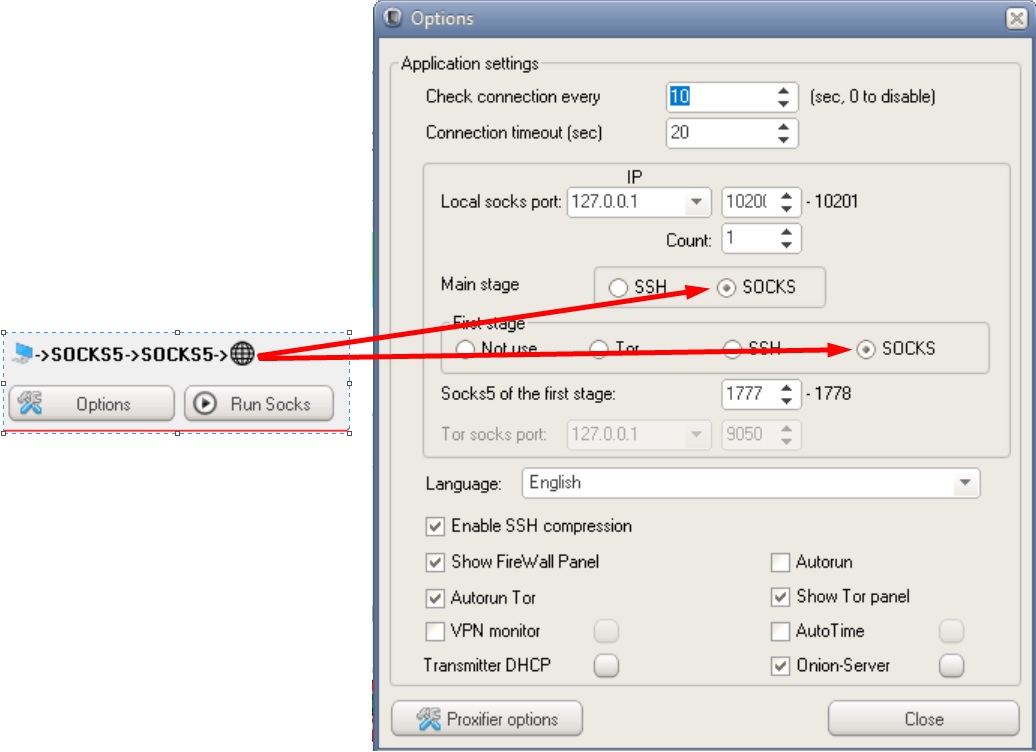
Phew, that's it. One day I will compare different anonymity tools with each other, tell you in detail about how they work, and also tell you the whole truth about vpn providers that allegedly "do not keep logs". The further you go, the more interesting it gets, I think you've already noticed that ?

