

Hacker
Professional
- Messages
- 1,041
- Reaction score
- 852
- Points
- 113
Kodachi is a secure, counter-forensic, anonymous operating system.
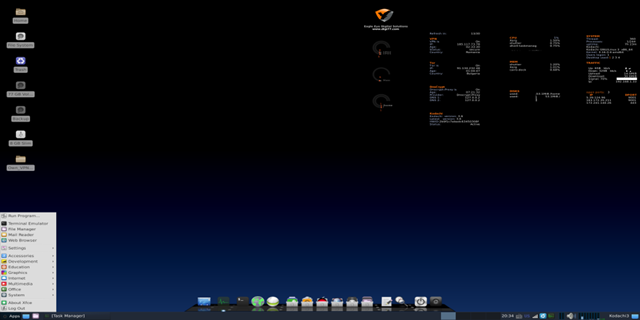
Linux Kodachi, an operating system based on Debian 8.6, provides you with a reliable, counter-forensic and anonymous operating system that takes into account all the features that a person who is concerned about their privacy will need to stay safe.
Download Linux kodachi
Kodachi is very easy to use, all you need is to connect it via USB to your computer, then you should have a fully working operating system with a VPN connection installed + Tor connection installed + DNSCrypt service running. You won't need any Linux knowledge or knowledge about the installation process, we've already taken care of everything for you. The entire OS functions from your temporary RAM, so as soon as you close it, no traces remain, information about all the actions you have performed is destroyed.
Kodachi is a live operating system that you can run on almost any computer using a DVD, USB storage device, or SD card. Its mission is to protect your privacy and anonymity, and to help you:
Use the Internet anonymously. All Internet connections pass through a VPN, then through the Tor network with DNS encryption. Does not leave any traces on the computer you use, unless you request detailed information. Allows you to use state-of-the-art encryption and anonymity tools to encrypt your files, emails, and instant messages.
Kodachi is based on Debian compressed Linux with custom XFCE. This makes Kodachi stable, secure, and unique.
Kodachi Properties
To log in as a regular user:
To log in as a super user:
If you need to use the Sudo or su command as root, the password remains the same: r@@t00
Where to use it:
How to install Linux Kodachi for permanent use on your hard drive:
Linux Kodachi, an operating system based on Debian 8.6, provides you with a reliable, counter-forensic and anonymous operating system that takes into account all the features that a person who is concerned about their privacy will need to stay safe.
Download Linux kodachi
Kodachi is very easy to use, all you need is to connect it via USB to your computer, then you should have a fully working operating system with a VPN connection installed + Tor connection installed + DNSCrypt service running. You won't need any Linux knowledge or knowledge about the installation process, we've already taken care of everything for you. The entire OS functions from your temporary RAM, so as soon as you close it, no traces remain, information about all the actions you have performed is destroyed.
Kodachi is a live operating system that you can run on almost any computer using a DVD, USB storage device, or SD card. Its mission is to protect your privacy and anonymity, and to help you:
Use the Internet anonymously. All Internet connections pass through a VPN, then through the Tor network with DNS encryption. Does not leave any traces on the computer you use, unless you request detailed information. Allows you to use state-of-the-art encryption and anonymity tools to encrypt your files, emails, and instant messages.
Kodachi is based on Debian compressed Linux with custom XFCE. This makes Kodachi stable, secure, and unique.
Kodachi Properties
- VPN Ready
- Tor Ready with a choice of exit node
- DNScrypt ready
- Truecrypt-keepass-Secure Cloud and much more
- Free open source code
- Custom Mac Generator
- Clearing memory on shutdown / reboot
- Built-in Tor Browser
- Pidigin Messenger
- Bitcoin Wallet
- Litecoin Wallet
- Free built-in VPN ready to use!
- DNSCrypt
- Multi Tor output node changer
- Multi DNS options
- Truecrypt/ Vera Crypt
- Peer Guardian
- Panic Room/Wipe Ram/Wipe Free Space/Kill OS!
- Bleachbit/Nautilus-wipe/Keepass2xdotool/Seahorse/Gpa/Gnupg2/Enigmail/ufw/gufw/firejail
- KomodoEdit/Geany/Krusader/Meld/Shutter/FileZilla/Audicity/Terminator/Transmission/VirtualBox APPS
- Htop/Rdesktop/Gksu/Ncdu/Xtrlock/Nmap/Pcmanfm/Cairo-dock/Geoip-bin/Sysv-rc-conf/Disper/Smbclient/Syslinux-utils/Fcitx/Ibus/Pidgin-Otr
- System and security information on the desktop
- First option (recommended): Download the ISO file and burn it to a USB drive using free tools such as Rufus или Linux Live, then start your computer from it. You will need to press F12 immediately after startup to bring up the boot menu and select USB there, and on older PCs you will need to change your BIOS settings to allow the system to start from USB.
- Second option: Download the ISO file and burn it to DVD using a free tool like DAEMON Tools, then boot from it to your computer.
- Third option: Download the ISO file and run it using Vmware Player or Virtualbox.
To log in as a regular user:
Code:
Username: kodachi
Password:r@@t00
To log in as a super user:
Code:
Username:root
Password:r@@t00
If you need to use the Sudo or su command as root, the password remains the same: r@@t00
Where to use it:
- On a personal computer or laptop (run it via a USB stick or DVD, or on a virtual machine).
- On professional computers (run it via a USB stick or DVD, or on a virtual machine).
- In an Internet cafe (run it via a USB stick or DVD).
- In hotels or when traveling (run it via a USB stick or DVD).
- In school computer classes (run it via a USB stick or DVD).
- On any computer that has a DVD ROM or USB port and can use them.
How to install Linux Kodachi for permanent use on your hard drive:
- Run from your USB image or ISO image.
- In your desktop menu, Go to - > System -> Refracta Installer - > Use su - > Enter the password r@@t00 - > Normal Installation - > Run (Run GParted) - > Device) - >
- Create partition Table - > Apply - > Partition - > New - > Add - > Apply All Operations - > Close - > Close the window) - >
- Select partition)- >Ok - >Proceed with the installation - > close windows - > y - >
- Configure the host and user name ! Do not change the user name here, otherwise you will have problems with Kodachi scripts - > Mark the first 2 boxes, allow and use sudo by default - > Use current password - >
- OK -> Use current password - > OK - >
- Reboot and that's it, you're done, now you don't need a flash drive to run the OS, it will run directly from your hard drive.
- We do not recommend installing Linux Kodachi for permanent use on any computer, because it will save all your settings on the hard disk, and this goes against the main task of any counter-forensic operating system.
- Kodachi is a Debian-based live DVD / USB operating system, which means that all packages are based purely on the Debian repository.
- Kodachi is an open source project with Apache License 2.0 and above all, the codes used in the system have plaintext bash scripts and are included in the ISO package without compiled binaries, no hidden Kodachi code is available on GitHub.
- If you abuse Bandwith or post illegal torrent files, you will be banned forever


