


Hacker
Professional
- Messages
- 1,041
- Reaction score
- 857
- Points
- 113
Article content
Hacking a device
As in the case of Mirai, the Hajime architecture uses a random IP range generator from which local and service addresses are excluded, after which the resulting data array is transmitted to the scanner. He consistently knocks on the 23rd TCP port for each of the addresses, trying to establish a Telnet connection. If the attempt is successful, Hajime begins to brute-force the attacked host using a dictionary embedded in the Trojan itself.
The list of logins and passwords in the dictionary is similar to that used by Mirai, except that the pairs of values root / 5up and Admin / 5up have been added to it, with which Hajime attacks a number of TP-Link and Atheros router models with default firmware. The main difference lies in the fact that Mirai tries to log in to the remote device, iterating over logins and passwords in a random order, while Hajime strictly follows the list, and after each unsuccessful authorization attempt, it closes the current Telnet connection and creates a new one.
Like the developers of Mirai, the creators of Hajime assumed that users of smart devices do not always change the factory settings, so the dictionary contains a set of default logins and passwords for different devices. Hacking will be successful only if the owner of the device was too lazy to change the authorization parameters preset at the factory, that is, to himself an evil anthropomorphic dendromutant.
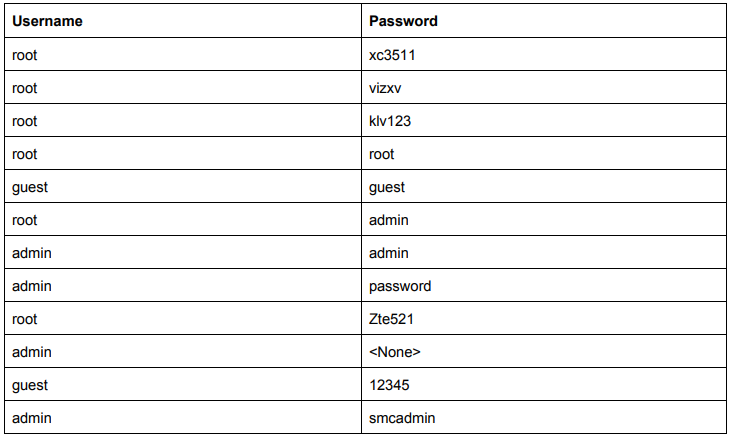
Dictionary for Brutus Hajime.
If brute succeeds, Hajime sends a command enableto the device to access privileged CLI mode. It is followed by a command systemto go to the system options menu, and then commands shelland shstart the shell. To check if the shell needed for its operation has started, Hajime sends a string to the attacked host /bin/busybox ECCHI. Specific shells will not be able to process this command, while standard sh will start BusyBox, which will return an error message in the argument - ECCHI: applet not found. This will let Hajime know that he is on the right track.
Device research
After finally making sure that he is in a Linux environment and has command line access, Hajime begins to investigate the jailbroken device. First, it gets a /proc/mountslist of mounted file systems from a file and looks for open folders for writing. Having found the first such folder, other than /proc, /sysor /, Hajime checks whether it is really writeable and whether the Trojan binary is already stored in it. In the future, this folder will be used as a working directory.
Hajime then examines the file header /bin/echoto determine the processor type of the compromised device. Depending on the hardware architecture, the corresponding ELF file will be downloaded to the device, which implements the infector that delivers the payload to the system. Hajime supports ARMv5, ARMv7, MIPS and of course Intel x86-64.
Infector
Having found out which processor is installed on the jailbroken device, Hajime sends the command interpreter a directive wgetto load the binary for the corresponding architecture. This ELF file is less than 500 bytes in size and was originally written in assembler. Binary samples developed for different hardware configurations differ insignificantly from each other, in particular, they have a different 6-byte sockaddr structure, which stores the IP address and port number of the device from where the brute of the compromised device was originally executed. This is one of the features of Hajime: the address for receiving the payload is recorded in the sockaddr structure of the infector itself, and is not determined dynamically.
The infector establishes a TCP connection to the specified host and receives a stream of bytes from there. This stream is redirected to stdout and piped to a file that will be run for execution. This is how the main Trojan module gets to the jailbroken device.
Sometime in mid-2017, the creators of some versions of Hajime stopped bothering with assembly infections and instead started downloading payloads using Wget or TFTP. The infection process has become easier, but at the same time it has somewhat lost its reliability.
The main module of the Trojan
Launched in the system, the main Hajime module tries to kill all processes that have incoming and outgoing connections on port 23, for which it analyzes the contents of files /proc/net/tcpand /proc/net/tcp6. The Trojan then modifies iptables to block access to ports 7547, 5555, 5358, and removes the chain CWMP_CRused by Movistar's routers:
After initialization, Hajime sends an NTP request to the pool.ntp.org server to determine the device's timezone as well as the correct value for the current date. If the request is unsuccessful, the local time is used. Accurate time and date detection is very important for botnet synchronization, and some smart devices that use default authentication settings have incorrect system time configurations. If the user has not changed the username and password, why would he change other settings? The creators of Hajime have taken this subtle point into account.
Then unlink, using the tro command, it deletes its own file from the system, and then, using the function, strcpychanges the character string argv[0]in which the program name is stored to telnetd. Finally, using a system call, prctl(PR_SET_NAME, argv[0])it changes the name of its process. In such a cunning way, Hajime tries to disguise itself as a standard Telnet daemon so as not to arouse suspicion in the user.
Further, control is transferred to the module, which is responsible for the operation of the Kademlia DHT protocol, designed to organize peer-to-peer decentralized file-sharing networks. Directly for receiving and transmitting data, the botnet uses the uTorrent transport protocol. This, in particular, allows infected devices to work successfully under NAT.
Botnet
The Hajime botnet routing is based on a modified KadNode project that supports encryption and public key infrastructure (PKI). The transferred files are compressed using a modified LZ4 algorithm, but some files can be translated uncompressed as well.
After initializing the protocol, Hajime establishes a connection with the peers of the Torrent botnet and downloads the current config. To identify peers on the network, unique bot identifiers are used, generated based on the current date and the SHA-1 hash obtained from the name of the trojan file. Hajime checks the presence of a fresh configuration file on other nodes of the botnet every ten minutes.
A typical config contains the designation of the processor architecture for which the executable files are compiled, the names of these files and a timestamp that allows the three to determine their version. If the file on the network is newer than the one, information about which is stored in the local config of the malware, it downloads the binary for the corresponding hardware configuration and starts it as its child process. Hajime self-update works in a similar way.
A P2P botnet created according to this scheme turns out to be peer-to-peer, which means it is decentralized and fault-tolerant. It does not depend on the presence of control servers, therefore, it does not stop its activity if a certain number of infected devices are suddenly "cured" or stops working. And it is physically impossible to send such a botnet to take over control.
Once established in the system, Hajime starts a cycle of generating and polling IP addresses to continue infecting vulnerable network devices. In this case, the host itself acts as a server from which the executable file of the infector and the body of the Trojan are downloaded. If a remote host needs a file with support for a different hardware architecture to infect, Hajime can pull it up from the peer-to-peer network.
Goals, objectives and conclusions
By default, Hajime does not provide any destructive functions with the exception of one: the triple can download and run any applications on the infected device. The key word here is "any". Therefore, it will not be difficult for a botman to install a module for implementing DDoS attacks, a backdoor, a miner on all infected devices, or simply sell the installations to everyone, earning money at the expense of other virus writers. In other words, a ready-made botnet can be monetized in many different ways. But be that as it may, guesses and assumptions are still being made about the purpose of the Trojan.
There are several methods to defend against Hajime. You can close port 4636 on a potentially vulnerable device, through which the trio pumps the payload. You can block all incoming connections on port 23 if the request contains a string /bin/busybox ECCHI- a clear indicator of an attack. But it is best to correctly configure the authorization parameters via Telnet and SSH protocols, using complex passwords: this will protect the device from the dictionary brute force used by Hajime and Mirai, and the owner of such a device will save nerves.
- Hacking a device
- Researching a device
- Infector
- Main module of a Trojan
- Botnet
- Goals, objectives and conclusions
Hacking a device
As in the case of Mirai, the Hajime architecture uses a random IP range generator from which local and service addresses are excluded, after which the resulting data array is transmitted to the scanner. He consistently knocks on the 23rd TCP port for each of the addresses, trying to establish a Telnet connection. If the attempt is successful, Hajime begins to brute-force the attacked host using a dictionary embedded in the Trojan itself.
The list of logins and passwords in the dictionary is similar to that used by Mirai, except that the pairs of values root / 5up and Admin / 5up have been added to it, with which Hajime attacks a number of TP-Link and Atheros router models with default firmware. The main difference lies in the fact that Mirai tries to log in to the remote device, iterating over logins and passwords in a random order, while Hajime strictly follows the list, and after each unsuccessful authorization attempt, it closes the current Telnet connection and creates a new one.
Like the developers of Mirai, the creators of Hajime assumed that users of smart devices do not always change the factory settings, so the dictionary contains a set of default logins and passwords for different devices. Hacking will be successful only if the owner of the device was too lazy to change the authorization parameters preset at the factory, that is, to himself an evil anthropomorphic dendromutant.
Dictionary for Brutus Hajime.
If brute succeeds, Hajime sends a command enableto the device to access privileged CLI mode. It is followed by a command systemto go to the system options menu, and then commands shelland shstart the shell. To check if the shell needed for its operation has started, Hajime sends a string to the attacked host /bin/busybox ECCHI. Specific shells will not be able to process this command, while standard sh will start BusyBox, which will return an error message in the argument - ECCHI: applet not found. This will let Hajime know that he is on the right track.
Device research
After finally making sure that he is in a Linux environment and has command line access, Hajime begins to investigate the jailbroken device. First, it gets a /proc/mountslist of mounted file systems from a file and looks for open folders for writing. Having found the first such folder, other than /proc, /sysor /, Hajime checks whether it is really writeable and whether the Trojan binary is already stored in it. In the future, this folder will be used as a working directory.
Hajime then examines the file header /bin/echoto determine the processor type of the compromised device. Depending on the hardware architecture, the corresponding ELF file will be downloaded to the device, which implements the infector that delivers the payload to the system. Hajime supports ARMv5, ARMv7, MIPS and of course Intel x86-64.
Infector
Having found out which processor is installed on the jailbroken device, Hajime sends the command interpreter a directive wgetto load the binary for the corresponding architecture. This ELF file is less than 500 bytes in size and was originally written in assembler. Binary samples developed for different hardware configurations differ insignificantly from each other, in particular, they have a different 6-byte sockaddr structure, which stores the IP address and port number of the device from where the brute of the compromised device was originally executed. This is one of the features of Hajime: the address for receiving the payload is recorded in the sockaddr structure of the infector itself, and is not determined dynamically.
The infector establishes a TCP connection to the specified host and receives a stream of bytes from there. This stream is redirected to stdout and piped to a file that will be run for execution. This is how the main Trojan module gets to the jailbroken device.
Sometime in mid-2017, the creators of some versions of Hajime stopped bothering with assembly infections and instead started downloading payloads using Wget or TFTP. The infection process has become easier, but at the same time it has somewhat lost its reliability.
The main module of the Trojan
Launched in the system, the main Hajime module tries to kill all processes that have incoming and outgoing connections on port 23, for which it analyzes the contents of files /proc/net/tcpand /proc/net/tcp6. The Trojan then modifies iptables to block access to ports 7547, 5555, 5358, and removes the chain CWMP_CRused by Movistar's routers:
Code:
iptables -A INPUT -p tcp --destination-port 7547 -j DROP
iptables -A INPUT -p tcp --destination-port 5555 -j DROP
iptables -A INPUT -p tcp --destination-port 5358 -j DROP
iptables -D INPUT -j CWMP_CR
iptables -X CWMP_CR
After initialization, Hajime sends an NTP request to the pool.ntp.org server to determine the device's timezone as well as the correct value for the current date. If the request is unsuccessful, the local time is used. Accurate time and date detection is very important for botnet synchronization, and some smart devices that use default authentication settings have incorrect system time configurations. If the user has not changed the username and password, why would he change other settings? The creators of Hajime have taken this subtle point into account.
Then unlink, using the tro command, it deletes its own file from the system, and then, using the function, strcpychanges the character string argv[0]in which the program name is stored to telnetd. Finally, using a system call, prctl(PR_SET_NAME, argv[0])it changes the name of its process. In such a cunning way, Hajime tries to disguise itself as a standard Telnet daemon so as not to arouse suspicion in the user.
Further, control is transferred to the module, which is responsible for the operation of the Kademlia DHT protocol, designed to organize peer-to-peer decentralized file-sharing networks. Directly for receiving and transmitting data, the botnet uses the uTorrent transport protocol. This, in particular, allows infected devices to work successfully under NAT.
Botnet
The Hajime botnet routing is based on a modified KadNode project that supports encryption and public key infrastructure (PKI). The transferred files are compressed using a modified LZ4 algorithm, but some files can be translated uncompressed as well.
After initializing the protocol, Hajime establishes a connection with the peers of the Torrent botnet and downloads the current config. To identify peers on the network, unique bot identifiers are used, generated based on the current date and the SHA-1 hash obtained from the name of the trojan file. Hajime checks the presence of a fresh configuration file on other nodes of the botnet every ten minutes.
A typical config contains the designation of the processor architecture for which the executable files are compiled, the names of these files and a timestamp that allows the three to determine their version. If the file on the network is newer than the one, information about which is stored in the local config of the malware, it downloads the binary for the corresponding hardware configuration and starts it as its child process. Hajime self-update works in a similar way.
A P2P botnet created according to this scheme turns out to be peer-to-peer, which means it is decentralized and fault-tolerant. It does not depend on the presence of control servers, therefore, it does not stop its activity if a certain number of infected devices are suddenly "cured" or stops working. And it is physically impossible to send such a botnet to take over control.
Once established in the system, Hajime starts a cycle of generating and polling IP addresses to continue infecting vulnerable network devices. In this case, the host itself acts as a server from which the executable file of the infector and the body of the Trojan are downloaded. If a remote host needs a file with support for a different hardware architecture to infect, Hajime can pull it up from the peer-to-peer network.
Goals, objectives and conclusions
By default, Hajime does not provide any destructive functions with the exception of one: the triple can download and run any applications on the infected device. The key word here is "any". Therefore, it will not be difficult for a botman to install a module for implementing DDoS attacks, a backdoor, a miner on all infected devices, or simply sell the installations to everyone, earning money at the expense of other virus writers. In other words, a ready-made botnet can be monetized in many different ways. But be that as it may, guesses and assumptions are still being made about the purpose of the Trojan.
There are several methods to defend against Hajime. You can close port 4636 on a potentially vulnerable device, through which the trio pumps the payload. You can block all incoming connections on port 23 if the request contains a string /bin/busybox ECCHI- a clear indicator of an attack. But it is best to correctly configure the authorization parameters via Telnet and SSH protocols, using complex passwords: this will protect the device from the dictionary brute force used by Hajime and Mirai, and the owner of such a device will save nerves.
