

Hacker
Professional
- Messages
- 1,041
- Reaction score
- 852
- Points
- 113
To get started, we will need:
Getting started with the installation.
I take Windows 7 as an example. All settings will apply specifically to Windows 7.
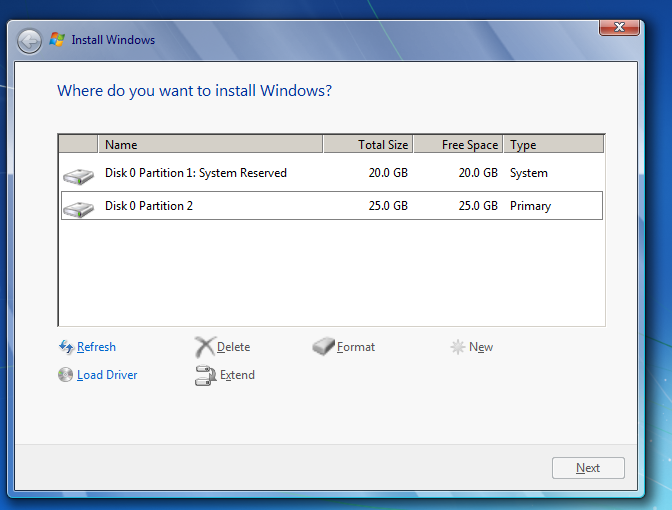
When marking up a new disk, Windows will ask you to reserve some space (100mb in Win7 and 350mb in Win8). We will need to install Windows on this, in our case, 100 megabyte partition. How? But simply. You just need to send an SMS to the number select this section and click on the "Extend" and expand this section in our case to 20 gigs.
System migration.
Don't know what type of encryption to choose? Especially for you my little friend I have saved a clipping from one of the articles related to encryption:
What type of encryption should I choose?
Let's look at all the encryption algorithms in order.
AES (Advanced Encryption Standard) is a symmetric encryption algorithm with a block size of 128 bits and a key size of 128/192/256 bits. An important fact is that it is adopted as an encryption standard by the US government, and it was decided that its cipher is quite reliable even for protecting information that has state secrets, provided that 128-bit keys are used. In fact, this algorithm is one of the most common symmetric encryption algorithms.
Twofish is a symmetric block encryption algorithm with a block size of 128 bits and a key length of up to 256 bits. The number of rounds is 16. Developed by a team of specialists led by Bruce Schneier. He was one of the five finalists of the second stage of the AES competition. The study of Twofish with a reduced number of rounds showed that the algorithm has a large margin of safety, and, compared to the other finalists of the AES competition, it turned out to be the most stable. However, its unusual structure and relative complexity have raised some doubts about the quality of this strength.
Serpent is a symmetric block algorithm. The algorithm was one of the finalists of the 2nd stage of the AES competition. Like other algorithms participating in the AES competition, Serpent has a block size of 128 bits and possible key lengths of 128, 192, or 256 bits. When developing and analyzing the Serpent algorithm, no vulnerabilities were found in the full 32-round version. But when choosing the winner of the AES competition, this was also true for the other finalist algorithms.
The remaining algorithms AES-Twofish, AES-Twofish-Serpent, Serpent-AES, Serpent-Twofish-AES, Twofish-Serpent use cascade encryption, while the encryption speed is noticeably reduced, their use is no worse than the previous algorithms, but as one smart person said, they are intended for aesthetes and paranoids
Given Snowden's declassified NSA documents, we can conclude that AES is still secure. However, if paranoia is eating you up from the inside out, you can choose Serpent-Twofish-AES for this you will pay with performance. I, of course, choose AES!
We continue.
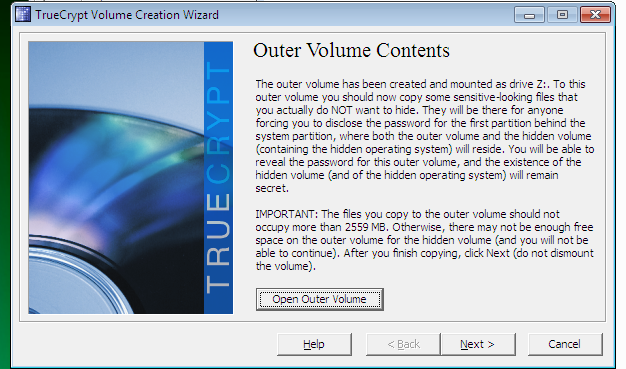
We throw in the window that opens what logically can be hidden but is not something illegal (no CPU!) in our case, the other gig (no more than 5% of the logical disk volume) gay or hardcore bdsm porn will go perfectly. Golden rain, in general, is also suitable, as is coprophilia. So. Where was I going? In general, we continue.
Installing a public OS.
After the hidden OS is installed, we will need to install the public OS on the same logical disk (!).
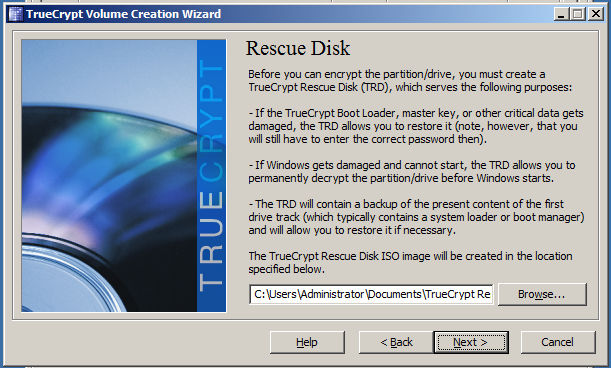
Next, we need to create a recovery disk. And here we have 2 ways:
Let's assume that we don't have a disk. And we will cheat truecrypt.
We mount it in Daemon Tools by double-clicking and continue.
We are testing it.
Before you start working.
Question/answer.
Q: Why do we need an encrypted container and why did we put porn there?
A: When you boot from a public OS, your system displays 2 logical drives. You have already decrypted one (section C) when you turn it on. The second can be decrypted through the TrueCrypt interface by selecting the drive in the Select Device tab and entering the password from the container. There will be porn hidden by us and our hidden OS will be hidden in the unmarked part of this disk.
Q: Why do I need to encrypt an entire laptop?
A: 2 operating systems are convenient because you can change, for example, the mac address of your wifi card.
About True Crypt Security
The Open Crypto Audit Project website announces the completion of the second stage of the code audit of the popular open encryption tool TrueCrypt, whose developers left the scene very strangely on May 28, 2014, advising them to switch to BitLocker, a Microsoft data encryption solution.
According to the audit results, there is no bookmark in TrueCrypt 7.1 a. The auditors noted only 4 potentially bad locations that did not compromise any data under normal conditions:
opencryptoaudit.org/reports/TrueCrypt_Phase_II_NCC_OCAP_final.pdf - results of the second round of audit.
blog.cryptographyengineering.com/2015/04/truecrypt-report.html - conclusions of Matthew Green, one of the OCAP members.
- The laptop itself (you can also use a regular PC).
- A system image that we will install twice(in our case, Win 7).
- And a little gay pron (for which you will learn a little later).
Getting started with the installation.
I take Windows 7 as an example. All settings will apply specifically to Windows 7.
- Boot from the flash drive / disk on which the Windows 7 image is installed.
- When partitioning a hard disk, we need to create 2 logical disks. And the first section should be at least 10-15% smaller than the second one.
- For example, I have 45 gigs of space. We distribute 20 and 25 gigs.
When marking up a new disk, Windows will ask you to reserve some space (100mb in Win7 and 350mb in Win8). We will need to install Windows on this, in our case, 100 megabyte partition. How? But simply. You just need to send an SMS to the number select this section and click on the "Extend" and expand this section in our case to 20 gigs.
- Now install the system on a 20-gig disk.
- After installing the system, you need to fully configure it. Activate the system, install drivers, updates, etc.
- Once you're done, disable Windows Update and we can continue.
System migration.
- Download Truecrypt.
- After opening it, select "Create Hidden Operating System" in the "System"tab.
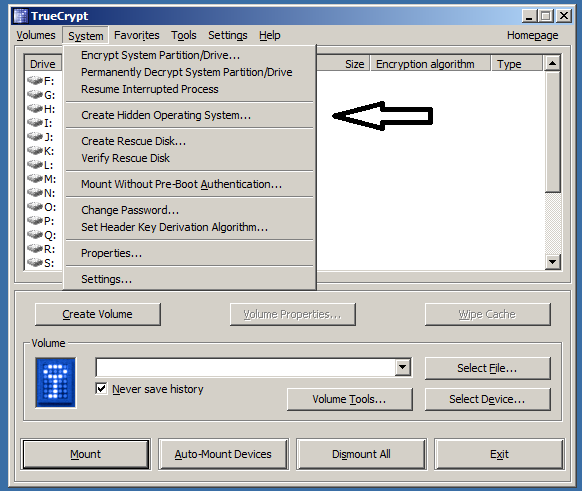
- We agree and click "Next" until TrueCrypt sends us to reboot.
- After rebooting, go back to TrueCrypt and select "Create Hidden Operating System" again, after a couple of clicks on " Yes "and" Next", then select"Single-boot".
- Next, select the encryption type.
Don't know what type of encryption to choose? Especially for you my little friend I have saved a clipping from one of the articles related to encryption:
What type of encryption should I choose?
Let's look at all the encryption algorithms in order.
AES (Advanced Encryption Standard) is a symmetric encryption algorithm with a block size of 128 bits and a key size of 128/192/256 bits. An important fact is that it is adopted as an encryption standard by the US government, and it was decided that its cipher is quite reliable even for protecting information that has state secrets, provided that 128-bit keys are used. In fact, this algorithm is one of the most common symmetric encryption algorithms.
Twofish is a symmetric block encryption algorithm with a block size of 128 bits and a key length of up to 256 bits. The number of rounds is 16. Developed by a team of specialists led by Bruce Schneier. He was one of the five finalists of the second stage of the AES competition. The study of Twofish with a reduced number of rounds showed that the algorithm has a large margin of safety, and, compared to the other finalists of the AES competition, it turned out to be the most stable. However, its unusual structure and relative complexity have raised some doubts about the quality of this strength.
Serpent is a symmetric block algorithm. The algorithm was one of the finalists of the 2nd stage of the AES competition. Like other algorithms participating in the AES competition, Serpent has a block size of 128 bits and possible key lengths of 128, 192, or 256 bits. When developing and analyzing the Serpent algorithm, no vulnerabilities were found in the full 32-round version. But when choosing the winner of the AES competition, this was also true for the other finalist algorithms.
The remaining algorithms AES-Twofish, AES-Twofish-Serpent, Serpent-AES, Serpent-Twofish-AES, Twofish-Serpent use cascade encryption, while the encryption speed is noticeably reduced, their use is no worse than the previous algorithms, but as one smart person said, they are intended for aesthetes and paranoids
Given Snowden's declassified NSA documents, we can conclude that AES is still secure. However, if paranoia is eating you up from the inside out, you can choose Serpent-Twofish-AES for this you will pay with performance. I, of course, choose AES!
We continue.
- Setting a password for the container (!) which will be in the public OS.
- And then we already hammer the "Next" button until TrueCrypt starts encrypting the disk.
- Click on Open Outer Volume.
We throw in the window that opens what logically can be hidden but is not something illegal (no CPU!) in our case, the other gig (no more than 5% of the logical disk volume) gay or hardcore bdsm porn will go perfectly. Golden rain, in general, is also suitable, as is coprophilia. So. Where was I going? In general, we continue.
- Once you've downloaded all your dirty videos, you can close the folder and continue.
- Next, we will need to enter the password for the future hidden OS (!).
- After that, the system will reboot and you will need to enter the password for the hidden OS in the bootloader (!).
- Then the system will start moving your OS to a hidden partition.
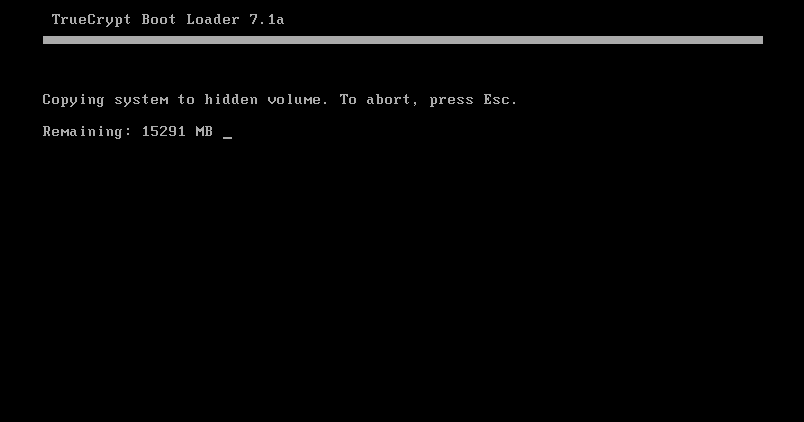
- Then it asks you to enter your password again.
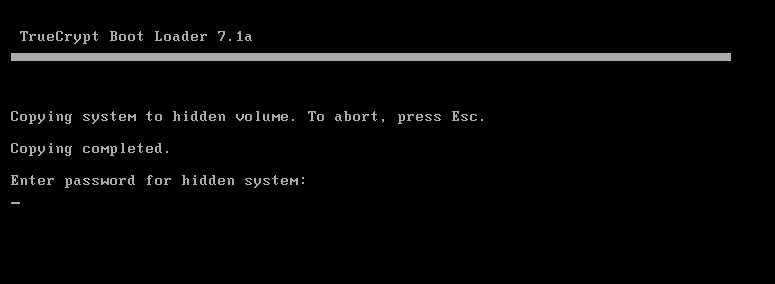
- After that, we load the hidden OS.
- After uploading to TrueCrypt, click again a couple of times "Next" and after "Wipe" "Yes" and finally "Continue". TrueCrypt will start cleaning up after the transfer.
- Once the cleanup is complete, you can close TrueCrypt.
- Congratulations! Hidden OS installed!
Installing a public OS.
After the hidden OS is installed, we will need to install the public OS on the same logical disk (!).
- Booting from a flash drive/disk. Select the disk on which the system was installed for the first time. In our case, this is a 20 GB disk.
- We format it and immediately install the public OS there.
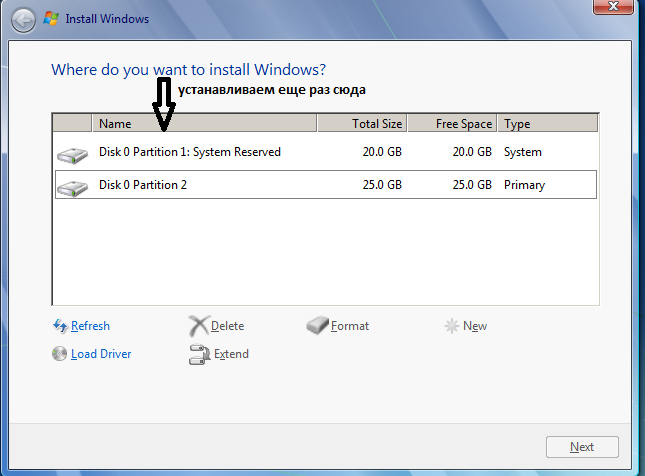
- After installation, we do everything the same as with the first system. Install drivers, updates, and activate the system.
- After activation, download TrueCrypt and go to the "System" tab and select "Encrypt System Partition / Drive".
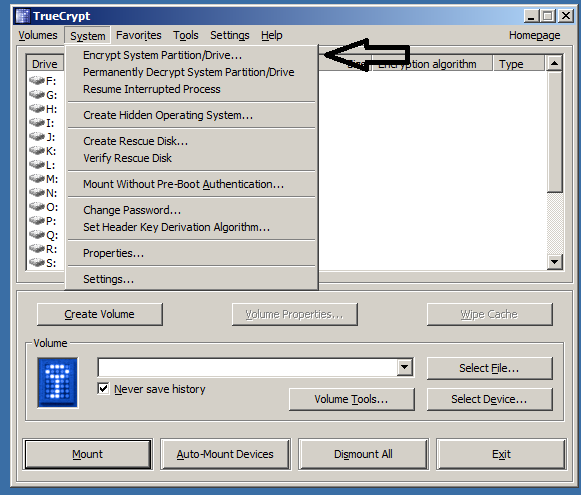
- Select "Normal".
- Next, "Single Boot".
- Choose the same type of encryption. In our case, this is AES.
- Enter the password for your public OS.
Next, we need to create a recovery disk. And here we have 2 ways:
- Найти CD/DVD диск и записать все как и положенно и продолжить.
- Use the emulator to trick TrueCrypt, but at the same time remain without recovery(the image can be saved somewhere in the cloud and if the bootloader is damaged, you can write it separately to disk and recover).
Let's assume that we don't have a disk. And we will cheat truecrypt.
- Download Daemon Tools Lite (click on the link and select Free License during installation, during installation you will have to click Skip a couple of times otherwise it will install a bunch of various shit on our machine)
- The TrueCrypt window indicates where our save file will be saved.
- Click "Next" and go there.
- We are asked to write it down, but we click "Cancel" and go to pull out the file.
We mount it in Daemon Tools by double-clicking and continue.
- Then click on "Next" everywhere and the system will ask you to test encryption. This will reset us.
- After rebooting, enter the password from the public OS(!) which was specified earlier. And after downloading, we will be thrown out immediately to configure encryption in TrueCrypt.
- Just click "Encrypt" and wait.
We are testing it.
- We go to reboot and enter the password from the public OS as soon as the AXIS starts, we go again to reboot and there we enter the password from the hidden OS.
- If you did everything according to the rules, both systems will boot up without any problems.
Before you start working.
- I advise you to use programs such as TMAC to change the mac address in network cards before you start working in a hidden OS(so that the addresses of the public and hidden OS do not match).)
- You can also change the hardware/OS identifiers, which are all possible with the help of such programs as CC Tools and others.
Question/answer.
Q: Why do we need an encrypted container and why did we put porn there?
A: When you boot from a public OS, your system displays 2 logical drives. You have already decrypted one (section C) when you turn it on. The second can be decrypted through the TrueCrypt interface by selecting the drive in the Select Device tab and entering the password from the container. There will be porn hidden by us and our hidden OS will be hidden in the unmarked part of this disk.
Q: Why do I need to encrypt an entire laptop?
A: 2 operating systems are convenient because you can change, for example, the mac address of your wifi card.
About True Crypt Security
The Open Crypto Audit Project website announces the completion of the second stage of the code audit of the popular open encryption tool TrueCrypt, whose developers left the scene very strangely on May 28, 2014, advising them to switch to BitLocker, a Microsoft data encryption solution.
According to the audit results, there is no bookmark in TrueCrypt 7.1 a. The auditors noted only 4 potentially bad locations that did not compromise any data under normal conditions:
- No authentication of encrypted data in the volume header
- The key file is mixed in a non-cryptographically secure manner
- An AES implementation may be vulnerable to a time-bound attack
- CryptAcquireContext may be uninitialized without error messages
opencryptoaudit.org/reports/TrueCrypt_Phase_II_NCC_OCAP_final.pdf - results of the second round of audit.
blog.cryptographyengineering.com/2015/04/truecrypt-report.html - conclusions of Matthew Green, one of the OCAP members.
Last edited:


