

Teacher
Professional
- Messages
- 2,669
- Reaction score
- 829
- Points
- 113
The release of Windows 11 is just around the corner, so we analyzed what Microsoft has changed in the operating system in terms of security and privacy. How much better does Windows 11 protect user data compared to Windows 10, and how does this version of the OS resist cyber attacks?
Introduction
Windows 11 has not yet been released (the official release date is set for October 5, 2021), and has already made a lot of noise with its "version for testing". Even created its simulator. You can also install it already, but you don't have to wait for stable operation yet, after all, it is intended for testing.
I would like to note that the article was written before the official release of the new OS version, which means that some of the described functions or additions can be improved in the future or, conversely, deleted from the declared ones — as happened, for example, with minimal system requirements: initially, Windows 11 was not intended for everyone (processors at least the 8th generation Intel were announced), but Microsoft found out about this and decided that it would not take action to restrict installations. In the blog the corporation disowned possible problems, including with drivers on older PCs.
New Windows 11 security Features
In the new release of Windows, Microsoft focuses on the security and stability of the operating system, hence the inflated system requirements that are imposed not only on the computing resource, but also on the "hardware" of the PC directly. Apparently, Microsoft plans to protect the future of the information space from vulnerabilities that have allowed ransomware and cryptographers to spread over the past few years.
TPM 2.0 Security Module
A TPM, or Trusted Platform Module — is an additional security component. It can store information in a secure form (the specification is not fully disclosed). In the case of Windows, it at least helps in storing BitLocker encryption keys. The eleventh version of the OS focuses on the inability to install it on hardware without this module (although in our dynamic world this is already possible, but in this case Microsoft will not provide support). In this case, the chip must be of the second revision.
The module is delivered soldered on the motherboard or as a separate physical element. In the second case, you need to look at the compatibility of the board with it. Modern processors also have a program to emulate this device. And here comes the most interesting part: to install Windows 11, this module is required, but in what form — it is not said. And whether there will be support for emulation programs-too. But if we approach this issue logically, then:
Given that there are already publicly available programs that can find a password for BitLocker, Microsoft should have worked out and strengthened the user's protection against data leakage, and then there is a reason for such a requirement. But, on the other hand, the company did not give a choice to other users who place their data in cloud storage or do not care about their safety and confidentiality at all. This is especially true for companies that do not keep up with the times and only recently jumped the transition to the "top ten".
But we got what we got, and it's worth checking if the module is available on your computer. To do this, you can press "Win+R" and enter the command "tpm. msc". The window "Managing a Trusted Platform Module (TPM) on the local computer" opens. If there is a module, its settings will be displayed.
In the lower-right part of the window, the specification version is displayed, which according to the requirements should not be lower than 2. If this is not the case, then either the emulation program in the BIOS is turned off, or you will not be able to install Windows 11 "legally".
We can also say that if TPM emulation and processor virtualization are enabled, Windows 11 is installed on virtual machines without any problems.
Windows Secured-Core PC
Attempts to create the most secure device on the Windows market are just attempts. But that's exactly what Panasonic uses when it comes to a Windows Secured-Core PC, or "secure-core PC."
What is this protected core? In fact, there is no core (or hint of it), only the name. Protection is "smeared" across individual services. It consists of two parts:
The program part, in turn, includes the following elements:
Such PCs" out of the box " are already delivered with everything pre-installed and configured. Now Windows 11 will also be included in this pipeline, although it is not entirely clear what it has to do with it and why the above is indicated in the list of security elements of the operating system itself, if all this is not new at all and was already in the previous, tenth version.
Windows Hello
Microsoft believes that " ... traditional passwords are not secure, as they are difficult to remember and therefore people either choose passwords that are easy to guess, or write down their passwords." The Windows Hello system is aimed at "password-free" protection of PCs and accounts.
At its core, Windows Hello is a tool for working with biometric data. Many laptops, ultrabooks, and other mobile devices are equipped with special cameras or fingerprint readers. In this case, you can really get away from the password and enjoy the benefits of this function.
However, in practice, this technology has a number of disadvantages:
Microsoft Azure Attestation Support
Microsoft Azure certification is intended for solutions that are not used locally. This is a mechanism for checking the integrity and reliability of software that runs on information systems. This check occurs when a vendor is added. You can learn more about it on the Microsoft blog. The description of this system is dated to the second half of 2020.
Windows 11 Telemetry
Windows telemetry has been rumored since version 10 was released. Many believe that Microsoft collects sensitive data that can identify a person. This is partly true, but only partly.
According to the corporation itself, Microsoft uses telemetry data from Windows to identify security and reliability issues. This allows you to analyze and fix problems with the software in order to improve the quality of the product in the future. In other words, telemetry is system data that is loaded by the "Connected User Experience and Telemetry" component, also known as the Universal Telemetry Client (UTC). This function is started as a service in Windows DiagTrack.
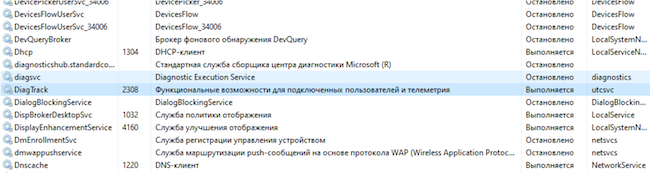
Windows Service
Before going on to describe the telemetry of the new Windows, I would like to find out whether Microsoft can actually identify a person.
During installation, Windows gives you the right to select the data that it will transmit as telemetry. With wide settings, yes, Windows collects enough data to know almost everything about the user.
With narrow telemetry settings, the collection process is designed in such a way that the component involved tries to avoid collecting information that can directly identify a person. But when Windows or an application crashes or freezes, the memory contents of the process that caused the crash are included in the diagnostic report, and this crash dump may contain sensitive information.
When installing Windows 11, you can disable sending the following telemetry:
It turns out that if you do not disable the transmission of this telemetry, then Microsoft will know the user's location, sites visited, data entered from the keyboard, preferences, and so on. But Windows 10 also prepared us for this.
Using the TCPView program, you can track the list of open connections if you do not disable telemetry at all.
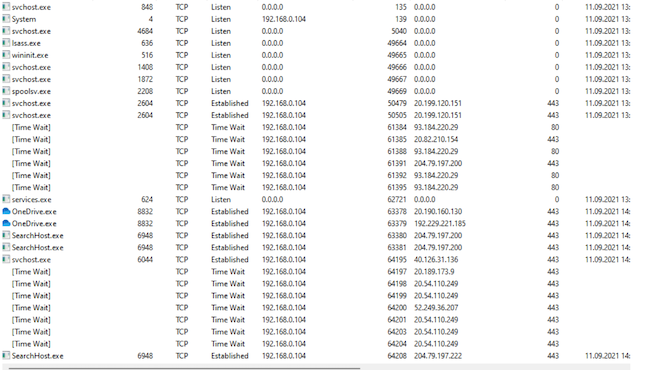
List of open connections at maximum telemetry
If you go to "Settings" → "Privacy and Security", you can find a huge list of telemetry settings that can be disabled.
Windows 11 Privacy and Security Settings
App permissions are also located there.
App Permissions in Windows 11
When telemetry is completely disabled, there are much fewer connections.
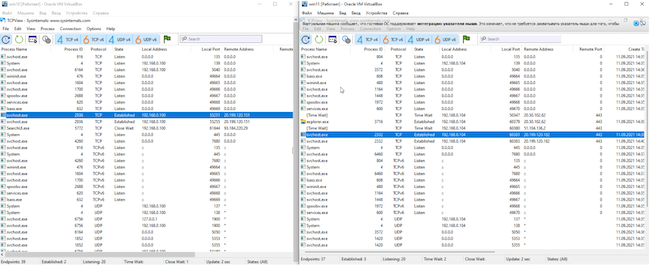
Comparison of open Windows 10 and 11 connections
Figure 7 shows a comparison of open connections between Windows 11 (right) and Windows 10 (left). A stable connection to the addresses 20.190.120.* with different octets is clearly visible. Here's what the Whois service "told" about these IP addresses:
NetRange: 20.192.0.0 — 20.255.255.255
CIDR: 20.192.0.0/10
NetName: MSFT
NetHandle: NET-20-192-0-0-1
Parent: NET20 (NET-20-0-0-0-0)
NetType: Direct Assignment
OriginAS:
Organization: Microsoft Corporation (MSFT)
RegDate: 2017-10-18
Updated: 2017-10-18
Ref: https://rdap.arin.net/registry/ip/20.192.0.0
OrgName: Microsoft Corporation
OrgId: MSFT
Address: One Microsoft Way
City: Redmond
StateProv: WA
PostalCode: 98052
Country: US
RegDate: 1998-07-10
Updated: 2021-04-13
After a long observation, the list of IP addresses that the OS connects to increases, and they all belong to Microsoft.
From time to time, multiple connections occur and are quickly closed.
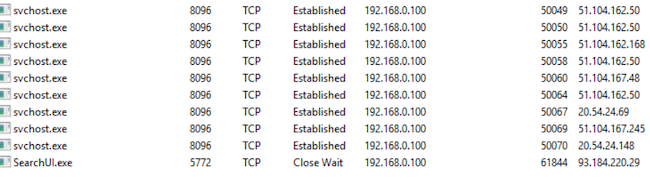
Multiple connections
Of course, do not forget that "svchost.exe" it is responsible for almost any OS data transfer, such as downloading updates. However, after a long observation on both versions of Windows, you can notice the transfer of DiagTrack data.
Conclusions
The article analyzed the declared security features of Windows 11. The word " new " does not apply to them. There are no such drastic innovations as Windows Defender in the 10th version compared to the previous ones.
Windows stability may be improved, as Microsoft has limited installation to a fixed list of AMD, Intel, and Qualcomm processors, but this is more like a race against Apple in stability and performance. Now in both companies, software is written for a certain "hardware".
As for telemetry: it remains the same as it was in Windows 10 — you can partially disable it, but you will not be able to completely, you will have to catch data transmission and block it with third-party software. Yes, and Microsoft itself secretly declares that there are mandatory diagnostic data, the transmission of which is not disabled. All of this is transmitted in encrypted form, so only Microsoft knows what's inside these packets.
www.anti-malware.ru
Introduction
Windows 11 has not yet been released (the official release date is set for October 5, 2021), and has already made a lot of noise with its "version for testing". Even created its simulator. You can also install it already, but you don't have to wait for stable operation yet, after all, it is intended for testing.
I would like to note that the article was written before the official release of the new OS version, which means that some of the described functions or additions can be improved in the future or, conversely, deleted from the declared ones — as happened, for example, with minimal system requirements: initially, Windows 11 was not intended for everyone (processors at least the 8th generation Intel were announced), but Microsoft found out about this and decided that it would not take action to restrict installations. In the blog the corporation disowned possible problems, including with drivers on older PCs.
New Windows 11 security Features
In the new release of Windows, Microsoft focuses on the security and stability of the operating system, hence the inflated system requirements that are imposed not only on the computing resource, but also on the "hardware" of the PC directly. Apparently, Microsoft plans to protect the future of the information space from vulnerabilities that have allowed ransomware and cryptographers to spread over the past few years.
TPM 2.0 Security Module
A TPM, or Trusted Platform Module — is an additional security component. It can store information in a secure form (the specification is not fully disclosed). In the case of Windows, it at least helps in storing BitLocker encryption keys. The eleventh version of the OS focuses on the inability to install it on hardware without this module (although in our dynamic world this is already possible, but in this case Microsoft will not provide support). In this case, the chip must be of the second revision.
The module is delivered soldered on the motherboard or as a separate physical element. In the second case, you need to look at the compatibility of the board with it. Modern processors also have a program to emulate this device. And here comes the most interesting part: to install Windows 11, this module is required, but in what form — it is not said. And whether there will be support for emulation programs-too. But if we approach this issue logically, then:
- Microsoft requires the module,
- Microsoft requires newer processors (from the 8th generation Intel).
Given that there are already publicly available programs that can find a password for BitLocker, Microsoft should have worked out and strengthened the user's protection against data leakage, and then there is a reason for such a requirement. But, on the other hand, the company did not give a choice to other users who place their data in cloud storage or do not care about their safety and confidentiality at all. This is especially true for companies that do not keep up with the times and only recently jumped the transition to the "top ten".
But we got what we got, and it's worth checking if the module is available on your computer. To do this, you can press "Win+R" and enter the command "tpm. msc". The window "Managing a Trusted Platform Module (TPM) on the local computer" opens. If there is a module, its settings will be displayed.
In the lower-right part of the window, the specification version is displayed, which according to the requirements should not be lower than 2. If this is not the case, then either the emulation program in the BIOS is turned off, or you will not be able to install Windows 11 "legally".
We can also say that if TPM emulation and processor virtualization are enabled, Windows 11 is installed on virtual machines without any problems.
Windows Secured-Core PC
Attempts to create the most secure device on the Windows market are just attempts. But that's exactly what Panasonic uses when it comes to a Windows Secured-Core PC, or "secure-core PC."
What is this protected core? In fact, there is no core (or hint of it), only the name. Protection is "smeared" across individual services. It consists of two parts:
- Protection based on Windows software.
- Protection based on hardware and its components.
The program part, in turn, includes the following elements:
- Virtualization-based Security Service (VBS).
- Windows Hypervisor Code Integrity Services (HVCI).
- Dynamic Trust Root (DRTM).
- Windows Hello.
Such PCs" out of the box " are already delivered with everything pre-installed and configured. Now Windows 11 will also be included in this pipeline, although it is not entirely clear what it has to do with it and why the above is indicated in the list of security elements of the operating system itself, if all this is not new at all and was already in the previous, tenth version.
Windows Hello
Microsoft believes that " ... traditional passwords are not secure, as they are difficult to remember and therefore people either choose passwords that are easy to guess, or write down their passwords." The Windows Hello system is aimed at "password-free" protection of PCs and accounts.
At its core, Windows Hello is a tool for working with biometric data. Many laptops, ultrabooks, and other mobile devices are equipped with special cameras or fingerprint readers. In this case, you can really get away from the password and enjoy the benefits of this function.
However, in practice, this technology has a number of disadvantages:
- You will still need to set and remember the password. And it should be a cryptographic combination. Still, at the moment, this is the last layer of protection.
- If you fail to read biometrics, Windows prompts you to enter a PIN code that consists of numbers. Brute-forcing the PIN code is much easier due to the limited number of characters used (there are 10 of them). And in practice, not the most complex combinations are used.
- This solution is intended more for use in the home than in enterprises, otherwise the company will have to retrofit desktop PCs with devices for reading biometrics. Companies in the Russian segment that equip their workplaces with additional security devices usually follow the requirements of the regulator. Such requirements will include licensed hardware (according to the information protection levels of the FSTEC of Russia), but not Windows Hello.
Microsoft Azure Attestation Support
Microsoft Azure certification is intended for solutions that are not used locally. This is a mechanism for checking the integrity and reliability of software that runs on information systems. This check occurs when a vendor is added. You can learn more about it on the Microsoft blog. The description of this system is dated to the second half of 2020.
Windows 11 Telemetry
Windows telemetry has been rumored since version 10 was released. Many believe that Microsoft collects sensitive data that can identify a person. This is partly true, but only partly.
According to the corporation itself, Microsoft uses telemetry data from Windows to identify security and reliability issues. This allows you to analyze and fix problems with the software in order to improve the quality of the product in the future. In other words, telemetry is system data that is loaded by the "Connected User Experience and Telemetry" component, also known as the Universal Telemetry Client (UTC). This function is started as a service in Windows DiagTrack.
Windows Service
Before going on to describe the telemetry of the new Windows, I would like to find out whether Microsoft can actually identify a person.
During installation, Windows gives you the right to select the data that it will transmit as telemetry. With wide settings, yes, Windows collects enough data to know almost everything about the user.
With narrow telemetry settings, the collection process is designed in such a way that the component involved tries to avoid collecting information that can directly identify a person. But when Windows or an application crashes or freezes, the memory contents of the process that caused the crash are included in the diagnostic report, and this crash dump may contain sensitive information.
When installing Windows 11, you can disable sending the following telemetry:
- Location.
- Diagnostic data (including information about site visits and applications used; there is a note here that this is additional information, but there is also mandatory information that you can't disable).
- Handwriting and keyboard input.
- Individual capabilities (personal diagnostic data).
- Ad ID.
It turns out that if you do not disable the transmission of this telemetry, then Microsoft will know the user's location, sites visited, data entered from the keyboard, preferences, and so on. But Windows 10 also prepared us for this.
Using the TCPView program, you can track the list of open connections if you do not disable telemetry at all.
List of open connections at maximum telemetry
If you go to "Settings" → "Privacy and Security", you can find a huge list of telemetry settings that can be disabled.
Windows 11 Privacy and Security Settings
App permissions are also located there.
App Permissions in Windows 11
When telemetry is completely disabled, there are much fewer connections.
Comparison of open Windows 10 and 11 connections
Figure 7 shows a comparison of open connections between Windows 11 (right) and Windows 10 (left). A stable connection to the addresses 20.190.120.* with different octets is clearly visible. Here's what the Whois service "told" about these IP addresses:
NetRange: 20.192.0.0 — 20.255.255.255
CIDR: 20.192.0.0/10
NetName: MSFT
NetHandle: NET-20-192-0-0-1
Parent: NET20 (NET-20-0-0-0-0)
NetType: Direct Assignment
OriginAS:
Organization: Microsoft Corporation (MSFT)
RegDate: 2017-10-18
Updated: 2017-10-18
Ref: https://rdap.arin.net/registry/ip/20.192.0.0
OrgName: Microsoft Corporation
OrgId: MSFT
Address: One Microsoft Way
City: Redmond
StateProv: WA
PostalCode: 98052
Country: US
RegDate: 1998-07-10
Updated: 2021-04-13
After a long observation, the list of IP addresses that the OS connects to increases, and they all belong to Microsoft.
From time to time, multiple connections occur and are quickly closed.
Multiple connections
Of course, do not forget that "svchost.exe" it is responsible for almost any OS data transfer, such as downloading updates. However, after a long observation on both versions of Windows, you can notice the transfer of DiagTrack data.
Conclusions
The article analyzed the declared security features of Windows 11. The word " new " does not apply to them. There are no such drastic innovations as Windows Defender in the 10th version compared to the previous ones.
Windows stability may be improved, as Microsoft has limited installation to a fixed list of AMD, Intel, and Qualcomm processors, but this is more like a race against Apple in stability and performance. Now in both companies, software is written for a certain "hardware".
As for telemetry: it remains the same as it was in Windows 10 — you can partially disable it, but you will not be able to completely, you will have to catch data transmission and block it with third-party software. Yes, and Microsoft itself secretly declares that there are mandatory diagnostic data, the transmission of which is not disabled. All of this is transmitted in encrypted form, so only Microsoft knows what's inside these packets.
www.anti-malware.ru
