

Carding
Professional
- Messages
- 2,870
- Reaction score
- 2,522
- Points
- 113
Now no one will be able to understand what you are watching when you are alone at home.
Google Chrome has introduced a new feature in its Canary version that allows users to hide the metadata of media played in the browser. Previously, when viewing videos in incognito mode, the title and thumbnail of the video could be displayed on the lock screen or in the media control panel, but now this "gap" in privacy has been eliminated.
The function is called "Hide media metadata when in Incognito" (Hide media metadata in incognito mode) and works at the operating system level. Researchers from Windows Latest found several mentions of the option in Chromium Gerrit . Google plans to implement it in all OSS where Chrome is available, including Windows, Mac, Linux, Chrome OS, Android and iOS.
When you enable the feature on Windows, Chrome stops displaying information such as titles, artists, covers, and other details in the media control panel or on the Windows 10/11 lock screen while playing media in incognito mode. Instead, Google replaced the name of the media with a stub text: "Media is playing on the site."
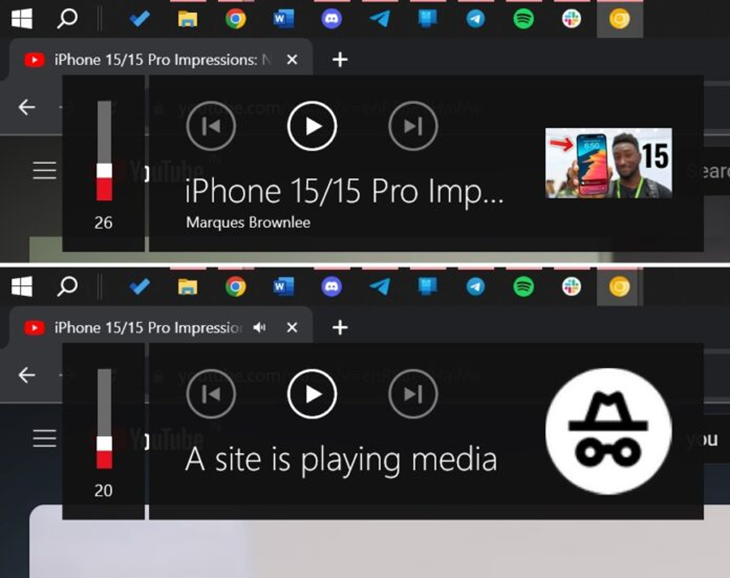
This feature hides video data in the browser
The changes were made possible by the new MediaSessionClient API, which hides media metadata and retrieves stub data. Chrome has a specific interpretation of this API called ChromeMediaSessionClient, designed to mask media metadata when working in incognito mode.

Stub on the mini video player
To try out the new feature, go to Chrome Canary settings and the Chrome://flags menu and activate the option. After that, Chrome will hide all media metadata on Windows 11, Windows 10, Android, macOS, and other OSS. Google is still testing a feature that only works best in Chrome Canary.
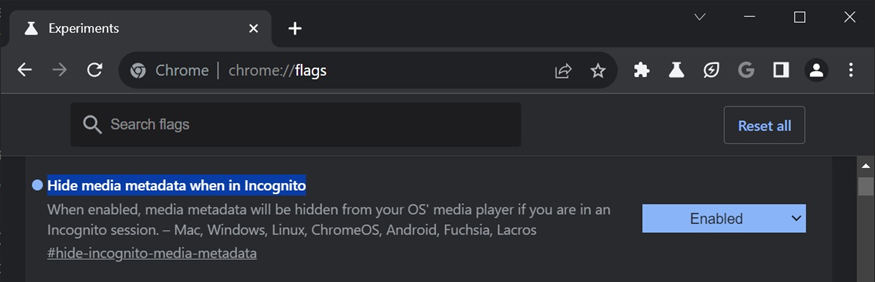
Function in Chrome://flags
In addition, Google is working on a new design for Chrome, which should appear in the fall. The new design, which includes rounded corners and Google Material for desktop versions, can be activated in the stable version of Chrome by enabling the "Chrome 2023" flags.
Google Chrome has introduced a new feature in its Canary version that allows users to hide the metadata of media played in the browser. Previously, when viewing videos in incognito mode, the title and thumbnail of the video could be displayed on the lock screen or in the media control panel, but now this "gap" in privacy has been eliminated.
The function is called "Hide media metadata when in Incognito" (Hide media metadata in incognito mode) and works at the operating system level. Researchers from Windows Latest found several mentions of the option in Chromium Gerrit . Google plans to implement it in all OSS where Chrome is available, including Windows, Mac, Linux, Chrome OS, Android and iOS.
When you enable the feature on Windows, Chrome stops displaying information such as titles, artists, covers, and other details in the media control panel or on the Windows 10/11 lock screen while playing media in incognito mode. Instead, Google replaced the name of the media with a stub text: "Media is playing on the site."
This feature hides video data in the browser
The changes were made possible by the new MediaSessionClient API, which hides media metadata and retrieves stub data. Chrome has a specific interpretation of this API called ChromeMediaSessionClient, designed to mask media metadata when working in incognito mode.
Stub on the mini video player
To try out the new feature, go to Chrome Canary settings and the Chrome://flags menu and activate the option. After that, Chrome will hide all media metadata on Windows 11, Windows 10, Android, macOS, and other OSS. Google is still testing a feature that only works best in Chrome Canary.
Function in Chrome://flags
In addition, Google is working on a new design for Chrome, which should appear in the fall. The new design, which includes rounded corners and Google Material for desktop versions, can be activated in the stable version of Chrome by enabling the "Chrome 2023" flags.


