

CarderPlanet
Professional
- Messages
- 2,549
- Reaction score
- 732
- Points
- 113
A browser update turned passwords into a meaningless set of characters.
The latest update of the Microsoft Edge browser unexpectedly turned saved user passwords into serial keys, which caused user concerns. The issue affected Windows 11, iOS, and Android users.
Previously, users could easily view and copy their saved passwords in Microsoft Edge, but now instead of the usual combinations of characters, sets of letters and numbers that resemble serial numbers are displayed. For example, if the previously saved password was "Hello@123", it is now shown as"6B29FC40-CA47-1067-B31D-00DD010662DA".
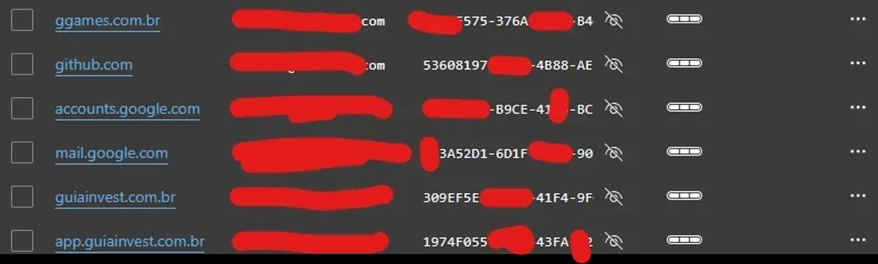
Displaying passwords after Windows 11 update
As you know, saved passwords in Microsoft Edge are stored and encrypted on the company's servers and synced in real time on all the user's devices. The data is also cached in the browser's local folder, and only Microsoft can read the information in the folder or on the server.
To view the saved passwords, users had to go to the passwords page in their profile settings, click on the "eyes" icon in the list, and pass a security check (enter a password or PIN, use face recognition). However, after the last update, the process has become more complicated.
Users report the issue on various platforms, including Reddit and official Microsoft communities . However, there is a way to restore the browser functionality.
The problem affected many users, but not everyone noticed the changes, as they rarely visit the page with saved passwords.
The latest update of the Microsoft Edge browser unexpectedly turned saved user passwords into serial keys, which caused user concerns. The issue affected Windows 11, iOS, and Android users.
Previously, users could easily view and copy their saved passwords in Microsoft Edge, but now instead of the usual combinations of characters, sets of letters and numbers that resemble serial numbers are displayed. For example, if the previously saved password was "Hello@123", it is now shown as"6B29FC40-CA47-1067-B31D-00DD010662DA".
Displaying passwords after Windows 11 update
As you know, saved passwords in Microsoft Edge are stored and encrypted on the company's servers and synced in real time on all the user's devices. The data is also cached in the browser's local folder, and only Microsoft can read the information in the folder or on the server.
To view the saved passwords, users had to go to the passwords page in their profile settings, click on the "eyes" icon in the list, and pass a security check (enter a password or PIN, use face recognition). However, after the last update, the process has become more complicated.
Users report the issue on various platforms, including Reddit and official Microsoft communities . However, there is a way to restore the browser functionality.
- On your PC, you need to open Microsoft Edge, go to Settings > Profiles > Sync, enable the "Passwords" option, and perform a second sync.
- On iOS or Android, we recommend reinstalling Microsoft Edge, opening it, then go to Settings, select a profile and open the sync page, enable the "Passwords" option, and perform a second sync.
The problem affected many users, but not everyone noticed the changes, as they rarely visit the page with saved passwords.

