


Carding 4 Carders
Professional
- Messages
- 2,724
- Reaction score
- 1,598
- Points
- 113
Administrators can now control the security of the connection and avoid data leaks.
In the latest Windows 11 Insider Preview Build 25982 update for Canary Channel members, Microsoft has made significant security improvements regarding SMB (Server Message Block) encryption. Windows administrators can now require encryption for all outgoing SMB connections, enabling End-to-End data encryption (E2EE). Encryption can be activated for each individual resource or for the entire file server via Windows Admin Center, Windows PowerShell, or UNC Hardening.
Although SMB encryption was first introduced in SMB 3.0 on Windows 8 and Windows Server 2012, support for AES-256-GCM cryptographic suites was only added in Windows 11 and Windows Server 2022.
You can configure the new option using PowerShell or the Require Encryption group policy under Computer Configuration \ Administrative Templates \ Network \ Lanman Workstation.
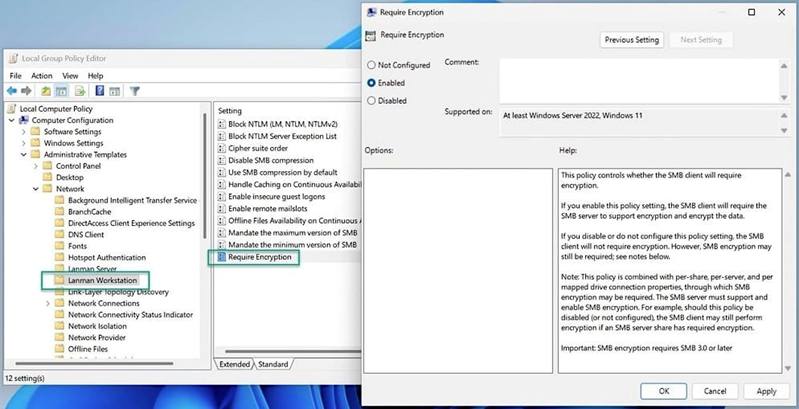
Windows 11 "Require encryption"
A Microsoft representative noted in a blog post that the administrator can now force SMB encryption on all connections and refuse to connect if the SMB server does not support such encryption. This measure is designed to protect against data interception attempts
Additionally, starting with Windows 11 Insider Preview Build 25951, administrators can configure systems to automatically block sending NTLM data over SMB, preventing Pass-the-Hash, NTLM Relay attacks, and password cracking attempts.
With the release of Windows 11 Insider Preview Build 25381 in the Canary Channel, Microsoft also started requiring SMB signing by default for all connections. Microsoft emphasized that SMB encryption provides the same level of protection against unauthorized access as an SMB signature. If the SMB client requires a signature, SMB encryption disables it – there is no point in requiring both, because encryption is a priority.
These improvements are part of a broader initiative to strengthen the security of Windows and Windows Server. Against the background of innovations, the company also strengthened protection against brute-force attacks by introducing SMB authentication speed limits, reducing the risks from unsuccessful NTLM authentication attempts.
In the latest Windows 11 Insider Preview Build 25982 update for Canary Channel members, Microsoft has made significant security improvements regarding SMB (Server Message Block) encryption. Windows administrators can now require encryption for all outgoing SMB connections, enabling End-to-End data encryption (E2EE). Encryption can be activated for each individual resource or for the entire file server via Windows Admin Center, Windows PowerShell, or UNC Hardening.
Although SMB encryption was first introduced in SMB 3.0 on Windows 8 and Windows Server 2012, support for AES-256-GCM cryptographic suites was only added in Windows 11 and Windows Server 2022.
You can configure the new option using PowerShell or the Require Encryption group policy under Computer Configuration \ Administrative Templates \ Network \ Lanman Workstation.
Windows 11 "Require encryption"
A Microsoft representative noted in a blog post that the administrator can now force SMB encryption on all connections and refuse to connect if the SMB server does not support such encryption. This measure is designed to protect against data interception attempts
Additionally, starting with Windows 11 Insider Preview Build 25951, administrators can configure systems to automatically block sending NTLM data over SMB, preventing Pass-the-Hash, NTLM Relay attacks, and password cracking attempts.
With the release of Windows 11 Insider Preview Build 25381 in the Canary Channel, Microsoft also started requiring SMB signing by default for all connections. Microsoft emphasized that SMB encryption provides the same level of protection against unauthorized access as an SMB signature. If the SMB client requires a signature, SMB encryption disables it – there is no point in requiring both, because encryption is a priority.
These improvements are part of a broader initiative to strengthen the security of Windows and Windows Server. Against the background of innovations, the company also strengthened protection against brute-force attacks by introducing SMB authentication speed limits, reducing the risks from unsuccessful NTLM authentication attempts.
