Lock the computer using a USB flash drive

Hacker

Professional
Messages
1,041
Reaction score
850
Points
113
d8ccd33e92d66c50267a9.png


Predator is a free program to lock your computer using a USB flash drive as a key.

The program's operating principle is simple:
- Predator creates a key file on a USB flash drive.
- The program checks for the presence of this key flash drive with a certain frequency after launching, and if it does not detect it, it blocks the computer - the keyboard, mouse, screen goes dark.
- Just insert the USB key back to unlock the system.
- The key on the flash drive changes periodically, making theft pointless by copying the key file.
- All events related to the program, including hacking attempts, are recorded in logs.
- The Task Manager is also disabled for the duration of blocking, so Ctrl-Alt-Del does not work.
- If the key flash drive is lost, control can be restored using the master password, which is entered at the first launch.
- An audible alarm is provided in case of incorrect input the main password.
- Predator allows you to protect multiple computers with one key, for example, home and work.

Link: https://www.predator-usb.com/predator/en/index.php?n=Main.Download
 
Hello hackers, earlier we discussed how to use a flash drive to steal all passwords from a PC, today we will analyze how to lock a computer using a regular usb flash drive well, what we need for this:

Predator is a free program to lock your computer using a USB flash drive as a key.

The program's operating principle is simple:
  • Predator creates a key file on a USB flash drive.
  • The program checks for the presence of this key flash drive with a certain frequency after launching, and if it does not detect it, it blocks the computer - the keyboard, mouse, screen goes dark.
  • Just insert the USB key back to unlock the system.
  • The key on the flash drive changes periodically, making theft pointless by copying the key file.
  • All events related to the program, including hacking attempts, are recorded in logs.
  • The Task Manager is also disabled for the duration of blocking, so Ctrl-Alt-Del does not work.
  • If the key flash drive is lost, control can be restored using the master password, which is entered at the first launch.
  • An audible alarm is provided in case of incorrect input the main password.
  • Predator allows you to protect multiple computers with a single key, for example, home and work.

Getting started with the installation:
https://yadi.sk/d/uQlcpm7Q3KRhe2 x64
https://yadi.sk/d/BeXw1KwA3KRhdu x32

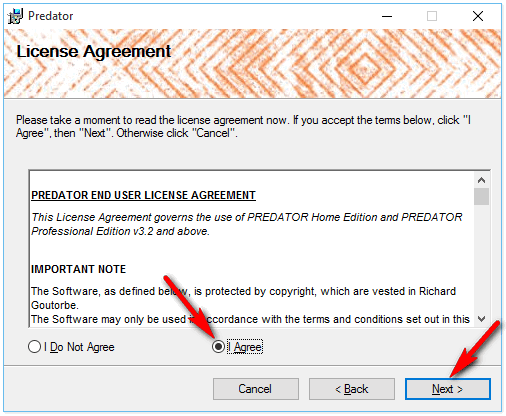
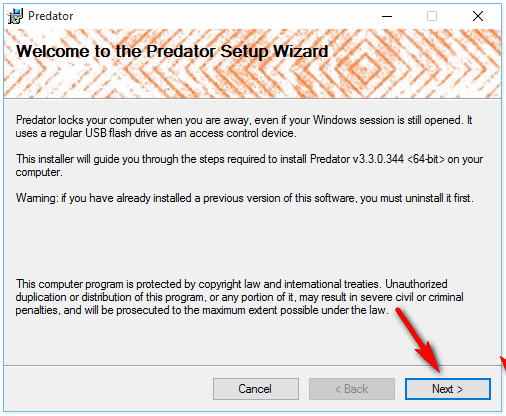
Run the installation file, either of the two in the folder...

Blokirovka-kompyutera-fleshkoy-Predator.png


Check the box and click "Next"...

Blokirovka-kompyutera-fleshkoy-Predator1.png


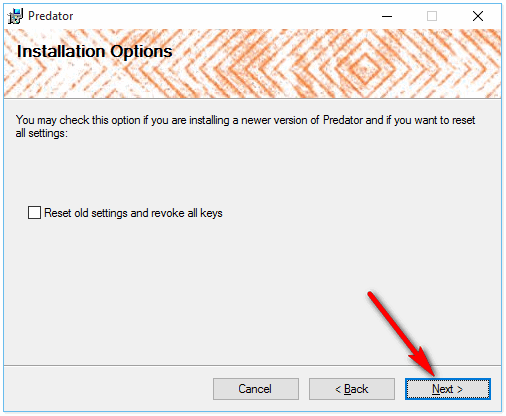
Blokirovka-kompyutera-fleshkoy-Predator2.png


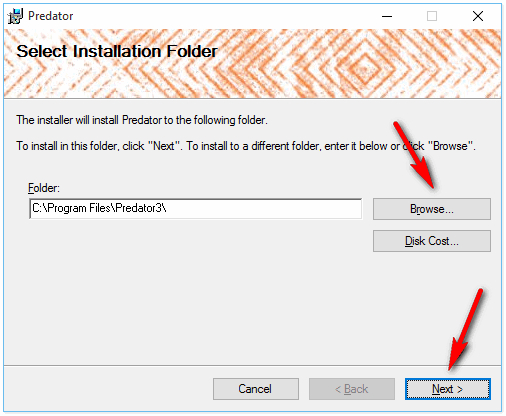
Select the installation location and tap the "Next" button again...

Blokirovka-kompyutera-fleshkoy-Predator3.png


We confirm the end of the installation with the "Ok" button... Next, insert a flash drive into the computer and run the program... We come up with a password, click "Ok", we don't put any ticks anywhere else.

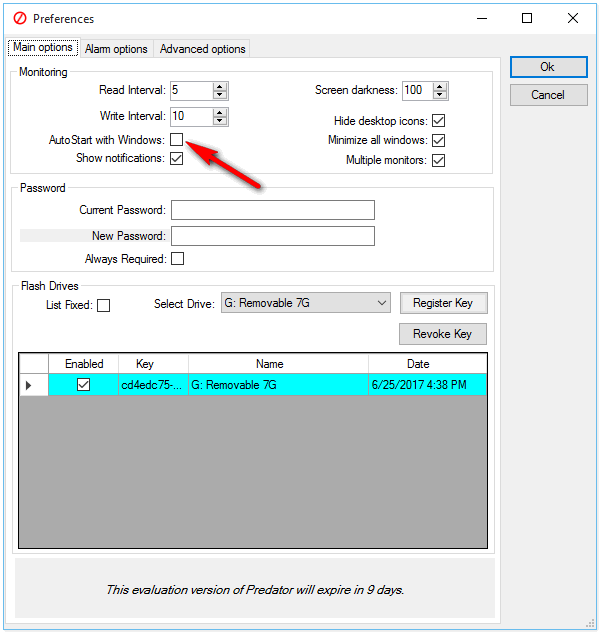
Also check in the settings that there is no check mark on the item "Auto Start with Windows". This is so that if you have not configured something correctly in the program, you can delete it after restarting the system.

Blokirovka-kompyutera-fleshkoy-Predator4.png


Well, that's basically all, we don't touch anything else. Now try to remove the flash drive from the computer, aha, you are scared, the screen is black and nothing works, now insert it again - everything will turn on and work as before...
 
How to lock and unlock your computer using a USB device

PS: This article is presented for informational purposes only and does not constitute a call to action. All information is aimed at protecting readers from illegal actions.


An interesting program caught my eye, albeit a little damp, but the functionality is very curious. Allows you to prepare a USB flash drive in a special way and lock the computer when the USB flash drive is removed, as well as unlock it when connected.

  • .Net Framework 4.0 required
  • Link to the program: bdyms ! (Remember that all links are best opened in the sandbox).

First launch of the program​

At this stage, we can set the interface language settings and accept the license agreement.
1621201886200.png


Brief settings​

After the first launch, you can open brief settings (advanced - in the upper right corner of the window, the corresponding checkmark). At this stage, we set a security password (with its help it will be possible to unlock the computer if something goes wrong).

We also indicate the letter of the flash drive on which the unlock file is created.

Well, the last checkmark is to activate the blocking service.
1621201912600.png


Lock screen​

We will pull out the USB flash drive after activating the program and we will see the following window. There is no password entry window by default, it appears when you double-click the mouse. If you connect a "charged" USB flash drive, the system will be unlocked.
1621201951200.png

Of course, the lock screen is not very good, but it can be customized in the advanced settings. In the same place, register the automatic start of the service when the OS starts. You can turn off the network unlock feature with password or batch, leaving only USB unlocking.

In addition, I was interested in the option when the binding goes not just to the key file on the USB flash drive (which can be copied), but also to the software serial number of the USB Mass Storage device. Of course, it can also be copied, but it requires more complex preparation.

Testing in different variations - the application crashed a couple of times (apparently tried to change the settings with the protection enabled, which is not recommended). In general, the application is interesting, the functionality is good, it may be convenient for someone.
 
Top