

Father
Professional
- Messages
- 2,602
- Reaction score
- 850
- Points
- 113
The first stage of a pentest is, as you know, reconnaissance. Once you have determined which system is running on the remote host, you can start looking for vulnerabilities in it. In this article, you will learn about seven tools to help you in this step, while at the same time you will see how to compute the operating system on a remote host.
Content
1. A small excursion into the theory
2. Nmap
3. NetworkMiner
4. p0f v3
5. NetScanTools
6. X probe
7. Ettercap
8. THC-Archive
9. Conclusion
You may be familiar with the term TCP / IP stack fingerprinting, which refers to how such tools work.
Let's look at the most suitable utilities for this purpose, and try to assess their capabilities and features.
A small excursion into the theory
It is also obvious that the remote system appears to us as a "black box" at the initial stage of intelligence activities, and we only know the IP address. It is necessary to find out all possible ports on the host under investigation, what operating system it has on board, what software is installed there and is able to interact with the network. And if you already have certain information, then you can start looking for vulnerabilities and think about how to use them.
Passive and active research methods are used to determine the operating system on the host. In the first case, tools such as Wireshark and traffic analysis are used. In the second version, the principle of template portals is used: each operating system has its own characteristic set of open ports, on which you can knock and assess their available degree. And only after that, looking at this picture, draw the appropriate conclusions. In both the first and second cases, we are examining the emergence of operating system fingerprints, which is why this set of methods is called fingerprinting.
In most cases, all passive traffic analysis methods are based on examining the TCP / IP stack of the remote computer. At the same time, the packet headers contain fields related to the operating system. In particular, the TTL (Time To Live) packet lifetime of 64 is most common on Linux and freeBSD. If the Don't Fragment flag is missing, it means it's OpenBSD. Another indirect symbol is the window size, maximum segment size (MSS), window segment scaling value, and the state of the sackOK flag. The exclusion method allows you to determine the OS that is used on the host of interest to us. To facilitate this, the utilities from this article will be used.
Nmap.
The current version of Nmap 7.80 has an intuitive graphical interface, but the command line mode is provided for oldfags. In this case, you can use the command , where URL is the site being examined. Those who are quite stubborn can compile the tool from the source, kindly published on the developers' site.
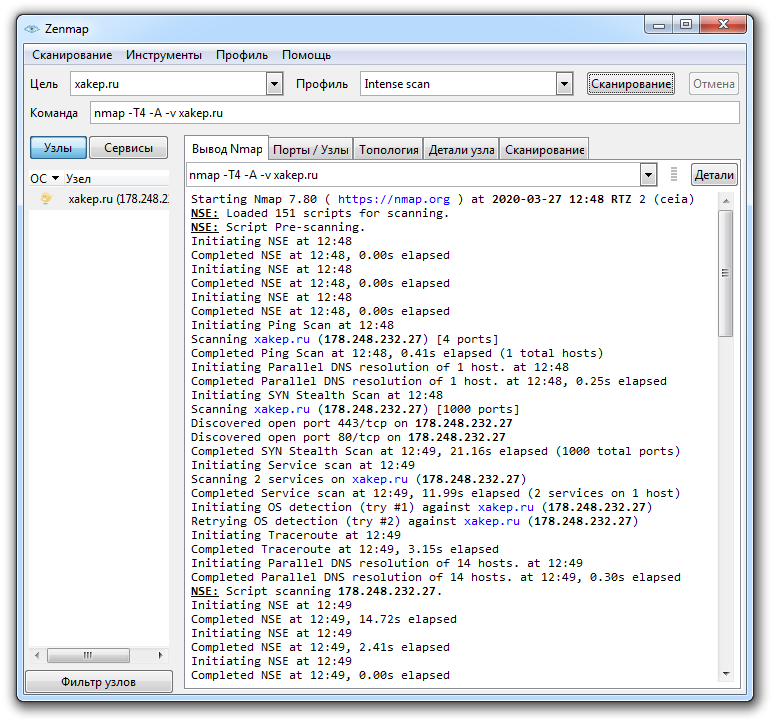
Nmap site crawl report
The utility gives a very rough diagnosis about the operating system installed on the host, but the probability of this or that variant can reach 90% and even more. In principle, this is quite enough to understand in which direction to dig further.
In addition, the program kindly displays information about the version of the server running there, about open ports, information obtained as a result of processing DNS requests, IP and IPv6 addresses, Classless inter-domain routing (CIDR) data. Softina can perform reverse DNS lookup, and also displays a large amount of other useful information. Nmap provides several scan scenarios, the choice of which depends on the goals of the researcher.
The principles of the program are described in detail in the documentation on the official website, and if the basic capabilities of Nmap are not enough for you, you can read the article about their extension. The utility is really very powerful: it even allows you to bypass firewalls, perform DoS and other types of attacks. In short, a useful tool if you know how to handle it.
NetworkMiner.
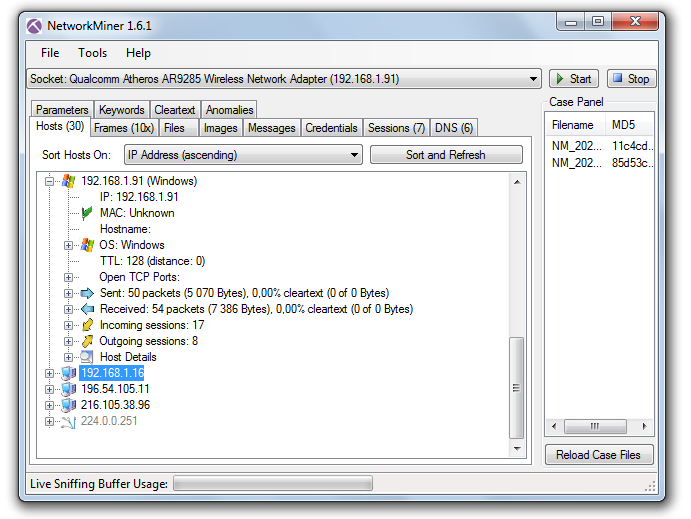
NetworkMiner interface
The utility can be downloaded from http://sourceforge.net/projects/networkminer, and the source code is available on the developers page.
NetworkMiner allows you to track established connections and analyze packets transmitted over the network, extracting useful information from them about the hosts with which your computer is exchanging information. TTL (packet lifetime), frame size, flags set in packet headers are used as initial data for analysis.
Individual frames can also be examined with NetworkMiner. To do this, use the Frames tab - here you can find information about the frame size, IP addresses and ports of the sender and recipient, as well as other useful information. In addition, it is possible to analyze demon banners. All this information allows you to recreate the structure of the network where packet capture is performed: this is especially useful for wireless networks, the internal kitchen of which is unfamiliar to you.
This tool has another great feature: it can extract files from traffic transmitted via FTP, TFTP, HTTP, HTTP / 2, SMB, SMB2, SMTP, POP3 and IMAP protocols. That is, it can be used to intercept a file transmitted by e-mail, FTP, LAN or simply in the user's browser. NetworkMiner can extract X.509 certificates from encrypted traffic. Beauty, and more!
In general, we have before us quite a powerful sniffer capable of doing magic in skillful hands. Well, fingerprinting and OS detection is just one of its broadest possibilities.
p0f v3.
There are several operating modes of the program that can be used depending on the network configuration and the task facing the researcher:
The p0f v3 version was rewritten by the developers from scratch, so the "fingerprint database" is not the most complete there. According to the official website, the program lacks data on older versions of operating systems like Windows 9x, IRIS and the like. But users can help the project by adding the results of their own experiments with the program to the databases.
NetScanTools.
But the commercial version of the Pro boasts more advanced features. It can work with various protocols, including ARP and SNMP, intercept and analyze packets, obtain DNS records for specified IP addresses, search for open TCP and UDP ports on a remote host, determine the SMB versions it supports, search for devices on the network, including SMTP servers with open relays. In an Active Directory network, NetScanTools can find all shared folders, even hidden ones. The software includes a TCP, UDP, ICMP, CDP, RAW packet generator, in which you can change various parameters, thanks to which NetScanTools easily and naturally turns into a flooder.
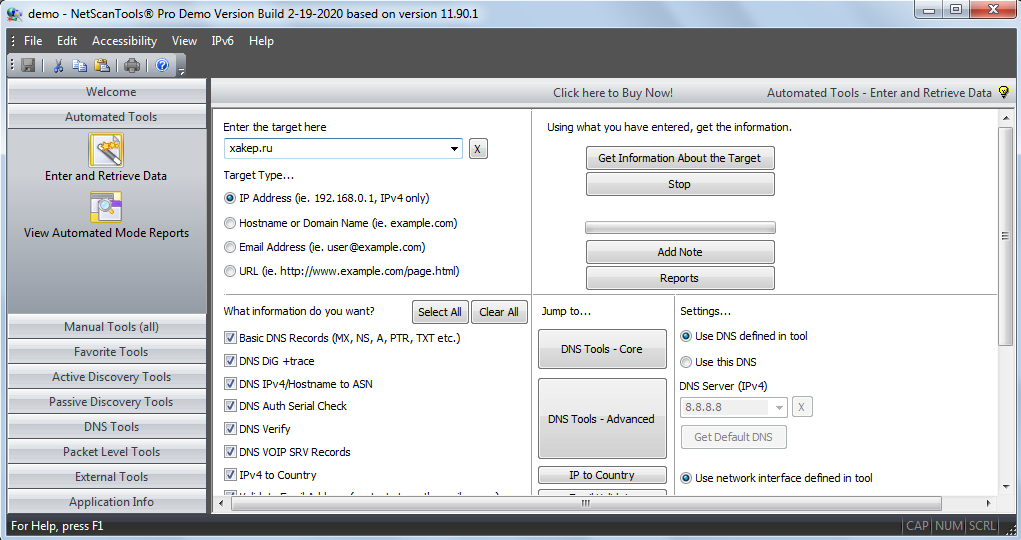
In general, we can say that NetScanTools Pro is a rather interesting project that includes tools for active and passive network research. But the $ 249 price tag is a bit biting, especially when you consider that quite free NetworkMiner and Nmap have almost the same set of basic functions. However, you can download a 30-day trial version from the developer's site, which will help you decide whether to look for acrack for a pack of bucks, or it is better to use freeware software.
X probe.
Using the fuzzy logic algorithms embedded in the software, the X probe allows you to detect services hidden by a firewall. In addition to determining the operating system on a remote host using ICMP requests, the program's capabilities include scanning TCP and UDP ports. Unfortunately, the latest version of the utility is dated 2014 and it seems that the project has practically not developed since then.
Ettercap.
Like other sniffers, this one can work with Telnet, FTP, IMAP, SMB, LDAP and several others, but with Ettercap you can also gut encrypted traffic transmitted over HTTPS and SSH. Despite the fact that the tool was created with an eye to MiTM, it can be used to identify remote operating systems using fingerprinting, along with such routine procedures as determining the IP, open ports running on the studied service node, the type of adapter and the MAC address of the network interface.
After installing and running Ettercap, it starts sniffing traffic on the network and collecting the result in profiles created by the program, from where it can be extracted for analysis. This analysis allows you to establish, in particular, data such as IP address, host name and type, the estimated version of the OS running there, open pores and running services. An ample starter kit for any explorer.
THC-Archive.
The github at https://github.com/vanhauser-thc/THC-Archive/ contains a rich archive of utilities and exploits that can be a great help for a pentester. All the software was long and painstakingly assembled by a team of like-minded people called The Hacker's Choice, founded already in 1995 and, judging by the activity on Twitter, is feeling pretty good to this day.
The dudes offer a lot of interesting projects, but we are mainly interested in the tools from the section https://github.com/vanhauser-thc/THC-Archive/tree/master/Tools. Here, in particular, you can find the Amap scanner, which allows you to track services running on non-standard ports.
Some naive sysadmins sincerely hope that they can protect themselves from an attack if they set up, for example, an FTP server, SSH or Telnet on some non-standard port instead of the usual one. It is with such admins that Amap is designed to fight.
Conventional scanners knock on standard ports, analyze the received responses, and if they do not match what is expected, they break off. Amap instead polls the entire port range and checks the responses against its database for a match. Thus, a service running on a port is identified by its characteristic features contained in the response.
To make your life easier, you can use Amap in conjunction with any other scanner. The scanner determines the list of open ports on the host we are interested in, and Amap then probes this range and finds out which services are using these ports and what the researcher can learn from this. On The Hacker's Choice page, you can download Amap for both Windows and Linux, all versions of the utility are presented, starting with the earliest ones.
Conclusion
When conducting a penetration test, it is important to know what the operating system is currently on the victim's computer. And if you know the presence of holes in the protection of your computer, then the task of hacking is simplified to a minimum.
(c) cryptoworld.su
Content
1. A small excursion into the theory
2. Nmap
3. NetworkMiner
4. p0f v3
5. NetScanTools
6. X probe
7. Ettercap
8. THC-Archive
9. Conclusion
You may be familiar with the term TCP / IP stack fingerprinting, which refers to how such tools work.
Let's look at the most suitable utilities for this purpose, and try to assess their capabilities and features.
A small excursion into the theory
It is also obvious that the remote system appears to us as a "black box" at the initial stage of intelligence activities, and we only know the IP address. It is necessary to find out all possible ports on the host under investigation, what operating system it has on board, what software is installed there and is able to interact with the network. And if you already have certain information, then you can start looking for vulnerabilities and think about how to use them.
Passive and active research methods are used to determine the operating system on the host. In the first case, tools such as Wireshark and traffic analysis are used. In the second version, the principle of template portals is used: each operating system has its own characteristic set of open ports, on which you can knock and assess their available degree. And only after that, looking at this picture, draw the appropriate conclusions. In both the first and second cases, we are examining the emergence of operating system fingerprints, which is why this set of methods is called fingerprinting.
In most cases, all passive traffic analysis methods are based on examining the TCP / IP stack of the remote computer. At the same time, the packet headers contain fields related to the operating system. In particular, the TTL (Time To Live) packet lifetime of 64 is most common on Linux and freeBSD. If the Don't Fragment flag is missing, it means it's OpenBSD. Another indirect symbol is the window size, maximum segment size (MSS), window segment scaling value, and the state of the sackOK flag. The exclusion method allows you to determine the OS that is used on the host of interest to us. To facilitate this, the utilities from this article will be used.
Nmap.
- Website: nmap.org
- Platform: GNU / Linux, macOS, Windows (x86)
The current version of Nmap 7.80 has an intuitive graphical interface, but the command line mode is provided for oldfags. In this case, you can use the command , where URL is the site being examined. Those who are quite stubborn can compile the tool from the source, kindly published on the developers' site.
Nmap site crawl report
The utility gives a very rough diagnosis about the operating system installed on the host, but the probability of this or that variant can reach 90% and even more. In principle, this is quite enough to understand in which direction to dig further.
In addition, the program kindly displays information about the version of the server running there, about open ports, information obtained as a result of processing DNS requests, IP and IPv6 addresses, Classless inter-domain routing (CIDR) data. Softina can perform reverse DNS lookup, and also displays a large amount of other useful information. Nmap provides several scan scenarios, the choice of which depends on the goals of the researcher.
The principles of the program are described in detail in the documentation on the official website, and if the basic capabilities of Nmap are not enough for you, you can read the article about their extension. The utility is really very powerful: it even allows you to bypass firewalls, perform DoS and other types of attacks. In short, a useful tool if you know how to handle it.
NetworkMiner.
- Website: https://www.netresec.com/index.ashx?page=Networkminer
- Platform: GNU / Linux, Windows
NetworkMiner interface
The utility can be downloaded from http://sourceforge.net/projects/networkminer, and the source code is available on the developers page.
NetworkMiner allows you to track established connections and analyze packets transmitted over the network, extracting useful information from them about the hosts with which your computer is exchanging information. TTL (packet lifetime), frame size, flags set in packet headers are used as initial data for analysis.
Individual frames can also be examined with NetworkMiner. To do this, use the Frames tab - here you can find information about the frame size, IP addresses and ports of the sender and recipient, as well as other useful information. In addition, it is possible to analyze demon banners. All this information allows you to recreate the structure of the network where packet capture is performed: this is especially useful for wireless networks, the internal kitchen of which is unfamiliar to you.
This tool has another great feature: it can extract files from traffic transmitted via FTP, TFTP, HTTP, HTTP / 2, SMB, SMB2, SMTP, POP3 and IMAP protocols. That is, it can be used to intercept a file transmitted by e-mail, FTP, LAN or simply in the user's browser. NetworkMiner can extract X.509 certificates from encrypted traffic. Beauty, and more!
In general, we have before us quite a powerful sniffer capable of doing magic in skillful hands. Well, fingerprinting and OS detection is just one of its broadest possibilities.
p0f v3.
- Website: https://lcamtuf.coredump.cx/p0f3/
- Platform: GNU / Linux, Windows, macOS
There are several operating modes of the program that can be used depending on the network configuration and the task facing the researcher:
- SYN mode, implying examination of incoming connections;
- SYN + ACK mode - investigation of outgoing connections;
- RST + mode implies traffic analysis for a host behind a firewall that is rejecting connections;
- MiTM mode - investigation of the connection between nodes, the traffic of which you can sniff without interference on your part.
The p0f v3 version was rewritten by the developers from scratch, so the "fingerprint database" is not the most complete there. According to the official website, the program lacks data on older versions of operating systems like Windows 9x, IRIS and the like. But users can help the project by adding the results of their own experiments with the program to the databases.
NetScanTools.
- Website: netscantools.com
- Platform: Windows
But the commercial version of the Pro boasts more advanced features. It can work with various protocols, including ARP and SNMP, intercept and analyze packets, obtain DNS records for specified IP addresses, search for open TCP and UDP ports on a remote host, determine the SMB versions it supports, search for devices on the network, including SMTP servers with open relays. In an Active Directory network, NetScanTools can find all shared folders, even hidden ones. The software includes a TCP, UDP, ICMP, CDP, RAW packet generator, in which you can change various parameters, thanks to which NetScanTools easily and naturally turns into a flooder.
In general, we can say that NetScanTools Pro is a rather interesting project that includes tools for active and passive network research. But the $ 249 price tag is a bit biting, especially when you consider that quite free NetworkMiner and Nmap have almost the same set of basic functions. However, you can download a 30-day trial version from the developer's site, which will help you decide whether to look for a
X probe.
- Website: https://sourceforge.net/projects/xprobe/
- Platform: GNU / Linux
Using the fuzzy logic algorithms embedded in the software, the X probe allows you to detect services hidden by a firewall. In addition to determining the operating system on a remote host using ICMP requests, the program's capabilities include scanning TCP and UDP ports. Unfortunately, the latest version of the utility is dated 2014 and it seems that the project has practically not developed since then.
Ettercap.
- Website: https://www.ettercap-project.org/
- Platform: GNU / Linux
Like other sniffers, this one can work with Telnet, FTP, IMAP, SMB, LDAP and several others, but with Ettercap you can also gut encrypted traffic transmitted over HTTPS and SSH. Despite the fact that the tool was created with an eye to MiTM, it can be used to identify remote operating systems using fingerprinting, along with such routine procedures as determining the IP, open ports running on the studied service node, the type of adapter and the MAC address of the network interface.
After installing and running Ettercap, it starts sniffing traffic on the network and collecting the result in profiles created by the program, from where it can be extracted for analysis. This analysis allows you to establish, in particular, data such as IP address, host name and type, the estimated version of the OS running there, open pores and running services. An ample starter kit for any explorer.
THC-Archive.
The github at https://github.com/vanhauser-thc/THC-Archive/ contains a rich archive of utilities and exploits that can be a great help for a pentester. All the software was long and painstakingly assembled by a team of like-minded people called The Hacker's Choice, founded already in 1995 and, judging by the activity on Twitter, is feeling pretty good to this day.
The dudes offer a lot of interesting projects, but we are mainly interested in the tools from the section https://github.com/vanhauser-thc/THC-Archive/tree/master/Tools. Here, in particular, you can find the Amap scanner, which allows you to track services running on non-standard ports.
Some naive sysadmins sincerely hope that they can protect themselves from an attack if they set up, for example, an FTP server, SSH or Telnet on some non-standard port instead of the usual one. It is with such admins that Amap is designed to fight.
Conventional scanners knock on standard ports, analyze the received responses, and if they do not match what is expected, they break off. Amap instead polls the entire port range and checks the responses against its database for a match. Thus, a service running on a port is identified by its characteristic features contained in the response.
To make your life easier, you can use Amap in conjunction with any other scanner. The scanner determines the list of open ports on the host we are interested in, and Amap then probes this range and finds out which services are using these ports and what the researcher can learn from this. On The Hacker's Choice page, you can download Amap for both Windows and Linux, all versions of the utility are presented, starting with the earliest ones.
Conclusion
When conducting a penetration test, it is important to know what the operating system is currently on the victim's computer. And if you know the presence of holes in the protection of your computer, then the task of hacking is simplified to a minimum.
(c) cryptoworld.su

