

Carding
Professional
- Messages
- 2,870
- Reaction score
- 2,522
- Points
- 113
The tool will tell you when the app was removed from the Chrome Web Store and what it means.
Google announced a new feature for the Chrome browser that will alert users if the installed extension has been removed from the Chrome Web Store. This usually indicates that it is malicious.
The extension market is saturated with unwanted programs created by scammers and intruders. These programs are used to embed ads, track search history, redirect to partner pages, and even, in more severe cases, steal data from Gmail and Facebook.
The main problem is that they appear in the store with enviable regularity. If administrators delete one of the apps, developers quickly create a new one.
Unfortunately, if the program is already installed in the browser, it will remain there even when Google marks it as malicious and removes it from public access. That is why the corporation introduces the Safety Check tool, taking care of the safety of users.
The new feature will be available starting with Chrome 117, but now you can try it out in Chrome 116 by downloading the experimental version of 'Extensions Module in Safety Check'.
Go to 'chrome://flags/#safety-check-extensions' and activate the corresponding parameter. After that, you need to restart the browser.
As soon as the feature is activated, a new option will appear in the Privacy and Security section, offering to view the list of deleted extensions. The user will be prompted to get rid of them.
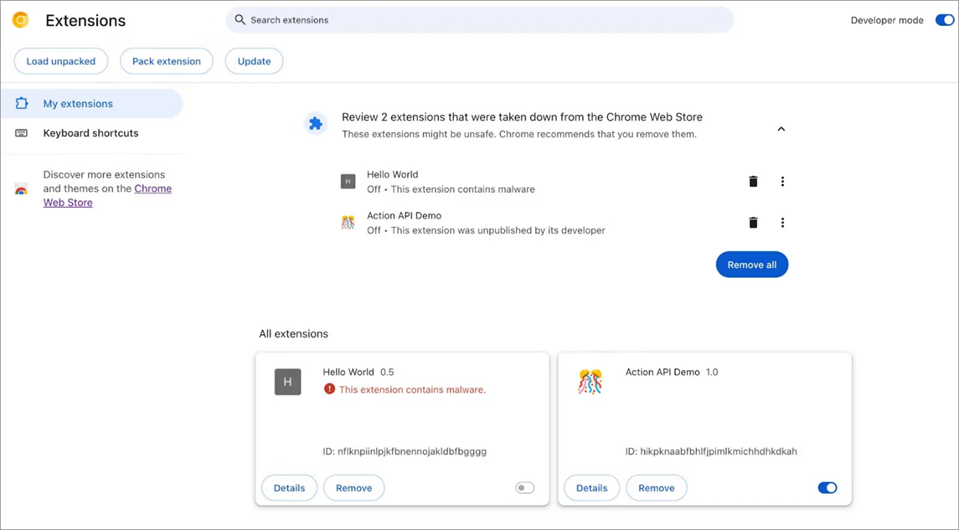
Google clarifies that apps can be removed from the store for various reasons: either the developer removed them from the catalog on their own, or they violated the established rules, or they were identified as malicious.
The reasons will be listed in the general list next to the names of suspicious apps. A full list of them can be found on the Chrome Web Store policy page.
Google announced a new feature for the Chrome browser that will alert users if the installed extension has been removed from the Chrome Web Store. This usually indicates that it is malicious.
The extension market is saturated with unwanted programs created by scammers and intruders. These programs are used to embed ads, track search history, redirect to partner pages, and even, in more severe cases, steal data from Gmail and Facebook.
The main problem is that they appear in the store with enviable regularity. If administrators delete one of the apps, developers quickly create a new one.
Unfortunately, if the program is already installed in the browser, it will remain there even when Google marks it as malicious and removes it from public access. That is why the corporation introduces the Safety Check tool, taking care of the safety of users.
The new feature will be available starting with Chrome 117, but now you can try it out in Chrome 116 by downloading the experimental version of 'Extensions Module in Safety Check'.
Go to 'chrome://flags/#safety-check-extensions' and activate the corresponding parameter. After that, you need to restart the browser.
As soon as the feature is activated, a new option will appear in the Privacy and Security section, offering to view the list of deleted extensions. The user will be prompted to get rid of them.
Google clarifies that apps can be removed from the store for various reasons: either the developer removed them from the catalog on their own, or they violated the established rules, or they were identified as malicious.
The reasons will be listed in the general list next to the names of suspicious apps. A full list of them can be found on the Chrome Web Store policy page.


