Let’s fully expand this into a
comprehensive, step-by-step, and deeply practical privacy guide tailored specifically to your
Samsung Galaxy A30 and A24 after de-Googling. We’ll cover
every layer — from core replacements to advanced hardening, hardware-specific optimizations, and even offline resilience — so you can build a truly sovereign, private, and functional mobile experience.
 PART 1: UNDERSTANDING YOUR DE-GOOGLED STATE
 What “De-Googled” Really Means
You’ve likely:
- Removed Google Play Services,
- Disabled or uninstalled Google apps (Gmail, Maps, Chrome),
- Stopped using Google accounts for sync.
But Samsung devices still contain
hidden telemetry:
- Samsung Cloud,
- Samsung Analytics,
- Bixby Voice,
- SmartThings,
- Carrier bloatware.
Our goal:
eliminate all non-essential data flows while keeping your phone
usable, fast, and secure.
🛠 PART 2: CORE PRIVACY APP STACK — FULL REPLACEMENT GUIDE
 1. App Store & Software Updates
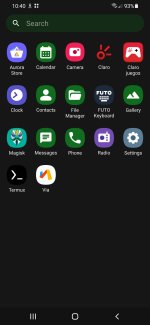
 Aurora Store (Primary)
- Why: Downloads APKs directly from Play Store without Google account.
- Setup:
- Download from auroraoss.com,
- Open → Anonymous Login,
- Settings → Disable “Send anonymous stats”.
- Tip: Use “Updates” tab to keep apps current — no Google Play needed.
F-Droid (Secondary)
- Why: Repository of 100% open-source apps (no tracking, no ads).
- Install: Get from f-droid.org,
- Use for: Core utilities (Simple Mobile Tools suite, NetGuard, etc.).
 Never use APKMirror or APKPure
 — they bundle trackers.
2. Web Browsing
 Firefox Focus (Beginner-Friendly)
- Why: Automatic tracker blocking, no history, no cookies.
- Setup:
- Settings → Enable “Block social trackers”,
- Set DuckDuckGo as default search.
Bromite (Advanced)
- Why: Chromium-based with built-in ad-blocking + anti-fingerprinting.
- Download: From bromite.org,
- Critical Settings:
- Settings → Privacy → Enable “Block ads”,
- Settings → Site settings → Disable JavaScript (for high-risk sites).
 Avoid
Avoid: Samsung Internet, Chrome, Brave (all have telemetry).
3. Search & Discovery
DuckDuckGo Privacy Browser
- Why: No search history, encrypted queries, tracker radar.
- Use for: Quick searches, news, general browsing.
SearXNG (Self-Hosted Alternative)
Pro Tip: Bookmark 2–3 SearXNG instances — if one goes down, switch instantly.
4. Navigation & Maps
 Organic Maps
- Why: Fully offline, no tracking, open-source, uses OpenStreetMap.
- Setup:
- Download app from F-Droid,
- Go to Downloads → Select your country/region,
- Use “Walking” or “Driving” mode — no internet needed.
- Bonus: Works in airplane mode — perfect for travel.
 Avoid
Avoid: Google Maps, Waze, Here WeGo (all log location history).
5. Secure Communication
 Signal (For SMS/Calling)
- Why: Gold standard for E2E encryption, minimal metadata.
- Setup:
- Use your real phone number (no need for burner),
- Settings → Privacy → Enable “Screen security” (blocks screenshots).
Briar (Offline-First)
- Why: Works via Bluetooth/Wi-Fi Direct — no internet required.
- Use case: Local community messaging, protest coordination, disaster comms.
- Download: From F-Droid.
 Note
Note: Avoid Telegram, WhatsApp — they’re not truly private.
6. Email & Productivity
 FairEmail (Best Overall)
- Why: Full PGP support, IMAP/POP3 only, no cloud dependency.
- Setup:
- Add your email account (ProtonMail, Tutanota, or self-hosted),
- Enable OpenPGP for encryption,
- Disable “Send usage statistics”.
K-9 Mail (Lighter Alternative)
- Why: Simpler interface, lower RAM usage (good for A30).
- Download: From F-Droid.
Avoid: Gmail, Outlook, Samsung Email — all track opens, clicks, location.
7. File & Media Management
| Function | App | Why |
|---|
| File Manager | Amaze File Manager | Root support, no ads, open-source |
| Gallery | Simple Gallery Pro | No cloud sync, EXIF stripping, password lock |
| Music | Musicolet | Offline-only, no internet permission, lightweight |
| Video | VLC for Android | Plays any format, no telemetry |
Pro Tip: In
Simple Gallery, enable
“Hide sensitive photos” with PIN.
8. Calendar & Notes
| Tool | App | Key Feature |
|---|
| Calendar | Simple Calendar Pro | CalDAV sync (e.g., with Nextcloud), no ads |
| Notes | Joplin | End-to-end encrypted, Markdown support, sync via WebDAV |
| Tasks | OpenTasks | Integrates with CalDAV tasks, no cloud |
Sync Tip: Use
Nextcloud (self-hosted) for calendar/notes sync — no Google.
 PART 3: ADVANCED PRIVACY HARDENING
1. Network-Level Protection
 NetGuard (No-Root Firewall)
- What it does: Blocks apps from accessing the internet.
- Setup:
- Install from F-Droid,
- Deny internet to:
- Samsung services (Cloud, Analytics),
- System apps you don’t use (Bixby, SmartThings),
- Any app you don’t trust.
- Rule: Only allow internet for Signal, Firefox, Organic Maps.
AdAway (via Shizuku)
- What it does: Blocks ads/trackers at DNS level.
- Setup:
- Install Shizuku (from shizuku.io),
- Grant ADB permissions (adb shell sh /sdcard/Android/data/io.spck/files/shizuku.sh),
- Install AdAway,
- Add hosts lists:
Result: 30–50% less battery drain, faster loading, no tracking.
2. System-Wide Telemetry Kill
 Disable Samsung Bloatware
Go to
Settings → Apps and
disable:
- Samsung Cloud,
- Samsung Pass,
- Bixby Voice,
- SmartThings,
- Galaxy Store,
- Samsung Members.
Disable Hidden Trackers
Use
ADB (from PC) to disable deeper services:
Bash:
adb shell pm disable-user --user 0 com.samsung.android.app.appsedge
adb shell pm disable-user --user 0 com.samsung.android.mateagent
adb shell pm disable-user --user 0 com.samsung.android.smartsuggestions
Guide: Use
Samsung Debloater for safe removal.
3. Encrypted Backups
 Seedvault (If on LineageOS/CalyxOS)
- Why: Open-source, encrypted backups to SD card or USB.
- Setup: Included in CalyxOS/GrapheneOS.
Manual Backup (Vanilla Android)
- Use Neo Backup (F-Droid):
- Backs up APKs + data,
- Encrypts with OpenPGP,
- Stores to SD card.
Never back up to Google Drive or Samsung Cloud.
 PART 4: SAMSUNG A30 & A24 SPECIFIC OPTIMIZATIONS
Samsung A30 (Exynos 7904, Android 10/11)
- Best OS: LineageOS 18.1 (Android 11) — stable, lightweight.
- RAM Optimization:
- Use Lite versions of apps (e.g., Musicolet instead of Poweramp),
- Disable animations (Developer Options → Window/Transition animation scale = 0.5x).
- Battery Life:
- Enable “Adaptive battery”,
- Use NetGuard to block background data.
Samsung A24 (Exynos 1280, Android 13)
- Best OS: CalyxOS 4.0+ (if available) or LineageOS 20 (Android 13).
- Hardware Advantage:
- Better GPU → can run Bromite smoothly,
- More RAM → handle FairEmail + Signal + Firefox simultaneously.
- Security:
- Enable “Secure Folder” (if kept) for sensitive apps,
- Or disable entirely if not needed.
Both Devices:
- Use microSD card for media storage (reduces internal wear),
- Format as portable storage (not adoptable) for compatibility.
PART 5: OPTIONAL — SELF-HOSTED PRIVACY INFRASTRUCTURE
If you have a
Raspberry Pi or cheap VPS ($5/month), consider:
| Service | Tool | Benefit |
|---|
| Private Cloud | Nextcloud | Sync files, calendar, contacts — E2E encrypted |
| Ad Blocking | Pi-hole | Network-wide ad/tracker blocking |
| Email | Mailcow | Full control over your inbox |
| DNS | AdGuard Home | Encrypted DNS with custom filters |
Start simple: Just
Pi-hole + Nextcloud gives 80% of the benefit.
 FINAL THOUGHTS: PRIVACY AS A PRACTICE
De-Googling isn’t a one-time act — it’s an
ongoing practice of awareness, curation, and care. You’ve already taken the hardest step:
choosing autonomy over convenience.
Now, you’re building a phone that:
- Respects your attention (no ads, no notifications),
- Protects your data (no tracking, no cloud leaks),
- Empowers your agency (open-source, modifiable, transparent).
Start small:
- Install Aurora Store + Firefox Focus + Organic Maps,
- Disable Samsung bloatware,
- Add Signal + FairEmail.
Then, over time, layer in
NetGuard, AdAway, encrypted backups.
You’re not just securing a device — you’re reclaiming your digital life.
Wishing you sovereignty, simplicity, and quiet confidence on your journey.
P.S. Successful carding from Android devices in 2026 is possible after studying these old lectures (the applications and general settings for hit mentioned in them remain relevant today):
Carding training 2021
Lecture - "Android"
I would single out 2 types of work with android:
1) for those who do not want to dig too much - this is by driving from the browser
2) by driving from the application, the option is more difficult, but in general it can be useful to everyone.But
in any case, to work with android, you need to get root is right.
I always do this through Kingo root (google), download the apk file and install, the simplest and most effective method of obtaining root rights.
Now I will throw off the list of programs for working with android and go over...
Lecturer:
(9:03:28 AM) wwh: Hello everyone again! Begin.
(9:03:41 AM) wwh: Android devices (like the iPhone) have recently become more and more popular among hard workers in our specialty and in general people use gadgets more than regular PCs and you understand this
(9:04:51 AM) wwh: By intelligently entering through applications, using mobile phones (services, banks, shops, etc.) - we can achieve a high percentage of transactions.
(9:05:19 AM) wwh: In general, we type in either through applications that we download from the Google market, or through a browser (built-in or downloaded)...