


Hacker
Professional
- Messages
- 1,041
- Reaction score
- 857
- Points
- 113
Developers: It’s super easy to bypass Android’s hidden API restrictions - a detailed story on how to bypass protection for access to hidden methods in Android 9 and higher.
You won't be able to call these functions directly, since they simply are not in the SDK. But you can use a modified SDK (difficult) or reflection (very simple).
Reflection allows you to reach any methods and fields of classes, which, of course, can be used for not entirely legal activities. Therefore, starting with Android 9, Google has created a blacklist of methods and fields that cannot be called by reflection. If the application tries to call them, it will either be forcibly stopped or receive a warning (in the case of greylisted methods).
But there is one problem with this protection - it is based on checking the name of the calling process. This means that if we do not call the method directly, but ask the system itself to do it for us, the check will give the go-ahead (it cannot prohibit itself).
So, the standard way to call a hidden method using reflection (doesn't work, the application exits):
A new way to call a hidden method using double reflection (works because the method is called not by our application, but by the system itself):
But that's not all: with this trick, we can call a very interesting hidden method setHiddenApiExemptionsthat allows (bam!) To add the methods we need to exceptions and call them with simple reflection.
The following code will tell the system to add all hidden methods to exceptions:
It's worth noting that Google is aware of this issue. They rejected a bug report about the possibility of calling hidden methods under the pretext that this is protection from fools, and not a security feature.
How to detect Magisk
Detecting Magisk Hide - An article on how to detect the presence of Magisk (and, as a result, root rights) on a device.
Magisk is a well-known and recently the only systemless device rooting tool. It allows you to get root rights without changing the system partition, as well as apply various system tweaks. One of the widely used features of Magisk is the Magisk Hide feature, which allows you to completely hide Magisk itself and the presence of root rights on the device from selected applications.
The principle of operation of Magisk is based on connecting another file system (overlay) on top of the file system of the system partition, which contains the su binary file (necessary for obtaining root rights) and the components necessary for its operation. It connects early in the download, but if Magisk Hide is activated it disables the overlay for the selected apps. In other words, regular applications will see the contents of the overlay, while those specified in the Magisk Hide settings will not. From their point of view, the smartphone will not be rooted.
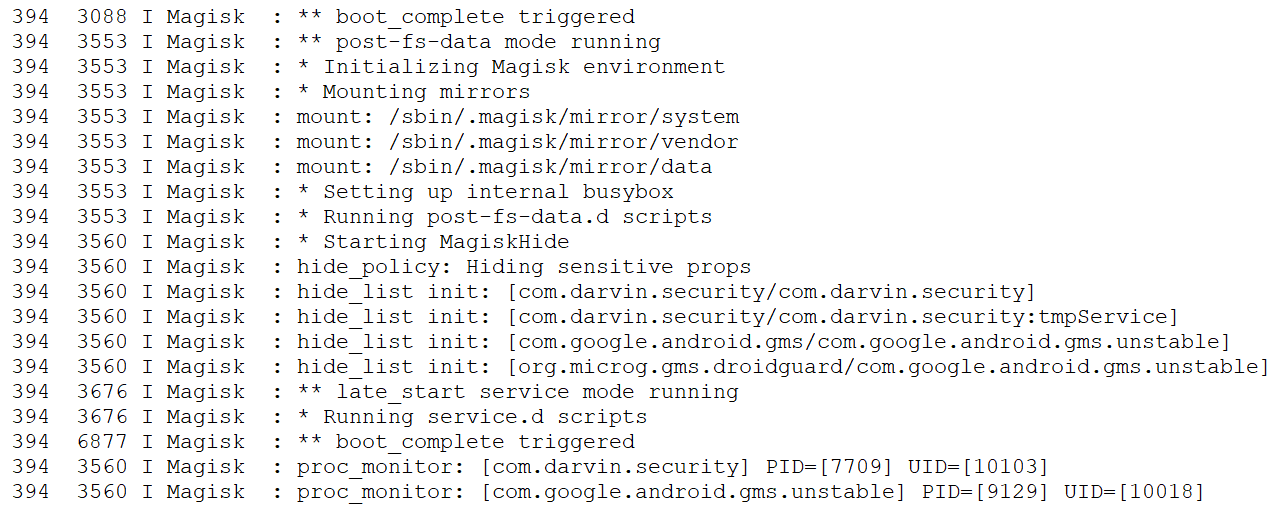
Root hiding process can be seen in Magisk logs
But there is one flaw in Magisk Hide. The fact is that if an application that is in the list for hiding root starts a service in an isolated process, Magisk will also disable the overlay for it, but /proc/<pid>/mountsthis overlay will remain in the list of mounted file systems ( ). Accordingly, in order to detect Magisk, you need to start the service in an isolated process and check the list of mounted file systems.
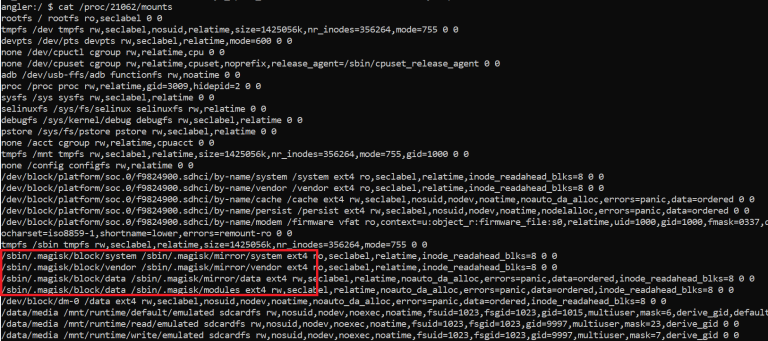
List of filesystems in a sandboxed process
The author claims that the method works for the latest version of Magisk on Android 8.0-10.0. Proof of concept can be found on GitHub.
How Google Calculates Malicious Apps
Why Does Google Think My App Is Harmful? - Alec Guertin's speech at Android Dev Summit'19 dedicated to Google Play Protect cloud antivirus.
Google Play Protect relies on over 30,000 servers to perform static analysis and constantly run applications published on Google Play and beyond in emulators and on real devices. The system pays attention to the following application behavior:
Separately, the author of the report dwelled on how an ordinary developer does not fall under suspicion. Google Play Protect may consider your app to be untrustworthy in the following cases:
Performance myths
Performance Myth Busters - A presentation from the developers of the ART compiler used in Android for JIT / AOT compilation of applications on the myths of improving application performance. So the myths.
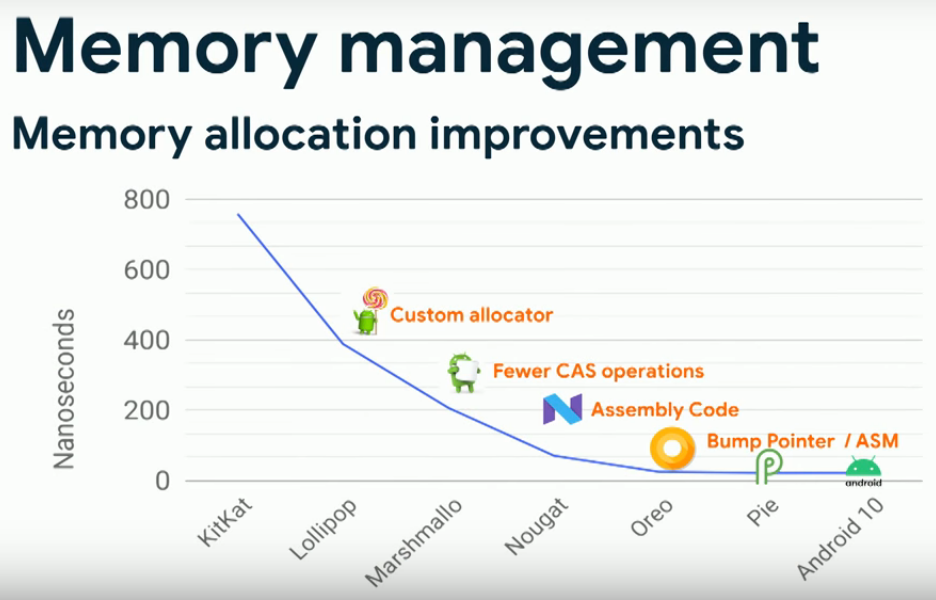
Object allocator optimization (Android 4.4 - Android 10).
Communication security
Securing Network and Inter-App Communications on Android - An introductory article on how to secure an application's communication with a network server and with other applications.
One of the main problems of network communication is the ability to intercept traffic, so the first thing to do when developing an application is to add a network configuration file that will prevent the use of unencrypted connections (since Android 7.0). The file itself can have an arbitrary name, but must be located in a directory res/xml. It also needs to be referenced from the manifest:
The following is a configuration file that disallows unencrypted traffic for all domains except localhost, and also allows you to use your own CA for debug assemblies. It is not necessary to include all of these options in the config.
The config file can also be used for Certificate Pinning. This is so that the application can verify that the remote server is actually using the real security certificate. To do this, you need to get the SHA-256 hash of this certificate and write it in the required field (you can find it using a browser):
The exchange of data between applications also needs to be protected. The standard messaging mechanism in Android is intents. They allow you to send a message to another application (or a group of applications) or call a function. Intents can be directed to one application or be broadcast (I send a message to the system, and let it figure out who the message is intended for - for example, it will call a standard browser to open the specified web page). The problem with broadcast intents is that they can be received by applications that you shouldn't communicate with. To solve the problem, you can call the selection dialog, and then the user will be able to specify the application that should receive the intent:
But what if you want to protect the application from receiving any intents other than those sent by your other applications (for example, you have implemented a plugin system)? To do this, you can create a new authorization and automatically grant it to applications signed with the same key.
First, we declare the permission:
Then we use it to protect the required application component:
In this case, we have protected the ContentProvider, but you can also make it completely invisible to other applications using the attribute android:exported="false".
Use of extension functions
Kotlin extension functions: more than sugar is a short article on the benefits of Kotlin extension functions. The ones that allow you to add a method to any class (your own or someone else's) on the fly.
Delegate classes in Kotlin
Kotlin Delegates in Android: Utilizing the power of Delegated Properties in Android development - An article about delegated properties in Kotlin and how they can be applied in Android development.
Delegated properties are class fields (or global variables) that can be accessed by the code of a special delegate class. The simplest example of using delegated properties would look like this:
All this delegate class does is trim the string (strips off leading and trailing whitespace) written to the variable. Further, if you declare a variable using this delegate class, the lines written to it will be automatically trimmed:
On Android, delegated properties are very useful for accessing options using SharedPreferences. Just create the following extension function for the SharedPreferences class:
Declare a variable that will be bound to the desired option, and just write / read the values. They will be automatically saved to the settings file:
TOOLS
LIBRARIES
You won't be able to call these functions directly, since they simply are not in the SDK. But you can use a modified SDK (difficult) or reflection (very simple).
Reflection allows you to reach any methods and fields of classes, which, of course, can be used for not entirely legal activities. Therefore, starting with Android 9, Google has created a blacklist of methods and fields that cannot be called by reflection. If the application tries to call them, it will either be forcibly stopped or receive a warning (in the case of greylisted methods).
But there is one problem with this protection - it is based on checking the name of the calling process. This means that if we do not call the method directly, but ask the system itself to do it for us, the check will give the go-ahead (it cannot prohibit itself).
So, the standard way to call a hidden method using reflection (doesn't work, the application exits):
Code:
val someHiddenClass = Class.forName("android.some.hidden.Class")
val someHiddenMethod = someHiddenClass.getMethod("someHiddenMethod", String::class.java)

someHiddenMethod.invoke(null, "some important string")
A new way to call a hidden method using double reflection (works because the method is called not by our application, but by the system itself):
Code:
val forName = Class::class.java.getMethod("forName", String::class.java)
val getMethod = Class::class.java.getMethod("getMethod", String::class.java, arrayOf<Class<*>>()::class.java)
val someHiddenClass = forName.invoke(null, "android.some.hidden.Class") as Class<*>
val someHiddenMethod = getMethod.invoke(someHiddenClass, "someHiddenMethod", String::class.java)

someHiddenMethod.invoke(null, "some important string")
But that's not all: with this trick, we can call a very interesting hidden method setHiddenApiExemptionsthat allows (bam!) To add the methods we need to exceptions and call them with simple reflection.
The following code will tell the system to add all hidden methods to exceptions:
Code:
val forName = Class::class.java.getDeclaredMethod("forName", String::class.java)
val getDeclaredMethod = Class::class.java.getDeclaredMethod("getDeclaredMethod", String::class.java, arrayOf<Class<*>>()::class.java)

val vmRuntimeClass = forName.invoke(null, "dalvik.system.VMRuntime") as Class<*>
val getRuntime = getDeclaredMethod.invoke(vmRuntimeClass, "getRuntime", null) as Method
val setHiddenApiExemptions = getDeclaredMethod.invoke(vmRuntimeClass, "setHiddenApiExemptions", arrayOf(arrayOf<String>()::class.java)) as Method

val vmRuntime = getRuntime.invoke (null)

setHiddenApiExemptions.invoke(vmRuntime, arrayOf("L"))
It's worth noting that Google is aware of this issue. They rejected a bug report about the possibility of calling hidden methods under the pretext that this is protection from fools, and not a security feature.
How to detect Magisk
Detecting Magisk Hide - An article on how to detect the presence of Magisk (and, as a result, root rights) on a device.
Magisk is a well-known and recently the only systemless device rooting tool. It allows you to get root rights without changing the system partition, as well as apply various system tweaks. One of the widely used features of Magisk is the Magisk Hide feature, which allows you to completely hide Magisk itself and the presence of root rights on the device from selected applications.
The principle of operation of Magisk is based on connecting another file system (overlay) on top of the file system of the system partition, which contains the su binary file (necessary for obtaining root rights) and the components necessary for its operation. It connects early in the download, but if Magisk Hide is activated it disables the overlay for the selected apps. In other words, regular applications will see the contents of the overlay, while those specified in the Magisk Hide settings will not. From their point of view, the smartphone will not be rooted.
Root hiding process can be seen in Magisk logs
But there is one flaw in Magisk Hide. The fact is that if an application that is in the list for hiding root starts a service in an isolated process, Magisk will also disable the overlay for it, but /proc/<pid>/mountsthis overlay will remain in the list of mounted file systems ( ). Accordingly, in order to detect Magisk, you need to start the service in an isolated process and check the list of mounted file systems.
List of filesystems in a sandboxed process
The author claims that the method works for the latest version of Magisk on Android 8.0-10.0. Proof of concept can be found on GitHub.
How Google Calculates Malicious Apps
Why Does Google Think My App Is Harmful? - Alec Guertin's speech at Android Dev Summit'19 dedicated to Google Play Protect cloud antivirus.
Google Play Protect relies on over 30,000 servers to perform static analysis and constantly run applications published on Google Play and beyond in emulators and on real devices. The system pays attention to the following application behavior:
- what URLs the application is accessing, if they are not in the phishing URL database;
- what files the application writes and whether there are any files among them that should not be overwritten;
- Does the application use known methods of obtaining root rights (I mean exploits, not applications for already rooted devices);
- is this application too similar to the well-known malicious application (97% match).
Separately, the author of the report dwelled on how an ordinary developer does not fall under suspicion. Google Play Protect may consider your app to be untrustworthy in the following cases:
- incomplete disclosure of information about the behavior of the application, for example, notify about the collection of information after its collection or without specifying what specific data will be sent to the developer's server;
- using third-party SDKs with malicious functionality;
- alternative methods of monetization like crypto mining, as well as price nondisclosure or automatic payments without consent;
- incomplete fix of vulnerabilities reported by the developer console;
- unexpected behavior of the application, for example, showing ads, which, judging by the code, should not be.
Performance myths
Performance Myth Busters - A presentation from the developers of the ART compiler used in Android for JIT / AOT compilation of applications on the myths of improving application performance. So the myths.
- Kotlin code is slower and thicker than Java. An experiment with converting a Google Drive application to Kotlin showed that the launch time and application size remained the same, but the size of the codebase was reduced by 25%.
- Getters slow down the code. Some developers are moving away from using getters in favor of public fields ( foo.baragainst foo.getBar()), hoping to improve performance. However, this does not work, because the ART compiler is able to inline getters, turning them into ordinary field calls.
- Lambdas slow down the code. Lambdas are considered to be very slow, and you may come across advice to replace them with nested classes. In fact, after compilation, lambdas turn into the same anonymous nested classes.
- Object allocation and garbage collection in Android is slow. Once upon a time this was indeed true, but in recent years, developers have made an object allocator dozens of times faster, and a garbage collector several times faster. For example, on Android 10, the automatic allocation of objects in performance tests is no different from allocating and freeing the pool of objects manually (this is the way that was recommended to use to maintain performance earlier).
- Profiling debug builds is okay. Usually, when profiling an application, developers do not pay attention to the fact that they are dealing with a debug build. As a result, they analyze the performance of unoptimized code and get incorrect profiling results.
- MultiDex applications have a slower cold start. If the limit on the number of methods is exceeded, the compiler splits the application into multiple DEX executables. It is believed that this slows down the start of the application. In fact, if there is such an effect, then it only appears if there are hundreds of DEX files. On the other hand, MultiDex applications take up several percent more RAM and persistent memory.
Object allocator optimization (Android 4.4 - Android 10).
Communication security
Securing Network and Inter-App Communications on Android - An introductory article on how to secure an application's communication with a network server and with other applications.
One of the main problems of network communication is the ability to intercept traffic, so the first thing to do when developing an application is to add a network configuration file that will prevent the use of unencrypted connections (since Android 7.0). The file itself can have an arbitrary name, but must be located in a directory res/xml. It also needs to be referenced from the manifest:
Code:
<?xml version="1.0" encoding="utf-8"?>
<manifest ... >
    <application
         android:networkSecurityConfig="@xml/config"
         ...>
        ...
    </application>
</manifest>
The following is a configuration file that disallows unencrypted traffic for all domains except localhost, and also allows you to use your own CA for debug assemblies. It is not necessary to include all of these options in the config.
Code:
<?xml version="1.0" encoding="utf-8"?>
<network-security-config>
    <! - Deny unencrypted traffic for all domains except those listed in the exceptions ->
    <base-config cleartextTrafficPermitted="false" />

    <! - Domains with which unencrypted traffic is allowed ->
    <domain-config cleartextTrafficPermitted="true">
        <domain includeSubdomains="true">localhost</domain>
        <trust-anchors>
            <! - In addition to the system ones, we also trust the certificate from the debug_certificate file ->
            <certificates src="system" />
            <certificates src="@raw/debug_certificate" />
        </trust-anchors>
    </domain-config>

    <! - The debug version of the application will also trust our own CA ->
    <debug-overrides>
        <trust-anchors>
            <certificates src="@raw/my_ca"/>
        </trust-anchors>
    </debug-overrides>

</network-security-config>
The config file can also be used for Certificate Pinning. This is so that the application can verify that the remote server is actually using the real security certificate. To do this, you need to get the SHA-256 hash of this certificate and write it in the required field (you can find it using a browser):
Code:
<domain-config>
    <domain includeSubdomains="true">website.net</domain>
    <pin-set expiration="2020-04-16">
        <pin digest="SHA256">хеш</pin>
        <pin digest="SHA-256">хеш</pin>
     </pin-set>
</domain-config>
The exchange of data between applications also needs to be protected. The standard messaging mechanism in Android is intents. They allow you to send a message to another application (or a group of applications) or call a function. Intents can be directed to one application or be broadcast (I send a message to the system, and let it figure out who the message is intended for - for example, it will call a standard browser to open the specified web page). The problem with broadcast intents is that they can be received by applications that you shouldn't communicate with. To solve the problem, you can call the selection dialog, and then the user will be able to specify the application that should receive the intent:
Code:
val intent = Intent(Intent.ACTION_SEND)
val activityList = packageManager.queryIntentActivities(intent, PackageManager.MATCH_ALL)
when {
    activityList.size > 1 -> {
        val chooser = Intent.createChooser(intent, "Choose an App")
        startActivity (chooser)
    }
    intent.resolveActivity(packageManager) != null -> startActivity(intent)
    else -> Toast.makeText(this, "No App to launch with", Toast.LENGTH_LONG).show()
}
But what if you want to protect the application from receiving any intents other than those sent by your other applications (for example, you have implemented a plugin system)? To do this, you can create a new authorization and automatically grant it to applications signed with the same key.
First, we declare the permission:
Code:
<permission android:name="packageName.HelloWorldPermission"
            android:protectionLevel="signature" />
Then we use it to protect the required application component:
Code:
<provider android:name="android.support.v4.content.FileProvider"
          ...
          android:permission="packageName.HelloWorldPermission"/>
In this case, we have protected the ContentProvider, but you can also make it completely invisible to other applications using the attribute android:exported="false".
Use of extension functions
Kotlin extension functions: more than sugar is a short article on the benefits of Kotlin extension functions. The ones that allow you to add a method to any class (your own or someone else's) on the fly.
- Extension functions improve the readability of your code. For example, a string string.emojify()looks clearly better than emojify(string), and all the more, better than StringUtils.emojify(string).
- Extension functions make a class easier and easier to read and understand. If, for example, a set of private methods of a class is needed only by one public method, they, together with the public method, can be moved into extensions.
- Extension functions make it easier to write code, since the IDE will automatically suggest which methods and extension functions a class has.
Delegate classes in Kotlin
Kotlin Delegates in Android: Utilizing the power of Delegated Properties in Android development - An article about delegated properties in Kotlin and how they can be applied in Android development.
Delegated properties are class fields (or global variables) that can be accessed by the code of a special delegate class. The simplest example of using delegated properties would look like this:
Code:
class TrimDelegate : ReadWriteProperty<Any?, String> {

    private var trimmedValue: String = ""

    override fun getValue(
        thisRef: Any?,
        property: KProperty<*>
    ): String {
        return trimmedValue
    }

    override fun setValue(
        thisRef: Any?,
        property: KProperty<*>, value: String
    ) {
        trimmedValue = value.trim()
    }
}
All this delegate class does is trim the string (strips off leading and trailing whitespace) written to the variable. Further, if you declare a variable using this delegate class, the lines written to it will be automatically trimmed:
Code:
var param: String by TrimDelegate ()
param = "  string  "
On Android, delegated properties are very useful for accessing options using SharedPreferences. Just create the following extension function for the SharedPreferences class:
Code:
fun SharedPreferences.string(
    defaultValue: String = "",
    key: (KProperty<*>) -> String = KProperty<*>::name
): ReadWriteProperty<Any, String> =
    object : ReadWriteProperty<Any, String> {
        override fun getValue(
            thisRef: Any,
            property: KProperty<*>
        ) = getString(key(property), defaultValue)
        override fun setValue(
            thisRef: Any,
            property: KProperty<*>,
            value: String
        ) = edit().putString(key(property), value).apply()
    }
Declare a variable that will be bound to the desired option, and just write / read the values. They will be automatically saved to the settings file:
Code:
var option3 by prefs.string(
        key = { "option3" },
        defaultValue = "default"
    )

option3 = "new_value"
TOOLS
- Can My Phone Run Linux? - a site that allows you to find out if your device supports the installation of a third-party Linux distribution (OpenEmbedded, PostmarketOS, Ubuntu Touch, and so on);
- Frizzer - General purpose fuzzer based on Frida
- WhatsDump - a script to extract the WhatsApp encryption key;
- iOS-related scripts - a set of scripts for iOS reverse engineering.
LIBRARIES
- FreeReflection - a library that allows you to bypass the restriction on access to hidden APIs using reflection (in Android 9 and 10);
- StringPacks - a library for more efficient storage of translation strings in a package (developed by WhatsApp);
- Croppy - image cropping screen;
- LiquidSwipe - beautiful animation of the transition between the ViewPager pages;
- EasyReveal - a library for effectively changing the background of an application;
- Shortcut - a library for conveniently creating dynamic application shortcuts (those that are shown when the icon is held for a long time);
- ChiliPhotoPicker - a library for selecting photos on a memory card;
- FlipTabs - a simple and effective switch between two tabs;
- Recycleradapter-generator - automatic generator of adapters for RecyclerView;
- IndicatorScrollView - a ScrollView that visually reacts to scrolling through the screen;
- StoryView - a library that implements Instagram stories;
- Falcon - a library for LRU caching of serializable objects in memory and on disk;
- Flow-preferences - Rx-preferences version rewritten to Kotlin Flow API;
- FlowRiddles is a set of tasks for learning the Kotlin Flow API.