


BadB
Professional
- Messages
- 2,568
- Reaction score
- 2,827
- Points
- 113
We have already written a lot about attacks on web applications. But as long as there are vulnerable applications on the network, there will be a job for a redtimer. Therefore, we will repeat and write until you “polish” your skills.
In this article, we'll go back to the basics and look at the basics of attacks against web applications. Let's go through such topics as:
What a typical WEB application consists of
Attacker's targets
Initially, the attacker wants to get a web-shell.
What is a web-shell?
The next point a hacker strives for is getting a shell on the server. What does the shell give? Shell makes it possible to directly control the server itself where the web application is located, create directories, change any rules, leave your malicious programs, for example, for mining cryptocurrency, sniffing various data, adding a hacked machine to a botnet. Or he can use this machine to attack the internal network (if there is one).
The final goal is to gain root access to the machine. This means that the hacker has full control over the server and can do absolutely anything with it, up to the complete capture of the machine.
After we have learned what a web application consists of and have decided on the goals that we want to achieve, it is worth thinking about how we will implement them and what we will use in this.
Let's move on to vulnerabilities that will help us achieve our goals. With the help of competent exploitation of vulnerabilities, we will be able to implement everything that was previously conceived.
The main set of vulnerabilities and attacks is described in the annual report of the OWASP company, called OWASP TOP 10 . This top is a list of the most common vulnerabilities this year.
This top describes the most common vulnerabilities and attacks found or carried out in web applications this year. Almost always in the first place are - SQLi (SQL injection) - SQL injection.
What does SQL injection look like in practice?
Let's say we have a certain query to the database, in which one of the parameters is the data that was entered by the user on the website. If this data is involved in compiling a request to the database, then we can directly influence this request, for example, first we will request a product with identification number 1, then with number 2, if there are such numbers, then we will receive data on them, which any description, price and so on. This is how database queries work in a simplified way. What happens if we want to break the logic of the request and request not the item number, but pass any keywords of the request language in this data?
For example, we have a database and it has a table of products, which contains information on products and which receives requests from a web application. Let's say that the site has an option to search for a product by number, then for this option the following request can be made:
where userinput is what the user entered. Let's imagine that no processing takes place and what the user entered is not checked in any way and is inserted into the request as it is. What happens then? If an attacker or an expert in web application vulnerabilities is in the user's place, he will be able to use SQL keywords to manage the query and extract the necessary data from various tables, for example, the administrator's login and password hash, bank card numbers, user emails, etc. which is most often stored in the database. This is roughly how the SQL injection vulnerability works. Almost all vulnerabilities are related to incorrect processing of input received from the user.

Now let's look at the standard course of action when attacking a web application.
So, at the first stage of analyzing a web application, information about this web application (site) is collected.
It is of two types: passive and active. Their essence is that when the mode is active, you are actually interfering with the operation of the web application, and if you do not have permission to do so, then this is a violation of the law.
After the discovery of a vulnerability or a number of vulnerabilities, an attack vector for the application is developed. What does it mean?
This means that, based on the vulnerabilities found and their type, it is necessary to develop an attack plan for the application, which should take into account what and how it will be carried out and what final goals, usually this is described in great detail in the researchers' reports. For cybercriminals, the attack vector depends on the goals, while the researchers have to describe all possible options for the attacker's attack and the consequences that will follow after a successful or unsuccessful attack. There are also general descriptive vectors of vulnerabilities that contain the type of vulnerability, access required to exploit it, and criticality.
Next comes the exploitation, this is considered the most difficult part, since a properly exploited one small, non-critical vulnerability can lead to catastrophic consequences.
Post-exploitation means covering up your tracks and leaving yourself comfortable access to the machine, or to the functions obtained.
Understood?
Now let's pay a little more attention to SQL injection.
SQLi
SQL-code injection (SQL injection) - one of the most common ways to hack websites and programs, working with databases, based on the introduction of SQL-query arbitrary code.
How it works?
the explanation is made as simple as possible and some nuances are omitted
As a result, each column defines some user parameter, and each row defines a specific user. And at the intersection of the column and row we need, there will be information about the parameter of the desired user.
Now let's convert this into a SQL database query, we get the following:
SELECT * FROM shop WHERE (type = 'water' AND price = 25) LIMIT 1
Actually, in response to your request (SQL query), you (script) receive a bottle (information), and the seller (Database) no longer cares what you will do with it, since he did his job. You can drink it, pour it out, donate it (process, withdraw, calculate) and so on.
What do you need to know?
To fully understand a database query, you need to know the SQL language at a basic level, however, even without special knowledge, you can see that the query looks understandable, since fairly well-known words are used and they are interpreted in this case unambiguously. Only the end of the query can cause questions: “LIMIT 1” - this construction declares that it is necessary to return only the first result found, if suddenly there are more than one of them (there can be a lot of bottles at this price, but we only need one).
All other query mnemonics (commands) are very clear:
SELECT - choose (take)
FROM - from (indicates where to take from, most often this command is followed by the name of one of the tables in the current database)
WHERE - where (indicates what values of various parameters should be in the row that we want to receive, in fact, indicates the criteria for the product that we want to receive)
To successfully implement an attack like SQLi, you must have a good knowledge of the SQL language.
Generally, a SQL injection attack occurs when an attacker can somehow modify a database query.
One more example
Let's consider the same example with a store.
Let's say you decide to go to the store for kefir, and specially wrote on a piece of paper a list of products that you want to buy, so as not to forget anything. Suppose that you have a friend at home who loves chocolate very much, but he cannot eat a lot of it, and to his request, you refused and did not write down his wish on a piece of paper. In total, you get a piece of paper, in which, on each new line, the products that you need in the store are written down. Let's say that each of the products will represent a query to the database (store) as in the previous example. You just give the seller your piece of paper (the script sends requests to the database) and he, reading the next line, puts this or that product in your package (saves the results that you managed to get from the database). Now let's imagine that in this piece of paper your friend still managed to enter chocolate (conducted a SQL injection attack) and the seller, reading the next line, may see the following: "Butter for 100 rubles or chocolate for 150 rubles." There may be no butter in the store, or the seller may take a long time to get it, and he will put chocolate in your bag. The seller in this case has no idea that your friend can't have chocolate and you don't really need it either, he just does his job, provides products according to the list passed to him (the database will work to return data on the basis of incoming requests, if they were drafted correctly). Translating this into a SQL query, we get the following: The store may not have butter, or the seller may take a long time to get it, and he will put chocolate in your bag. In this case, the seller has no idea that your friend can't have chocolate and you don't really need it either, he just does his job, provides products according to the list passed to him (the database will work to return data based on incoming requests if they were drafted correctly). Translating this into a SQL query, we get the following: There may be no butter in the store, or the seller may take a long time to get it, and he will put chocolate in your bag. In this case, the seller has no idea that your friend can't have chocolate and you don't really need it either, he just does his job, provides products according to the list passed to him (the database will work to return data based on incoming requests if they were drafted correctly). Translating this into a SQL query, we get the following: if they were drawn up correctly). Translating this into a SQL query, we get the following: if they were drawn up correctly). Translating this into a SQL query, we get the following:
SELECT * FROM shop WHERE (type = 'butter' AND price = '100') OR (type = 'chocolate' AND price = '150') LIMIT 1
The attack was successful because you did not check the leaflet before giving it to the seller (the script did not check the input data before generating the request and sending it to the database).
Where can i find SQLi?
SQLi can occur in places where parameters are entered, for example, product search forms in an online store or an authorization form, which are found in most of all web applications. Any non-filtered user input - almost always leads to disastrous consequences.
Features of the
In the case of SQLi, there are some peculiarities associated with the query, into which the data entered by the user is substituted. For example, the value type, which receives data from the user, can be an integer or string, or it can be in several parentheses, which makes it a little difficult to write a malicious query.
In the case of a request for authorization, you need to understand that as such, data cannot be obtained using such a request, since such requests are most often calculated to receive a hash from a user password and compare it with the calculated hash from the input password.
Most SQLi is discovered by violating the general opinion about what should be entered in a given field by the end user, most often the single quote character is triggered, since many of the parameters are strings. Substituting a quotation mark in any parameter and receiving an error containing the words “SQL syntax error” or something similar, you can immediately say that most likely there is SQLi here.
SQLi. Practice
Working with the database.
For a start, it would be nice to just work with the database. Try to create a new database, add one table to it, add a couple of records to this table. We will do all this and prepare a dedicated training database. This database will be the store's customer database (to get as close to reality as possible).
We open the console on Kali Linux (you can use another Linux distribution, but then you yourself have to install a set called LAMP - Linux / Apache / MySQL / PHP, which is a web server, database, and scripting language.
We write the following command to the console: mysql

We see an error. This error means that it is impossible to connect to the server (since mysql is a network service). You need to start it with the following command: service mysql start (this is the standard template for starting a service in Linux).

Next, we connect with the command we are already familiar with:
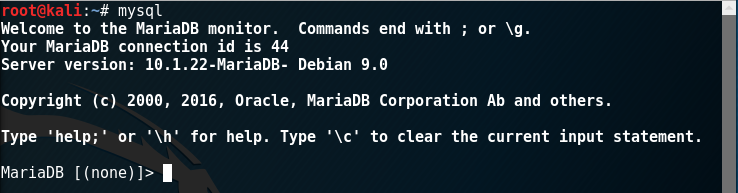
If the connection was correct, then we will be in the database management console. Essentially, MySQL is a DBMS (Database Management System), that is, you can use it to conveniently manage various databases. First, let's see what databases we currently have using the command: show databases;
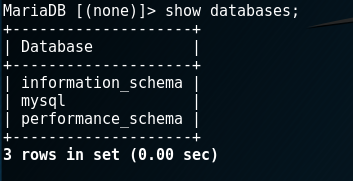
These are the standard 3 databases that are required for mysql to function correctly. We will not analyze them in detail now.
Let's create a new database and name it “shop” because we will store the credentials of the buyers of the fictitious store in it. Creation commands: create database shop;
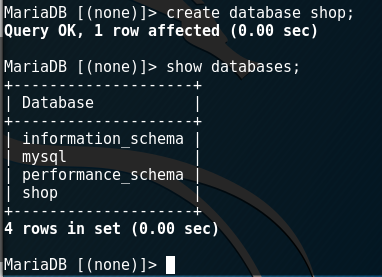
We have created a database, but so far it is empty. Now you need to "go" into this database and create tables in it. The used database can be changed using the command: use <databasename>

Now you need to create a table. Let's create a table named “user” in which we will store the login, hash-password, card number (invented from the head). To do this, when creating a table, we need to specify a data type for each field (the place where this or that value for one record will be located). Since all the data we store in the database can be represented in the form of text, then the type of cells will also be text.
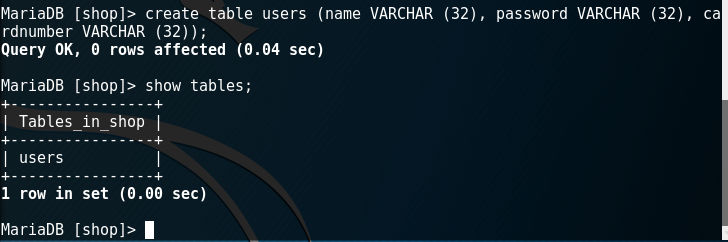
Command to create a table:
VARCHAER (32) means data type - character, 32 characters long.
We check the presence of tables in the database with the command:
Now our table is empty, it can be checked with the following command (query in SQL language).
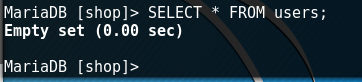
Command to get all contents of a table:
Let's add a new entry. For example, let's add a user - admin, who will be the administrator of this store.
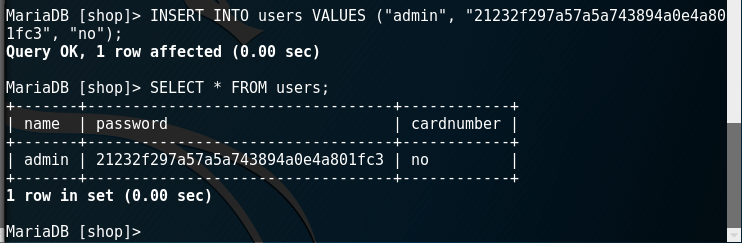
Command to add a new record:
The password is an md5 hash from the “admin” string and can be obtained with a simple command in the console:

Command:
Let's add one more entry, but now an ordinary user (do it yourself).
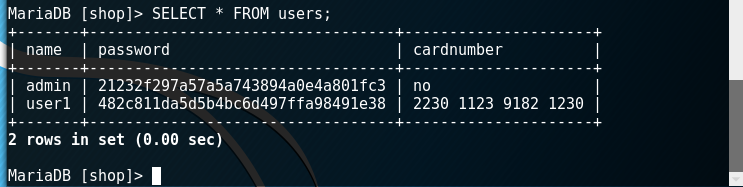
Excellent! We now have a test database.
We work with a web server and write a script!
Now you need to start the web server (in the case of Kali Linux, this is the apache2 web server).

You can check the correctness of its launch using a browser by going to localhost (ip 127.0.0.1).

Now we need to create a small script that accesses the database and works with the table we have created.
All files for the apache2 web server are stored in the folder: / var / www / html
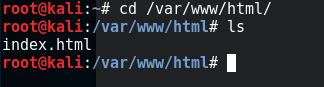
Now there is only one file, which we see in the browser.
Let's create a separate folder and put a plain text file there to check if everything is working correctly.
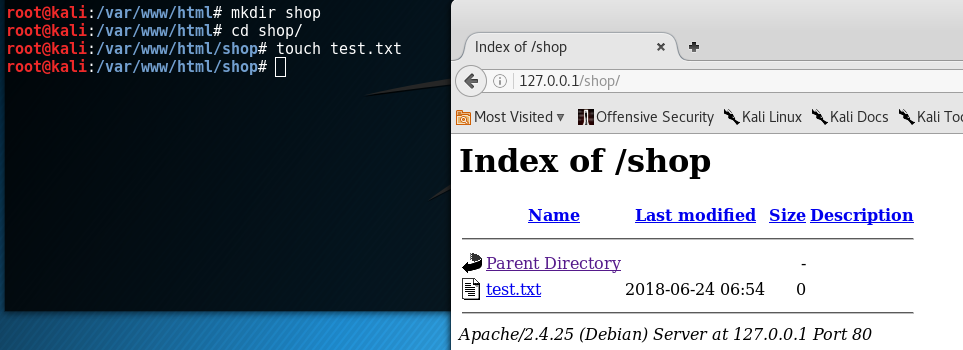
Now let's create a PHP script there (don't be afraid, we don't need any PHP programming skills yet).
Let's make a script that displays information about the PHP engine installed on a given machine.
In order to create a file and immediately start editing it, use the following command:

We type the following.
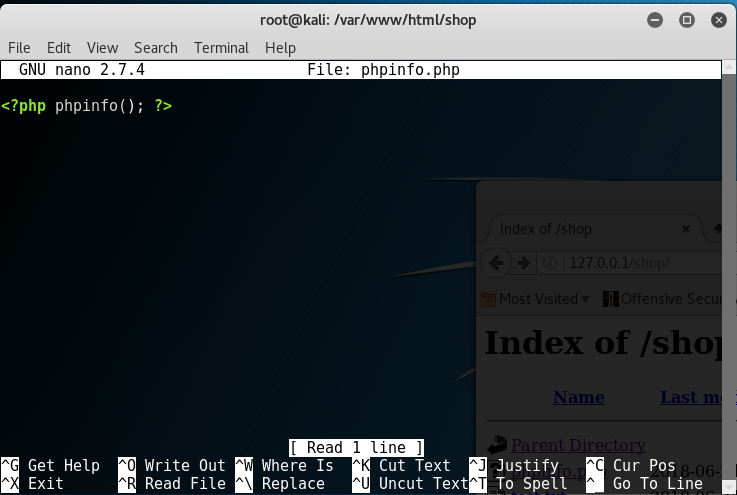
The essence of the script is that it simply calls the phpinfo () function.
Save the script (Ctrl + O) and exit the editor (Crtl + X).
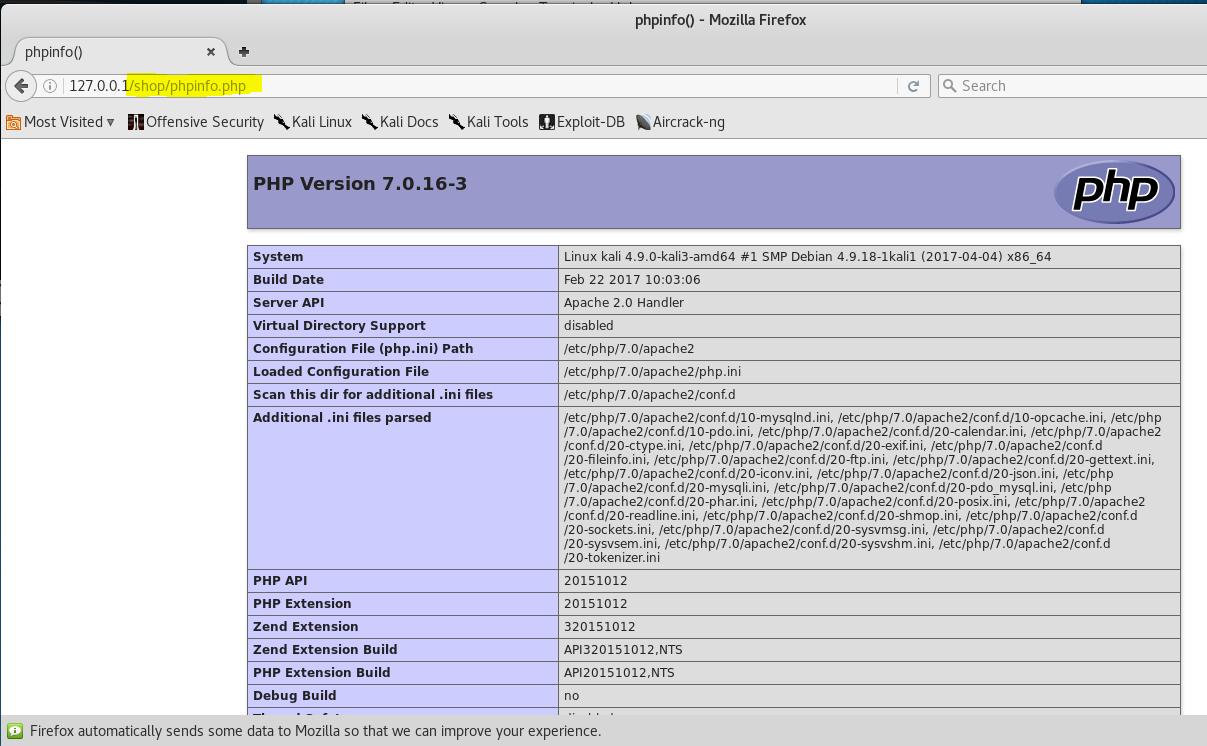
We check that the script is working:
Now we will write a script responsible for authorization in the store, and we will admit the possibility of SQL injection there.
Create a file “login.php” and put the following code (link) into it.
Please note that at the very beginning of the script, there is a parameter such as the user's password to connect to the database. You can see how to set a password for connecting to the database yourself on the Internet or repeat the steps from the following screenshots.
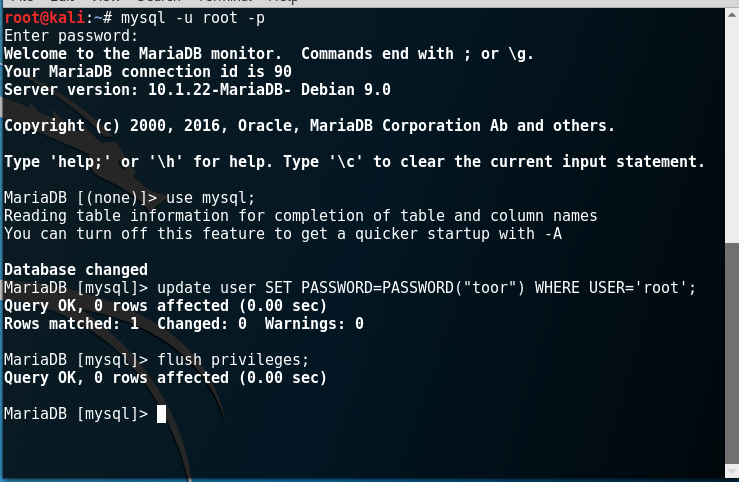
The image above shows the commands to update the password (if used for the first time, they will set the password).
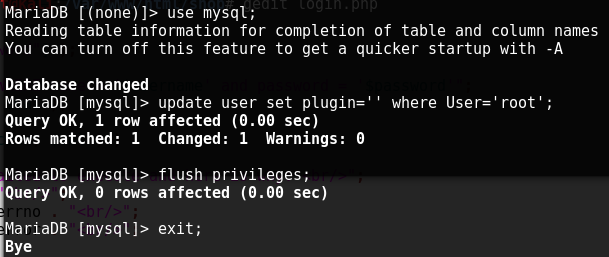
This image shows commands that configure the database in such a way that access to the database will be available to all users, provided that the correct password is entered.
We analyze the vulnerability!
Now for the most basic thing.
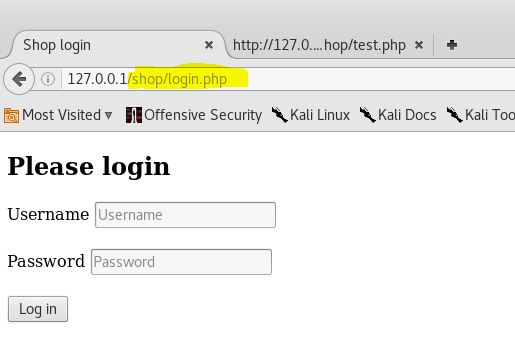
We see the authorization form. Let's imagine that we don't know what password the user "user1" has and in general we are just a visitor and saw the authorization form.
Let's try to enter the value “user1” in the username field, and “test123” in the password (we know this is not true).
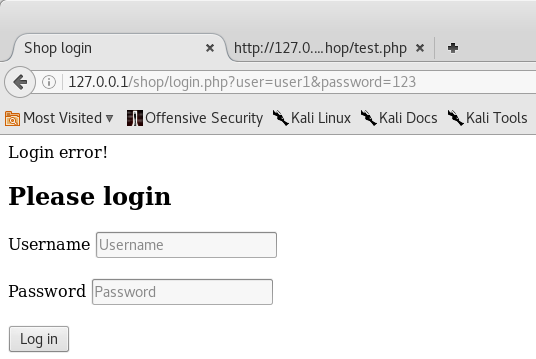
We see “Login error!”
Now, suppose that the database query is a little wrong, or rather, our input data is not quite correctly processed before being inserted into the query. Let's put a quotation mark in the username field (thus we break the syntax of the language, since quotation marks must be open and closed).
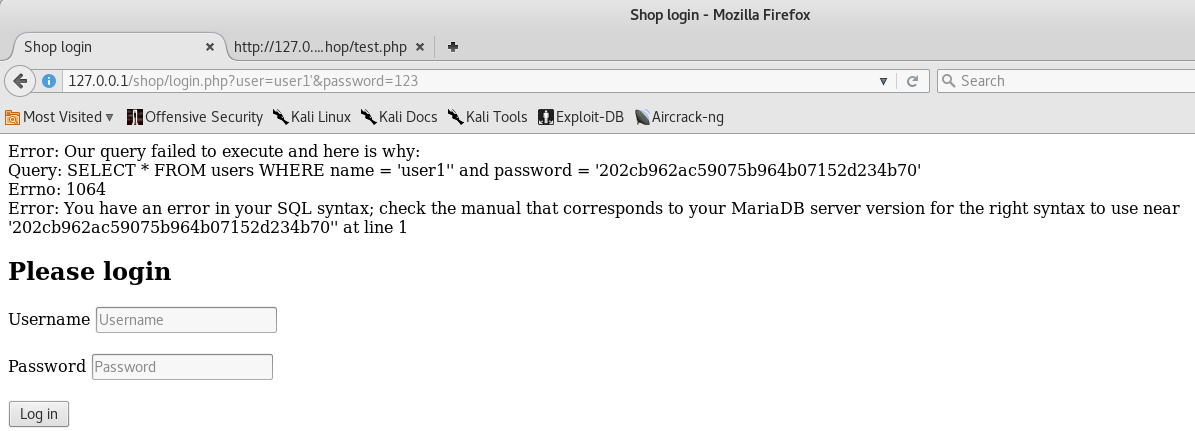
We are getting a syntax error and we can assume there is SQLi here.
Let's try to drop password verification. To do this, let's comment out everything that comes after the name.
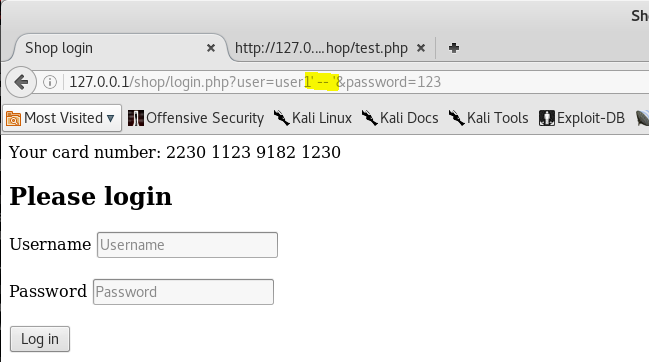
A comment is two dashes (minus) “-“, everything that comes after the comment is not processed (as in other languages).
The vulnerability arose due to the fact that the values entered by the user in the username field are not checked or filtered in any way, but are simply substituted into the request, this can be seen in the code snippet below.

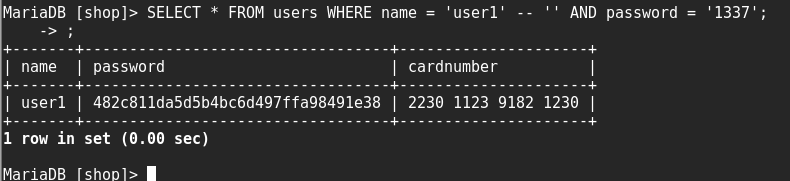
Thus, we can inject our SQL code and execute arbitrary queries to the database, extracting everything we need from it.
For a better understanding, try making such queries directly in the mysql DBMS, for example, like this.
Training Resources
This is a training site for a Russian CTF team. There are a number of tasks in SQLi, from simple to complex.
http://training.hackerdom.ru/board/
Category: Injections
If you do not want to register, then here is a link to the first task (the second will open after solving the first)
http://sql.training.hackerdom.ru/
Today we looked at the basics of attacking web applications. And even if you knew some of this, I'm sure it won't hurt to repeat it. And remember how the yogis say: the most important thing is practice. Who seeks will always find.
In this article, we'll go back to the basics and look at the basics of attacks against web applications. Let's go through such topics as:
- What does a typical web application consist of?
- What are the targets of the attack?
- How can they be achieved?
- What are the vulnerabilities?
- SQLi at a glance
- Standard attack plan
What a typical WEB application consists of
- First of all, these are static data, files, CSS ( Cascading Style Sheets) or stylesheet, JS (JavaScript), images, HTML files
- But we are not particularly interested in static data (except for important files stored on a web server), since there are usually no vulnerabilities associated with them. To begin with, we are interested in what language the web application is written in. The language in which the web application is written can be absolutely anything, from the default PHP, Ruby, Python and ending with ASM, but, of course, some kind of scripting language is most often used.
- In addition to the language, we need to understand which web server the application is running on. Most often it is Apache2 or nginx, but there are other options, for example, small, lightweight web servers written in C / C ++ are often used for embedded systems.
- Next come the databases. A database is almost always used by a more or less serious web application; the database stores user data, server settings, files, pictures and other information that is very interesting for an attacker. For large databases, you need convenient control systems or DBMS, often used options: MySQL, Oracle, SQLite.
- And the final element of the structure is the OS on which all this is located. It is clear that it can be anything, but most often some Linux distribution (server) is used.
Attacker's targets
Initially, the attacker wants to get a web-shell.
What is a web-shell?
Also, a hacker may be interested in the database (database) of a web application, for example, if it is an online store, then it can store bank card data. Also, the database may contain logins and passwords (sometimes in clear text) of users, including for the site administrator. Well, of course, the database can contain very important files containing any confidential information or secrets. Accordingly, the hacker's goal is to copy (drain, dump) the database to himself.The essence of a web shell is that a hacker somehow gets the opportunity to execute code in the language in which the application is written directly on the site using a browser. That is, it can call certain functions that are in this language and actually manage the site through the browser.
The next point a hacker strives for is getting a shell on the server. What does the shell give? Shell makes it possible to directly control the server itself where the web application is located, create directories, change any rules, leave your malicious programs, for example, for mining cryptocurrency, sniffing various data, adding a hacked machine to a botnet. Or he can use this machine to attack the internal network (if there is one).
The final goal is to gain root access to the machine. This means that the hacker has full control over the server and can do absolutely anything with it, up to the complete capture of the machine.
After we have learned what a web application consists of and have decided on the goals that we want to achieve, it is worth thinking about how we will implement them and what we will use in this.
Let's move on to vulnerabilities that will help us achieve our goals. With the help of competent exploitation of vulnerabilities, we will be able to implement everything that was previously conceived.
The main set of vulnerabilities and attacks is described in the annual report of the OWASP company, called OWASP TOP 10 . This top is a list of the most common vulnerabilities this year.
This top describes the most common vulnerabilities and attacks found or carried out in web applications this year. Almost always in the first place are - SQLi (SQL injection) - SQL injection.
What does SQL injection look like in practice?
Let's say we have a certain query to the database, in which one of the parameters is the data that was entered by the user on the website. If this data is involved in compiling a request to the database, then we can directly influence this request, for example, first we will request a product with identification number 1, then with number 2, if there are such numbers, then we will receive data on them, which any description, price and so on. This is how database queries work in a simplified way. What happens if we want to break the logic of the request and request not the item number, but pass any keywords of the request language in this data?
For example, we have a database and it has a table of products, which contains information on products and which receives requests from a web application. Let's say that the site has an option to search for a product by number, then for this option the following request can be made:
Code:
SELECT * FROM goods WHERE id = [I]userinput[/I],where userinput is what the user entered. Let's imagine that no processing takes place and what the user entered is not checked in any way and is inserted into the request as it is. What happens then? If an attacker or an expert in web application vulnerabilities is in the user's place, he will be able to use SQL keywords to manage the query and extract the necessary data from various tables, for example, the administrator's login and password hash, bank card numbers, user emails, etc. which is most often stored in the database. This is roughly how the SQL injection vulnerability works. Almost all vulnerabilities are related to incorrect processing of input received from the user.
Now let's look at the standard course of action when attacking a web application.
So, at the first stage of analyzing a web application, information about this web application (site) is collected.
It is of two types: passive and active. Their essence is that when the mode is active, you are actually interfering with the operation of the web application, and if you do not have permission to do so, then this is a violation of the law.
After collecting information, a search for vulnerabilities usually takes place. In fact, the most important part of the study, and one of the most difficult. There is no correct approach as such, each researcher has his own approach to finding vulnerabilities: someone uses scanners, fuzzers and other utilities, someone searches manually, using only basic tools like Burp Suite or just a browser, but this is very rare ... Searching for vulnerabilities, especially in BlackBox'e, most often involves creating a variety of assumptions and hypotheses and then testing them. There are also so-called “ famous“Vulnerabilities are vulnerabilities that are already known to the community and can be discovered if the web application did not update the part where this vulnerability is located, and scanners exist for just such vulnerabilities.Active collection of information is, for example, an active port scan that you conduct. Sometimes active ports can be viewed through various services like Shodan or online scanners.
Passive collection of information includes the collection of information about the web application, which does not affect its performance in any way and is associated only with general data that is obtained without the use of special programs and does not interact with the web application directly. For example, using a regular browsing of the site, you can download some documents and learn from them e-mails, which can then be used to carry out a brute-force attack on the authorization form, if it is present on the site. There are many options.
After the discovery of a vulnerability or a number of vulnerabilities, an attack vector for the application is developed. What does it mean?
This means that, based on the vulnerabilities found and their type, it is necessary to develop an attack plan for the application, which should take into account what and how it will be carried out and what final goals, usually this is described in great detail in the researchers' reports. For cybercriminals, the attack vector depends on the goals, while the researchers have to describe all possible options for the attacker's attack and the consequences that will follow after a successful or unsuccessful attack. There are also general descriptive vectors of vulnerabilities that contain the type of vulnerability, access required to exploit it, and criticality.
Next comes the exploitation, this is considered the most difficult part, since a properly exploited one small, non-critical vulnerability can lead to catastrophic consequences.
Post-exploitation means covering up your tracks and leaving yourself comfortable access to the machine, or to the functions obtained.
Understood?
Now let's pay a little more attention to SQL injection.
SQLi
SQL-code injection (SQL injection) - one of the most common ways to hack websites and programs, working with databases, based on the introduction of SQL-query arbitrary code.
How it works?
the explanation is made as simple as possible and some nuances are omitted
Roughly speaking, an ordinary, in our understanding, database consists of many tables. Each table naturally has columns and rows. Actually, this is the key point. Take, for example, a table of users of an online store. For each user, several parameters must be described (login, email address, registration date, saved card, etc.).To represent the mechanism of how SQLi works, you need to understand what a database is and scripts in which queries are made to the database, as well as know at least a primitive level of SQL and have the skill of writing basic queries.
As a result, each column defines some user parameter, and each row defines a specific user. And at the intersection of the column and row we need, there will be information about the parameter of the desired user.
Example
Imagine that you (the script) go to the store (database) and ask the store (create a SQL query and send it to the database) to the seller: “I need one bottle of water for 25 rubles”.Now let's convert this into a SQL database query, we get the following:
SELECT * FROM shop WHERE (type = 'water' AND price = 25) LIMIT 1
Actually, in response to your request (SQL query), you (script) receive a bottle (information), and the seller (Database) no longer cares what you will do with it, since he did his job. You can drink it, pour it out, donate it (process, withdraw, calculate) and so on.
What do you need to know?
To fully understand a database query, you need to know the SQL language at a basic level, however, even without special knowledge, you can see that the query looks understandable, since fairly well-known words are used and they are interpreted in this case unambiguously. Only the end of the query can cause questions: “LIMIT 1” - this construction declares that it is necessary to return only the first result found, if suddenly there are more than one of them (there can be a lot of bottles at this price, but we only need one).
All other query mnemonics (commands) are very clear:
SELECT - choose (take)
FROM - from (indicates where to take from, most often this command is followed by the name of one of the tables in the current database)
WHERE - where (indicates what values of various parameters should be in the row that we want to receive, in fact, indicates the criteria for the product that we want to receive)
To successfully implement an attack like SQLi, you must have a good knowledge of the SQL language.
Generally, a SQL injection attack occurs when an attacker can somehow modify a database query.
One more example
Let's consider the same example with a store.
Let's say you decide to go to the store for kefir, and specially wrote on a piece of paper a list of products that you want to buy, so as not to forget anything. Suppose that you have a friend at home who loves chocolate very much, but he cannot eat a lot of it, and to his request, you refused and did not write down his wish on a piece of paper. In total, you get a piece of paper, in which, on each new line, the products that you need in the store are written down. Let's say that each of the products will represent a query to the database (store) as in the previous example. You just give the seller your piece of paper (the script sends requests to the database) and he, reading the next line, puts this or that product in your package (saves the results that you managed to get from the database). Now let's imagine that in this piece of paper your friend still managed to enter chocolate (conducted a SQL injection attack) and the seller, reading the next line, may see the following: "Butter for 100 rubles or chocolate for 150 rubles." There may be no butter in the store, or the seller may take a long time to get it, and he will put chocolate in your bag. The seller in this case has no idea that your friend can't have chocolate and you don't really need it either, he just does his job, provides products according to the list passed to him (the database will work to return data on the basis of incoming requests, if they were drafted correctly). Translating this into a SQL query, we get the following: The store may not have butter, or the seller may take a long time to get it, and he will put chocolate in your bag. In this case, the seller has no idea that your friend can't have chocolate and you don't really need it either, he just does his job, provides products according to the list passed to him (the database will work to return data based on incoming requests if they were drafted correctly). Translating this into a SQL query, we get the following: There may be no butter in the store, or the seller may take a long time to get it, and he will put chocolate in your bag. In this case, the seller has no idea that your friend can't have chocolate and you don't really need it either, he just does his job, provides products according to the list passed to him (the database will work to return data based on incoming requests if they were drafted correctly). Translating this into a SQL query, we get the following: if they were drawn up correctly). Translating this into a SQL query, we get the following: if they were drawn up correctly). Translating this into a SQL query, we get the following:
SELECT * FROM shop WHERE (type = 'butter' AND price = '100') OR (type = 'chocolate' AND price = '150') LIMIT 1
The attack was successful because you did not check the leaflet before giving it to the seller (the script did not check the input data before generating the request and sending it to the database).
Where can i find SQLi?
SQLi can occur in places where parameters are entered, for example, product search forms in an online store or an authorization form, which are found in most of all web applications. Any non-filtered user input - almost always leads to disastrous consequences.
Features of the
In the case of SQLi, there are some peculiarities associated with the query, into which the data entered by the user is substituted. For example, the value type, which receives data from the user, can be an integer or string, or it can be in several parentheses, which makes it a little difficult to write a malicious query.
In the case of a request for authorization, you need to understand that as such, data cannot be obtained using such a request, since such requests are most often calculated to receive a hash from a user password and compare it with the calculated hash from the input password.
Most SQLi is discovered by violating the general opinion about what should be entered in a given field by the end user, most often the single quote character is triggered, since many of the parameters are strings. Substituting a quotation mark in any parameter and receiving an error containing the words “SQL syntax error” or something similar, you can immediately say that most likely there is SQLi here.
SQLi. Practice
Before starting to analyze the mechanism of the SQLi vulnerability, it is necessary to make a reservation about some points related to databases. Below is a list of theses of the relational databases that are most commonly used in web applications.
- A relational database is a database built on the basis of a relational model.
- In a relational database, each object is defined by a record (row) in a table. A relational database is created and then managed using a relational database management system.
- In fact, a relational database is the body of related information stored in two-dimensional tables.
- The relationship between tables can be reflected in the data structure, or it can only be implied, that is, be present at an informal level.
- Each database table is represented as a set of rows and columns, where the rows correspond to an object instance, a specific event or phenomenon, and the columns correspond to the attributes (features, characteristics, parameters) of an object, event, or phenomenon.
Working with the database.
For a start, it would be nice to just work with the database. Try to create a new database, add one table to it, add a couple of records to this table. We will do all this and prepare a dedicated training database. This database will be the store's customer database (to get as close to reality as possible).
We open the console on Kali Linux (you can use another Linux distribution, but then you yourself have to install a set called LAMP - Linux / Apache / MySQL / PHP, which is a web server, database, and scripting language.
We write the following command to the console: mysql
We see an error. This error means that it is impossible to connect to the server (since mysql is a network service). You need to start it with the following command: service mysql start (this is the standard template for starting a service in Linux).
Next, we connect with the command we are already familiar with:
If the connection was correct, then we will be in the database management console. Essentially, MySQL is a DBMS (Database Management System), that is, you can use it to conveniently manage various databases. First, let's see what databases we currently have using the command: show databases;
These are the standard 3 databases that are required for mysql to function correctly. We will not analyze them in detail now.
Let's create a new database and name it “shop” because we will store the credentials of the buyers of the fictitious store in it. Creation commands: create database shop;
We have created a database, but so far it is empty. Now you need to "go" into this database and create tables in it. The used database can be changed using the command: use <databasename>
Now you need to create a table. Let's create a table named “user” in which we will store the login, hash-password, card number (invented from the head). To do this, when creating a table, we need to specify a data type for each field (the place where this or that value for one record will be located). Since all the data we store in the database can be represented in the form of text, then the type of cells will also be text.
Command to create a table:
Code:
create table users (name VARCHAR (32), password VARCHAR (32), cardnumber VARCHAR (32));VARCHAER (32) means data type - character, 32 characters long.
We check the presence of tables in the database with the command:
Code:
show tables;Now our table is empty, it can be checked with the following command (query in SQL language).
Command to get all contents of a table:
Code:
SELECT * FROM users;Let's add a new entry. For example, let's add a user - admin, who will be the administrator of this store.
Command to add a new record:
Code:
REPLACE INTO users VALUES (“admin”, “21232f297a57a5a743894a0e4a801fc3”, “no”);The password is an md5 hash from the “admin” string and can be obtained with a simple command in the console:
Command:
Python:
python -c ‘import hashlib;print hashlib.md5(“admin”).hexdigest()’Let's add one more entry, but now an ordinary user (do it yourself).
- login - "user1"
- password - md5-hash from the string “password123”
- card number - any.
Excellent! We now have a test database.
We work with a web server and write a script!
Now you need to start the web server (in the case of Kali Linux, this is the apache2 web server).
You can check the correctness of its launch using a browser by going to localhost (ip 127.0.0.1).
Now we need to create a small script that accesses the database and works with the table we have created.
All files for the apache2 web server are stored in the folder: / var / www / html
Now there is only one file, which we see in the browser.
Let's create a separate folder and put a plain text file there to check if everything is working correctly.
Now let's create a PHP script there (don't be afraid, we don't need any PHP programming skills yet).
Let's make a script that displays information about the PHP engine installed on a given machine.
In order to create a file and immediately start editing it, use the following command:
Code:
nano phpinfo.phpWe type the following.
Code:
<?php phpinfo(); ?>The essence of the script is that it simply calls the phpinfo () function.
Save the script (Ctrl + O) and exit the editor (Crtl + X).
We check that the script is working:
Now we will write a script responsible for authorization in the store, and we will admit the possibility of SQL injection there.
Create a file “login.php” and put the following code (link) into it.
Please note that at the very beginning of the script, there is a parameter such as the user's password to connect to the database. You can see how to set a password for connecting to the database yourself on the Internet or repeat the steps from the following screenshots.
The image above shows the commands to update the password (if used for the first time, they will set the password).
This image shows commands that configure the database in such a way that access to the database will be available to all users, provided that the correct password is entered.
We analyze the vulnerability!
Now for the most basic thing.
We see the authorization form. Let's imagine that we don't know what password the user "user1" has and in general we are just a visitor and saw the authorization form.
Let's try to enter the value “user1” in the username field, and “test123” in the password (we know this is not true).
We see “Login error!”
Now, suppose that the database query is a little wrong, or rather, our input data is not quite correctly processed before being inserted into the query. Let's put a quotation mark in the username field (thus we break the syntax of the language, since quotation marks must be open and closed).
We are getting a syntax error and we can assume there is SQLi here.
Let's try to drop password verification. To do this, let's comment out everything that comes after the name.
A comment is two dashes (minus) “-“, everything that comes after the comment is not processed (as in other languages).
The vulnerability arose due to the fact that the values entered by the user in the username field are not checked or filtered in any way, but are simply substituted into the request, this can be seen in the code snippet below.
Thus, we can inject our SQL code and execute arbitrary queries to the database, extracting everything we need from it.
For a better understanding, try making such queries directly in the mysql DBMS, for example, like this.
Training Resources
This is a training site for a Russian CTF team. There are a number of tasks in SQLi, from simple to complex.
http://training.hackerdom.ru/board/
Category: Injections
If you do not want to register, then here is a link to the first task (the second will open after solving the first)
http://sql.training.hackerdom.ru/
Today we looked at the basics of attacking web applications. And even if you knew some of this, I'm sure it won't hurt to repeat it. And remember how the yogis say: the most important thing is practice. Who seeks will always find.


