

Linux servers are often attacked by hackers. Of course, optimal firewall configuration and timely security updates help to ward off such attacks. But you still need to be on the lookout and check if any virus has made its way through the server's protection.
Let's talk about tools for Linux, whose task is to scan servers and detect virus activity, hacks and other forms of interference with their work.
Lynis
Lynis is a popular free tool that is better than most at checking servers on UNIX-like operating systems. It is able to detect not only malware, but also file corruption and configuration errors. Lynis also checks the quality of antivirus software, examines installed software and checks permissions to access certain files and directories.
It is worth noting that this tool does not automatically harden the system, but only gives recommendations on how to protect it. You can install the latest version of Lynus (2.6.6) using the following commands:
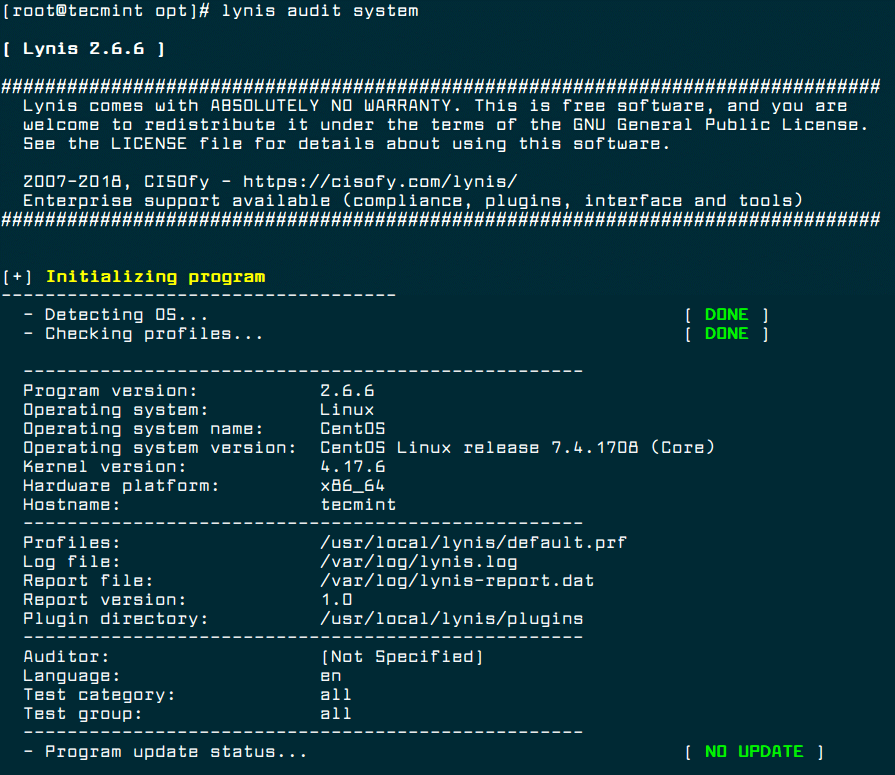
After that, you can start checking the server in this way:
To set up automatic scanning, use cron:
Chkrootkit
Another free tool for UNIX-like systems that is capable of detecting rootkits, that is, programs for masking malicious activity. Chkrootkit identifies rootkits and security holes using a shell script and a set of special programs.
On Debian servers, this tool can be installed using this command:
And for CentOS, the installation algorithm will be as follows:
Use this command to run the check:
As a result of the check, you will see a report. Chkrootkit can also be started automatically using cron:
Rootkit Hunter
This tool is easy to use and is known for its effectiveness in detecting backdoors as well as rootkits and other malware. It is able to scan the system very thoroughly in order to find even minor and non-obvious flaws in server protection.
Use this command to install Rootkit Hunter on Ubuntu and CentOS:
Checking the server with this tool is launched in this way:
Setting it up using cron is also possible:
ClamAV
ClamAV is a popular cross-platform antivirus that can detect all kinds of malware. It is most suitable for working with e-mail servers, but in all other cases it will be useful for Linux users. Its advantage is the ability to scan archives and compressed files (.zip, .rar, .7z).
Command to install ClamAV on Debian:
Command to install ClamAV on CentOS:
The check is started as follows:
Here, instead of "DIRECTORY", you must specify the folder for scanning. The "-r" option means "recursive scan", and "-i" means "show only infected files".
Linux Malware Detect
This tool was originally intended for shared hosting servers, but it works well for Linux-based systems as well. For the highest quality verification, it can be integrated with the ClamAV service.
LMD offers detailed reporting on current and past audits, it also allows you to enable email alerts about detected threats and has a number of other benefits.
Let's talk about tools for Linux, whose task is to scan servers and detect virus activity, hacks and other forms of interference with their work.
Lynis
Lynis is a popular free tool that is better than most at checking servers on UNIX-like operating systems. It is able to detect not only malware, but also file corruption and configuration errors. Lynis also checks the quality of antivirus software, examines installed software and checks permissions to access certain files and directories.
It is worth noting that this tool does not automatically harden the system, but only gives recommendations on how to protect it. You can install the latest version of Lynus (2.6.6) using the following commands:
Code:
# cd /opt/
# wget https://downloads.cisofy.com/lynis/lynis-2.6.6.tar.gz
# tar xvzf lynis-2.6.6.tar.gz
# mv lynis /usr/local/
# ln -s /usr/local/lynis/lynis /usr/local/bin/lynis
After that, you can start checking the server in this way:
Code:
# lynis audit systemTo set up automatic scanning, use cron:
Code:
0 3 * * * /usr/local/bin/lynis --quick 2>&1 | mail -s "Lynis Reports of My Server" you@yourdomain.comChkrootkit
Another free tool for UNIX-like systems that is capable of detecting rootkits, that is, programs for masking malicious activity. Chkrootkit identifies rootkits and security holes using a shell script and a set of special programs.
On Debian servers, this tool can be installed using this command:
Code:
$ sudo apt install chkrootkitAnd for CentOS, the installation algorithm will be as follows:
Code:
# yum update # yum install wget gcc-c++ glibc-static # wget -c ftp://ftp.pangeia.com.br/pub/seg/pac/chkrootkit.tar.gz # tar –xzf chkrootkit.tar.gz # mkdir /usr/local/chkrootkit # mv chkrootkit-0.52/* /usr/local/chkrootkit # cd /usr/local/chkrootkit # make senseUse this command to run the check:
Code:
$ sudo chkrootkit OR # /usr/local/chkrootkit/chkrootkitAs a result of the check, you will see a report. Chkrootkit can also be started automatically using cron:
Code:
0 3 * * * /usr/sbin/chkrootkit 2>&1 | mail -s "chkrootkit Reports of My Server" you@yourdomain.comRootkit Hunter
This tool is easy to use and is known for its effectiveness in detecting backdoors as well as rootkits and other malware. It is able to scan the system very thoroughly in order to find even minor and non-obvious flaws in server protection.
Use this command to install Rootkit Hunter on Ubuntu and CentOS:
Code:
$ sudo apt install rkhunter # yum install epel-release # yum install rkhunterChecking the server with this tool is launched in this way:
Code:
# rkhunter -cSetting it up using cron is also possible:
Code:
0 3 * * * /usr/sbin/rkhunter -c 2>&1 | mail -s "rkhunter Reports of My Server" you@yourdomain.comClamAV
ClamAV is a popular cross-platform antivirus that can detect all kinds of malware. It is most suitable for working with e-mail servers, but in all other cases it will be useful for Linux users. Its advantage is the ability to scan archives and compressed files (.zip, .rar, .7z).
Command to install ClamAV on Debian:
Code:
$ sudo apt-get install clamavCommand to install ClamAV on CentOS:
Code:
# yum -y update # yum -y install clamavThe check is started as follows:
Code:
# freshclam # clamscan -r -i DIRECTORYHere, instead of "DIRECTORY", you must specify the folder for scanning. The "-r" option means "recursive scan", and "-i" means "show only infected files".
Linux Malware Detect
This tool was originally intended for shared hosting servers, but it works well for Linux-based systems as well. For the highest quality verification, it can be integrated with the ClamAV service.
LMD offers detailed reporting on current and past audits, it also allows you to enable email alerts about detected threats and has a number of other benefits.
