
Papa Carder
Professional
- Messages
- 356
- Reaction score
- 277
- Points
- 63
Overview of Mobile Wallet Offline Payments
Mobile wallets, such as Apple Pay, Google Pay, and Samsung Pay, enable users to make payments without an active internet connection in many scenarios, particularly for contactless (NFC-based) transactions at point-of-sale terminals. This is achieved through secure hardware like embedded Secure Elements (SE) or Host Card Emulation (HCE), which store tokenized card details and generate dynamic cryptograms locally for authentication. Offline payments are ideal for areas with poor connectivity, such as remote locations, subways, or during network outages, and often involve preloaded balances, queued transactions, or token-based systems. However, initial setup, token provisioning, or syncing balances typically requires an internet connection, and offline capabilities may be limited by transaction amounts, frequency, or app-specific rules to mitigate fraud risks.How Offline Payments Work in Mobile Wallets
The process generally involves NFC for contactless communication with the payment terminal, without needing real-time issuer authorization:- Preloading or Tokenization: Users preload funds or tokens into the wallet when online. These are stored securely and used for offline transactions via cryptographic signatures or QR codes.
- Queued Transactions: Some systems (e.g., Stripe Terminal) queue payments offline and process them automatically upon reconnecting.
- Secure Offline Protocols: Advanced solutions like blockchain-based wallets or G+D Filia Unplugged use offline tokens and mutual authentication for resilience, even integrating with wearables or feature phones.
- No Internet for NFC Taps: The tap itself uses local NFC hardware; no data/Wi-Fi is needed at the moment of payment, as the wallet emulates a card.
Here's a simplified diagram illustrating the offline payment process:
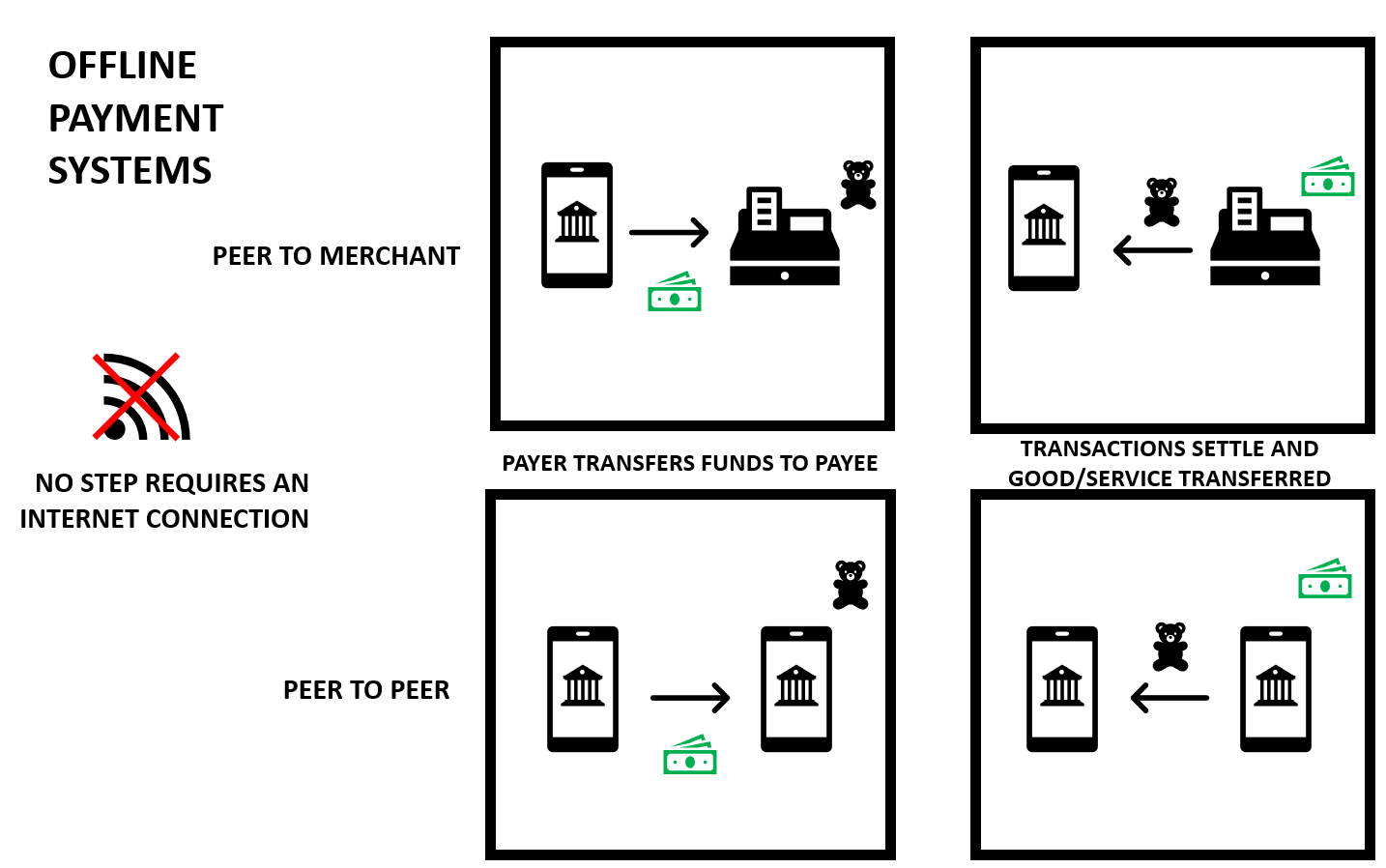
The Fed - Offline Payments: Implications for Reliability and Resiliency in Digital Payment Systems
Wallet-Specific Details
| Wallet | Offline Support Details | Limitations/Notes |
|---|---|---|
| Apple Pay | Works fully offline for in-store NFC payments using the device's Secure Element; no internet needed for taps. | Limited to a few transactions if device is low on battery; initial card addition requires online. |
| Google Pay | Supports offline NFC payments and UPI in low-connectivity modes; can queue or use pre-cached tokens. | Some features (e.g., P2P transfers) may require eventual sync; token refresh needs internet. |
| Samsung Pay/Wallet | Offline NFC payments work without internet; supports MST (Magnetic Secure Transmission) for broader compatibility. | Notifications sync later; limited for certain cards or high-value transactions. |
Security and Best Practices
Offline payments use encryption and limits (e.g., transaction caps) to prevent abuse, but risks like relay attacks exist. Enable biometrics (e.g., fingerprint) for added protection, and monitor app notifications for unauthorized activity. For emerging solutions, blockchain or dedicated offline e-wallets enhance security in low-connectivity areas. If traveling or in remote areas, preload funds and test offline mode in advance.Comparison: Mobile Wallet Offline Payments (Fiat) vs. Offline Crypto Wallets
Mobile wallet offline payments typically refer to fiat-based systems like Apple Pay or Google Pay, which allow contactless transactions (e.g., via NFC) without real-time internet connectivity, using pre-tokenized card data stored on the device. In contrast, offline crypto wallets (often called "cold wallets") are hardware or paper-based solutions for storing cryptocurrencies securely disconnected from the internet, emphasizing long-term asset protection rather than frequent transactions. Both leverage offline capabilities to enhance security and usability, but they differ in purpose, technology, and risks. Below is a detailed comparison based on key aspects.Key Differences Table
| Aspect | Mobile Wallet Offline Payments (Fiat) | Offline Crypto Wallets (Cold Storage) |
|---|---|---|
| Definition | Digital apps (e.g., Apple Pay, Google Pay) that emulate payment cards offline using secure elements or HCE for NFC taps at POS terminals. | Hardware devices (e.g., Ledger, Trezor) or paper wallets that store crypto private keys completely offline to prevent online hacks. |
| Primary Purpose | Facilitate quick, everyday fiat transactions (e.g., buying coffee) without internet, often for low-value amounts. | Long-term secure storage of cryptocurrencies; used for signing transactions offline before broadcasting online. |
| Offline Functionality | Transactions occur offline via local tokenization and cryptograms; queued for later syncing when online. No internet needed at the point of payment. | Entirely disconnected; keys never exposed online. Transactions are signed offline and transferred via USB/QR for broadcasting. |
| Technology/Standards | Relies on EMV, NFC (ISO/IEC 14443), and tokenization from banks/issuers; integrated with mobile OS secure elements. | Uses blockchain protocols; hardware with secure chips for key generation/storage. No NFC typically; focuses on air-gapped security. |
| Security Features | Biometrics (e.g., Face ID), device encryption, and limited offline counters to prevent abuse; vulnerable to relay attacks if not mitigated. Centralized (custodial elements via banks). | Air-gapped from internet; protects against remote hacks. Non-custodial (user controls keys); risks include physical theft or seed phrase loss. |
| Transaction Speed/Cost | Near-instant at POS; low or no fees for users, but network-dependent for settlement. | Slower for transfers (requires online broadcast); crypto network fees apply, varying by blockchain (e.g., low on Ethereum Layer 2). |
| Limitations/Risks | Transaction limits (e.g., $50-100 offline); requires initial online setup; potential for device loss exposing tokens. | Not ideal for frequent use; recovery phrases must be secured; no fiat integration without exchanges. |
| Use Cases | Everyday retail, transit, or vending in low-connectivity areas. | HODLing large crypto amounts; secure signing for DeFi or NFTs without online exposure. |
| Cost to User | Free apps; hardware is the phone itself. | Upfront cost ($50-200 for hardware); no ongoing fees. |
Summary of Pros and Cons
- Mobile Wallet Offline Payments (Fiat): Pros include convenience for daily use, seamless integration with banking, and no need for specialized hardware. Cons: More custodial (less user control), limited to fiat, and potential vulnerabilities in mobile ecosystems.
- Offline Crypto Wallets: Pros emphasize superior security for high-value assets and decentralization. Cons: Less convenient for transactions, requires manual steps for use, and no direct fiat support.
Hybrid solutions exist, like blockchain-based mobile wallets that support offline crypto transactions with fiat gateways, bridging the gap for users in low-connectivity regions. If you're choosing between them, consider your needs: fiat mobile wallets for everyday spending, offline crypto for secure storage.
