

Carding 4 Carders
Professional
- Messages
- 2,728
- Reaction score
- 1,574
- Points
- 113
Hello everybody! Straight to the point. First, we need to learn how AirDrop works:

The first stage of airdrop transmission is sending out a BLE package
To initiate data transfer via AirDrop, the initiator's phone sends a broadcast BLE packet containing hashed information about the iCloud account and phone number of the initiator's device owner, with a suggestion to establish a connection via the AWDL Protocol (Apple Wireless Direct Link), something like Wi-Fi Direct from the Android world. The structure of this BLE package is very interesting, and we will analyze it further.
On the recipient's side, AirDrop can be in three States::
* Disabled - will not be detected at all
* Contacts only - accept files only from contacts in your notebook. In this case, the contact is considered to be the phone number or email address that the iCloud account is linked to. The same account binding logic works here as with the iMessages messenger.
* For everyone-the phone will be detected for everyone
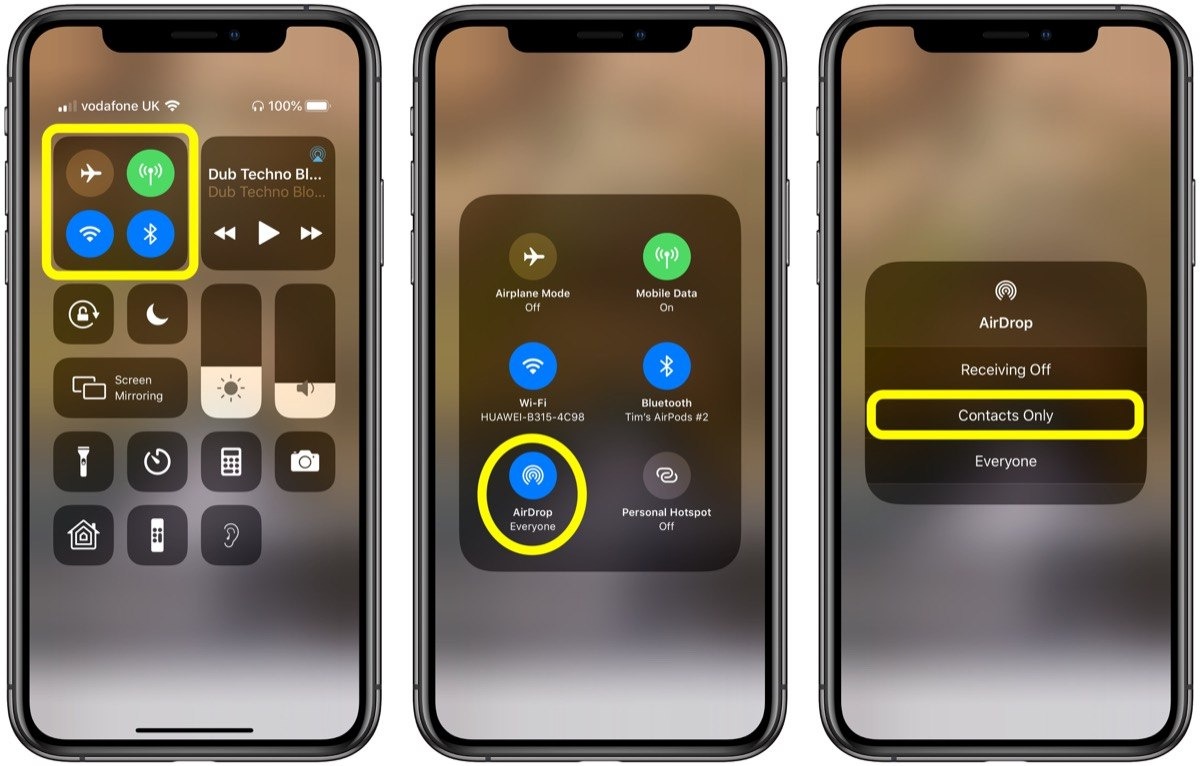
AirDrop privacy settings. The default state is set to "for contacts".
Depending on the privacy settings, the phone will either continue to establish a connection via AWDL, or simply ignore the BLE packet. If the "for all" setting is set for AirDrop, then in the next step, the devices will connect to each other via AWDL, raise an IPv6 network between them, inside which AirDrop will work as a regular application Protocol using mDNS via the standard IP Protocol.

At this stage, we know three entities:
Bluetooth LowEnergy (BLE) packet — this packet contains data from which the phone decides whether the initiator is in its contact list or not.
Apple Wireless Direct Link (AWDL), a proprietary replacement for Apple's Wi-Fi Direct, is enabled if ble communication is successful.
AirDrop is an application Protocol that works inside a regular IP network using mDNS, HTTP, etc. It can work inside any Ethernet network.
How to sniff traffic:
First, let's remember:
* AirDrop will only work if the phone is unlocked - best of all, if the target is continuously looking at the phone. Most often, this happens in places where it is boring, for example, in the subway
Classic method - phone only:
Suitable for anyone who has an iPhone, does not require special skills except social. Switch AirDrop to Everyone mode and go down to the subway. On a typical day (before self-isolation) in a Moscow metro car, I observed something like this::

List of targets.
As you can see, almost all phones broadcast the owner's name, which we can easily use to determine their gender and prepare the appropriate page load.
Pageload (we send any images)
If you have an iPhone, then we send an image to the victim's device via AirDrop. you can send either a trap image that blocks the system, or various other images.
Further description of actions is beyond the scope of a technical article and depends only on your imagination, improvisation and humor. I can only say that some of the victims join this game and start replying to you with pictures or sending you notes.
Automatic dikpik machine
If you are too lazy to generate and send payloads manually, and you want to automate the process, you can make an automatic dikpik machine that will send images in the background via AirDrop to everyone who is in range. As a hardware platform, we will use raspberry pi zero, but any computer with Linux will do, as long as the Wi-Fi card supports monitor mode and packet injection.

Airdrop dikpiker based on raspberry pi zero w + UPS Lite battery shield.
Configuring OWL on the raspberry pi is described in detail on the project's website, but I prefer to use the Kali Linux build for Raspberry Pi Zero, because it already has nexmon patches installed to activate Wi-Fi monitor mode on rpi0.
It is important to remember that airdrop (or rather AWDL) is activated in patients only after receiving the BLE package. Therefore, we must send it at intervals of several seconds. You can do this using py-bluetooth-utils. Using the start_le_advertising () function, I send a string of data from the apple bleee examples: 000000000000000001123412341234123400.
Once you have a working OWL daemon, you can then run the opendrop fork. The repository contains a script flooder.py, which sends an image to everyone kak_dela.jpeg.
Ble package structure
It may seem that this BLE packet passes only once from the initiator to the recipient, and then the exchange occurs only via AWDL. In reality, the AWDL connection lives very little, just a few minutes or less. So if the recipient of the file wants to respond to you, it will also act as an initiator and send a BLE packet.
How does the phone on the receiving end understand whether the initiator's number/email is in its contact list or not? I was very surprised when I found out the answer: the initiator sends his number and email in the form of a sha256 hash, but not in its entirety, but only the first 3 bytes.

Structure of THE ble packet from the AirDrop initiator. Using the hashes from the phone number and email, the Respondent understands whether the initiator is in its contact list.
For example, if your Apple account (also known as iCloud, also known as iMessages) is linked to the number +79251234567, the hash from it will be considered as follows::
And as a result, the value 07de58 for the phone number will fly out in the BLE packet. It doesn't seem like much, but often these three bytes are enough to find out the real phone number.
It is also important to remember that the AirDrop privacy setting does not affect the data in the BLE package. The hash from the phone number will be contained in it, even if the "For all" setting is set. Also, a BLE packet with the hash of the phone number is sent when the Share window is opened and the password for the Wi-Fi network is entered.
AWDL (Apple Wireless Direct Link)
AWDL is such a proprietary Apple add-on over regular Wi-Fi, implementing something like Wi-Fi Direct. I don't fully know how it works, there's a special way to announce and coordinate channels, and it only works on proprietary Apple drivers. That is, only MacBooks/iPhones can connect via AWDL.
Sad owners of Android phones still only dream of a normally working Wi-Fi Direct function.
But not so long ago, the guys from seemoo-lab wrote a completely open implementation of AWDL and called it Open Wireless Link (OWL). To run OWL, the Wi-Fi adapter must support monitor mode and packet injection, so it doesn't run on every hardware. The site has examples of configuration on the raspberry pi. This works significantly worse than the original AWDL, for example, the connection setup time stretches by ~10 seconds instead of a couple of seconds for the original, but it works.

Also, these guys wrote from scratch an implementation of the AirDrop Protocol in Python, called OpenDrop. It can be used both in conjunction with OWL, to run AirDrop on Linux, and with the original AWDL on macOS.
Maniacally mode - I know your number
If you want to show yourself an inadequate maniac and permanently discourage the desire to continue communicating with you, you can try to find out the phone number of the person who is nearby.
As we learned earlier, the ble packets sent by the initiator contain the first three bytes from the sha256 phone number. This hash can be caught at the moment when the victim clicks the "share" button and starts scanning airdrop devices or taps in the Wi-Fi password field for a new network (this is how apple searches for friends within range from whom you can request a network password).
You will need to somehow pull the hash message from the victim and catch it. I use utilities from Apple Bleee. Since the Bluetooth MAC addresses of devices are random and constantly changing, you will have to find another way to identify the desired device in this list. The task is simplified by the fact that iOS broadcasts the current state of the phone like: screen off, screen on, lock screen, unlocked, etc. Therefore, just by observing the actions of the victim, you can compare the current state of the device with the device in the table. The easiest way to catch the moment when the user took the phone out of his pocket, turned on the screen and unlocked the phone with his finger or face.

The X icon indicates that a packet with phone hashes has been caught.
Their parser sometimes breaks, but most often it works. I will not fully retell the essence of the vulnerability, as it is discussed in detail by the authors of Apple Blee, I will describe only my experience. I will only say that I use a USB Bluetooth adapter on a CSR 8510 chip, since it works much more stable for me than the Bluetooth adapter built into the MacBook, which is forwarded to the virtual machine.
So we caught the hash from the victim's phone and got the cherished three bytes from the hash of the phone number.

Intercepted BLE packet with a hash of the phone number, using the utility read_ble_state.py
We know that in Russia all mobile numbers start with the code +79 and, most likely, our victim's phone has the same code. It turns out that we have a range of numbers from +79000000000 to +79999999999, about a billion numbers.
To narrow down the range, we take only the codes that are actually registered for any operator and throw out the rest. As a result, the range becomes two times smaller, about half a billion numbers.
Next, we generate sha256 from all numbers and save only the first 3 bytes from each hash. We enter this list in the Sqlite database, and build an index to speed up the search.
This is what the data in the database looks like:

All Russian phone numbers and the first three bytes of the hash.
Then, having the victim's hash, we can search for all matches in the database. Usually, there are 15-30 matches per hash.

All numbers that match the victim's hash
Obviously, not all of these numbers are actually used. We can cut off the extra ones using an HLR request or an invisible SMS. Out of 30 numbers in the network, there were 5.
Result of executing the HLR request. Network numbers are highlighted in green.
I could continue to sift through the numbers, for example, add them all to Telegram/Whatsapp and view avatars, check through databases like Getcontact, and so on. But it was easier to just call all five numbers in turn and watch when the victim's phone rings.
AirDrop is a Protocol for transferring files within a peer-to-peer network. It can work either over a regular LAN or over the air between any Apple devices. We will analyze the last case, when two devices are not connected to a common network, but are simply located nearby, for example, two people with phones are traveling in a subway car and are not connected to a common Wi-Fi.
The first stage of airdrop transmission is sending out a BLE package
To initiate data transfer via AirDrop, the initiator's phone sends a broadcast BLE packet containing hashed information about the iCloud account and phone number of the initiator's device owner, with a suggestion to establish a connection via the AWDL Protocol (Apple Wireless Direct Link), something like Wi-Fi Direct from the Android world. The structure of this BLE package is very interesting, and we will analyze it further.
On the recipient's side, AirDrop can be in three States::
* Disabled - will not be detected at all
* Contacts only - accept files only from contacts in your notebook. In this case, the contact is considered to be the phone number or email address that the iCloud account is linked to. The same account binding logic works here as with the iMessages messenger.
* For everyone-the phone will be detected for everyone
AirDrop privacy settings. The default state is set to "for contacts".
Depending on the privacy settings, the phone will either continue to establish a connection via AWDL, or simply ignore the BLE packet. If the "for all" setting is set for AirDrop, then in the next step, the devices will connect to each other via AWDL, raise an IPv6 network between them, inside which AirDrop will work as a regular application Protocol using mDNS via the standard IP Protocol.
At this stage, we know three entities:
Bluetooth LowEnergy (BLE) packet — this packet contains data from which the phone decides whether the initiator is in its contact list or not.
Apple Wireless Direct Link (AWDL), a proprietary replacement for Apple's Wi-Fi Direct, is enabled if ble communication is successful.
AirDrop is an application Protocol that works inside a regular IP network using mDNS, HTTP, etc. It can work inside any Ethernet network.
How to sniff traffic:
First, let's remember:
* AirDrop will only work if the phone is unlocked - best of all, if the target is continuously looking at the phone. Most often, this happens in places where it is boring, for example, in the subway
Classic method - phone only:
Suitable for anyone who has an iPhone, does not require special skills except social. Switch AirDrop to Everyone mode and go down to the subway. On a typical day (before self-isolation) in a Moscow metro car, I observed something like this::
List of targets.
As you can see, almost all phones broadcast the owner's name, which we can easily use to determine their gender and prepare the appropriate page load.
Pageload (we send any images)
If you have an iPhone, then we send an image to the victim's device via AirDrop. you can send either a trap image that blocks the system, or various other images.
Further description of actions is beyond the scope of a technical article and depends only on your imagination, improvisation and humor. I can only say that some of the victims join this game and start replying to you with pictures or sending you notes.
Automatic dikpik machine
If you are too lazy to generate and send payloads manually, and you want to automate the process, you can make an automatic dikpik machine that will send images in the background via AirDrop to everyone who is in range. As a hardware platform, we will use raspberry pi zero, but any computer with Linux will do, as long as the Wi-Fi card supports monitor mode and packet injection.
Airdrop dikpiker based on raspberry pi zero w + UPS Lite battery shield.
Configuring OWL on the raspberry pi is described in detail on the project's website, but I prefer to use the Kali Linux build for Raspberry Pi Zero, because it already has nexmon patches installed to activate Wi-Fi monitor mode on rpi0.
It is important to remember that airdrop (or rather AWDL) is activated in patients only after receiving the BLE package. Therefore, we must send it at intervals of several seconds. You can do this using py-bluetooth-utils. Using the start_le_advertising () function, I send a string of data from the apple bleee examples: 000000000000000001123412341234123400.
Once you have a working OWL daemon, you can then run the opendrop fork. The repository contains a script flooder.py, which sends an image to everyone kak_dela.jpeg.
Ble package structure
It may seem that this BLE packet passes only once from the initiator to the recipient, and then the exchange occurs only via AWDL. In reality, the AWDL connection lives very little, just a few minutes or less. So if the recipient of the file wants to respond to you, it will also act as an initiator and send a BLE packet.
How does the phone on the receiving end understand whether the initiator's number/email is in its contact list or not? I was very surprised when I found out the answer: the initiator sends his number and email in the form of a sha256 hash, but not in its entirety, but only the first 3 bytes.
Structure of THE ble packet from the AirDrop initiator. Using the hashes from the phone number and email, the Respondent understands whether the initiator is in its contact list.
For example, if your Apple account (also known as iCloud, also known as iMessages) is linked to the number +79251234567, the hash from it will be considered as follows::
Code:
echo -n "+79251234567" | shasum -a 256
07de58621e5d274f5844b6663a918a94cfd0502222ec2adee0ae1aed148def36
And as a result, the value 07de58 for the phone number will fly out in the BLE packet. It doesn't seem like much, but often these three bytes are enough to find out the real phone number.
It is also important to remember that the AirDrop privacy setting does not affect the data in the BLE package. The hash from the phone number will be contained in it, even if the "For all" setting is set. Also, a BLE packet with the hash of the phone number is sent when the Share window is opened and the password for the Wi-Fi network is entered.
AWDL (Apple Wireless Direct Link)
AWDL is such a proprietary Apple add-on over regular Wi-Fi, implementing something like Wi-Fi Direct. I don't fully know how it works, there's a special way to announce and coordinate channels, and it only works on proprietary Apple drivers. That is, only MacBooks/iPhones can connect via AWDL.
Sad owners of Android phones still only dream of a normally working Wi-Fi Direct function.
But not so long ago, the guys from seemoo-lab wrote a completely open implementation of AWDL and called it Open Wireless Link (OWL). To run OWL, the Wi-Fi adapter must support monitor mode and packet injection, so it doesn't run on every hardware. The site has examples of configuration on the raspberry pi. This works significantly worse than the original AWDL, for example, the connection setup time stretches by ~10 seconds instead of a couple of seconds for the original, but it works.
Also, these guys wrote from scratch an implementation of the AirDrop Protocol in Python, called OpenDrop. It can be used both in conjunction with OWL, to run AirDrop on Linux, and with the original AWDL on macOS.
Maniacally mode - I know your number
If you want to show yourself an inadequate maniac and permanently discourage the desire to continue communicating with you, you can try to find out the phone number of the person who is nearby.
As we learned earlier, the ble packets sent by the initiator contain the first three bytes from the sha256 phone number. This hash can be caught at the moment when the victim clicks the "share" button and starts scanning airdrop devices or taps in the Wi-Fi password field for a new network (this is how apple searches for friends within range from whom you can request a network password).
You will need to somehow pull the hash message from the victim and catch it. I use utilities from Apple Bleee. Since the Bluetooth MAC addresses of devices are random and constantly changing, you will have to find another way to identify the desired device in this list. The task is simplified by the fact that iOS broadcasts the current state of the phone like: screen off, screen on, lock screen, unlocked, etc. Therefore, just by observing the actions of the victim, you can compare the current state of the device with the device in the table. The easiest way to catch the moment when the user took the phone out of his pocket, turned on the screen and unlocked the phone with his finger or face.
The X icon indicates that a packet with phone hashes has been caught.
Their parser sometimes breaks, but most often it works. I will not fully retell the essence of the vulnerability, as it is discussed in detail by the authors of Apple Blee, I will describe only my experience. I will only say that I use a USB Bluetooth adapter on a CSR 8510 chip, since it works much more stable for me than the Bluetooth adapter built into the MacBook, which is forwarded to the virtual machine.
So we caught the hash from the victim's phone and got the cherished three bytes from the hash of the phone number.
Intercepted BLE packet with a hash of the phone number, using the utility read_ble_state.py
We know that in Russia all mobile numbers start with the code +79 and, most likely, our victim's phone has the same code. It turns out that we have a range of numbers from +79000000000 to +79999999999, about a billion numbers.
To narrow down the range, we take only the codes that are actually registered for any operator and throw out the rest. As a result, the range becomes two times smaller, about half a billion numbers.
Next, we generate sha256 from all numbers and save only the first 3 bytes from each hash. We enter this list in the Sqlite database, and build an index to speed up the search.
This is what the data in the database looks like:
All Russian phone numbers and the first three bytes of the hash.
Then, having the victim's hash, we can search for all matches in the database. Usually, there are 15-30 matches per hash.
All numbers that match the victim's hash
Obviously, not all of these numbers are actually used. We can cut off the extra ones using an HLR request or an invisible SMS. Out of 30 numbers in the network, there were 5.
Result of executing the HLR request. Network numbers are highlighted in green.
I could continue to sift through the numbers, for example, add them all to Telegram/Whatsapp and view avatars, check through databases like Getcontact, and so on. But it was easier to just call all five numbers in turn and watch when the victim's phone rings.


