


Carder
Professional
- Messages
- 2,620
- Reaction score
- 2,042
- Points
- 113
In this series of articles, I want to look in detail at Bluetooth technology, types of attacks on it, and as a conclusion - a little practice on the part of the attacker, using an interesting device called Ubertooth One.

A detailed description of this toy can be found here.
So, in order, let's look at what Bluetooth is, and how it works.
Bluetooth technology is a short-range wireless communication technology that replaces the cables connecting electronic devices, allowing a person to talk on the phone through a headset, use a wireless mouse, and sync information from a mobile phone to a PC using the same core. the system.
The Bluetooth RF transceiver (or physical layer) operates in the unlicensed ISM band with a Central frequency of 2.4 gigahertz (the same frequency range used by microwaves and Wi-Fi). The basic system uses a frequency hopping transceiver to deal with interference and fading.

Bluetooth devices use a radio frequency topology known as the "star topology" to control them. A group of devices synchronized in this way forms a piconet, which can contain one master and up to seven active slaves, with additional slaves that do not actively participate in the network. (This device can also be part of one or more piconets, either as a master or as a slave.)
In a piconet, a physical radio channel is shared by a group of devices that are synchronized to a common clock and frequency hopping pattern, with the master device providing links for synchronization.
Piconet is a fundamental form of communication in Bluetooth technology. A piconet is an Ad Hoc network. A piconet can contain up to 7 active slave devices. In addition, there may be inactive (so-called "parked") slave devices in the vicinity (confident reception zone) of the master device, which are also synchronized to a common clock and a common frequency sequence, but cannot exchange data until the master device activates them.
It is not superfluous to tell us what PAN is a Personal Area Network (PAN) is a network built "around" a person. A PAN is a computer network that is used to transfer data between devices such as computers, phones, tablets, etc.

Personal networks can be used both for information interaction of individual devices with each other (interpersonal communication)both for connecting them to higher-level networks, such as the global Internet (uplink), where one "primary" device takes on the role of an Internet router.
A wireless personal area network (WPAN) is a low-power PAN that is organized over a short distance using wireless network technologies such as:
Let's say the main device is your mobile phone. All other devices in your piconet are called slaves. This can be a headset, GPS receiver, MP3 player, car stereo, etc.
Devices in the piconet use a specific frequency hopping pattern, which is algorithmically determined by the master device. The basic hopping pattern is a pseudorandom ordering of 79 frequencies in the ISM range.
The hopping pattern can be adapted to exclude some of the frequencies that are used by interfering devices. The adaptive switching technique improves the co-existence of Bluetooth technology with static (non-switching) ISM systems, such as Wi-Fi networks, when they are located in the vicinity of a piconet.
Bluetooth radio communication is carried out in the ISM band (Industry, Science and Medicine), which is used in various household appliances and wireless networks (license - free 2.4-2.4835 GHz band). For this purpose, Bluetooth uses the frequency Hopping Spread Spectrum (FHSS) method.

According to the FHSS algorithm, in Bluetooth, the carrier frequency of the signal changes abruptly 1600 times per second (a total of 79 operating frequencies with a width of 1 MHz are allocated).
A physical channel (or wireless communication) is divided into time units known as slots. Data is transmitted between Bluetooth-enabled devices in packets that are placed in these slots. Frequency hopping occurs between the transmission and reception of packets, so packets that make up a single transmission can be sent at different frequencies in the ISM range.
A physical channel is also used as a transport for one or more logical channels that support synchronous and asynchronous traffic, as well as broadcast traffic.
Each link type has a specific usage. For example, synchronous traffic is used to transmit audio data in hands-free mode, while asynchronous traffic can carry other forms of data that can withstand greater variability in delivery times, such as printing a file or syncing your calendar between your phone and computer.

One of the challenges often associated with wireless technology is the process of connecting wireless devices. Users are used to the process of connecting wired devices by inserting one end of the cable into one device and the other end into an additional device.
Bluetooth technology uses the principles of "request" and "scan requests". Scanning devices listen at known frequencies to devices that are actively being polled. When the request is received, the scanning device sends a response with the information necessary for the requesting device to determine and display the nature of the device that recognized its signal.
Let's say you want to wirelessly print an image from your mobile phone to a nearby printer. In this case, you go to the image on your phone and select print as the option to send that image. Your phone will start searching for nearby devices.
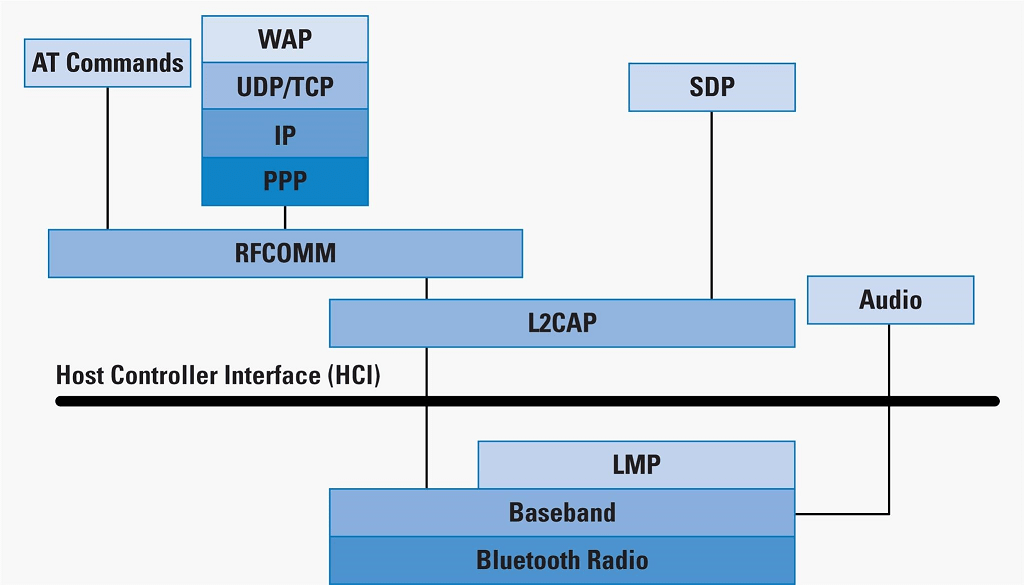
The printer (scanning device) responds to the request and, as a result, appears in the phone as an available printing device. When the printer responds, it is ready to accept the connection. When you select a Bluetooth wireless printer, the printing process begins by establishing connections at successively higher levels of the Bluetooth Protocol stack, which in this case controls the printing function.

As with any successful technology, all this complexity occurs without the user being aware of anything other than the task they are trying to perform, such as connecting devices and talking on a speakerphone, or listening to high-quality stereo music with wireless headphones.
In the next article, we will understand how secure Bluetooth technology is, and consider possible attack vectors.
A detailed description of this toy can be found here.
So, in order, let's look at what Bluetooth is, and how it works.
Bluetooth technology is a short-range wireless communication technology that replaces the cables connecting electronic devices, allowing a person to talk on the phone through a headset, use a wireless mouse, and sync information from a mobile phone to a PC using the same core. the system.
The Bluetooth RF transceiver (or physical layer) operates in the unlicensed ISM band with a Central frequency of 2.4 gigahertz (the same frequency range used by microwaves and Wi-Fi). The basic system uses a frequency hopping transceiver to deal with interference and fading.
Bluetooth devices use a radio frequency topology known as the "star topology" to control them. A group of devices synchronized in this way forms a piconet, which can contain one master and up to seven active slaves, with additional slaves that do not actively participate in the network. (This device can also be part of one or more piconets, either as a master or as a slave.)
In a piconet, a physical radio channel is shared by a group of devices that are synchronized to a common clock and frequency hopping pattern, with the master device providing links for synchronization.
Piconet is a fundamental form of communication in Bluetooth technology. A piconet is an Ad Hoc network. A piconet can contain up to 7 active slave devices. In addition, there may be inactive (so-called "parked") slave devices in the vicinity (confident reception zone) of the master device, which are also synchronized to a common clock and a common frequency sequence, but cannot exchange data until the master device activates them.
It is not superfluous to tell us what PAN is a Personal Area Network (PAN) is a network built "around" a person. A PAN is a computer network that is used to transfer data between devices such as computers, phones, tablets, etc.
Personal networks can be used both for information interaction of individual devices with each other (interpersonal communication)both for connecting them to higher-level networks, such as the global Internet (uplink), where one "primary" device takes on the role of an Internet router.
A wireless personal area network (WPAN) is a low-power PAN that is organized over a short distance using wireless network technologies such as:
- INSTEON
- IrDA
- Wireless USB
- Bluetooth
- Z-Wave
- ZigBee
- Body Area Network
- Piconet
Let's say the main device is your mobile phone. All other devices in your piconet are called slaves. This can be a headset, GPS receiver, MP3 player, car stereo, etc.
Devices in the piconet use a specific frequency hopping pattern, which is algorithmically determined by the master device. The basic hopping pattern is a pseudorandom ordering of 79 frequencies in the ISM range.
The hopping pattern can be adapted to exclude some of the frequencies that are used by interfering devices. The adaptive switching technique improves the co-existence of Bluetooth technology with static (non-switching) ISM systems, such as Wi-Fi networks, when they are located in the vicinity of a piconet.
Bluetooth radio communication is carried out in the ISM band (Industry, Science and Medicine), which is used in various household appliances and wireless networks (license - free 2.4-2.4835 GHz band). For this purpose, Bluetooth uses the frequency Hopping Spread Spectrum (FHSS) method.
According to the FHSS algorithm, in Bluetooth, the carrier frequency of the signal changes abruptly 1600 times per second (a total of 79 operating frequencies with a width of 1 MHz are allocated).
A physical channel (or wireless communication) is divided into time units known as slots. Data is transmitted between Bluetooth-enabled devices in packets that are placed in these slots. Frequency hopping occurs between the transmission and reception of packets, so packets that make up a single transmission can be sent at different frequencies in the ISM range.
A physical channel is also used as a transport for one or more logical channels that support synchronous and asynchronous traffic, as well as broadcast traffic.
Each link type has a specific usage. For example, synchronous traffic is used to transmit audio data in hands-free mode, while asynchronous traffic can carry other forms of data that can withstand greater variability in delivery times, such as printing a file or syncing your calendar between your phone and computer.
One of the challenges often associated with wireless technology is the process of connecting wireless devices. Users are used to the process of connecting wired devices by inserting one end of the cable into one device and the other end into an additional device.
Bluetooth technology uses the principles of "request" and "scan requests". Scanning devices listen at known frequencies to devices that are actively being polled. When the request is received, the scanning device sends a response with the information necessary for the requesting device to determine and display the nature of the device that recognized its signal.
Let's say you want to wirelessly print an image from your mobile phone to a nearby printer. In this case, you go to the image on your phone and select print as the option to send that image. Your phone will start searching for nearby devices.
The printer (scanning device) responds to the request and, as a result, appears in the phone as an available printing device. When the printer responds, it is ready to accept the connection. When you select a Bluetooth wireless printer, the printing process begins by establishing connections at successively higher levels of the Bluetooth Protocol stack, which in this case controls the printing function.
As with any successful technology, all this complexity occurs without the user being aware of anything other than the task they are trying to perform, such as connecting devices and talking on a speakerphone, or listening to high-quality stereo music with wireless headphones.
In the next article, we will understand how secure Bluetooth technology is, and consider possible attack vectors.

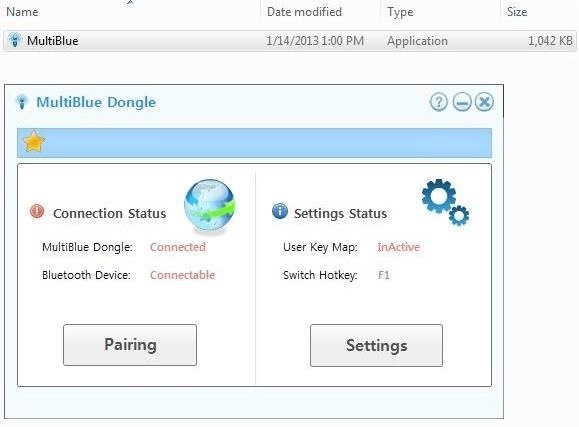
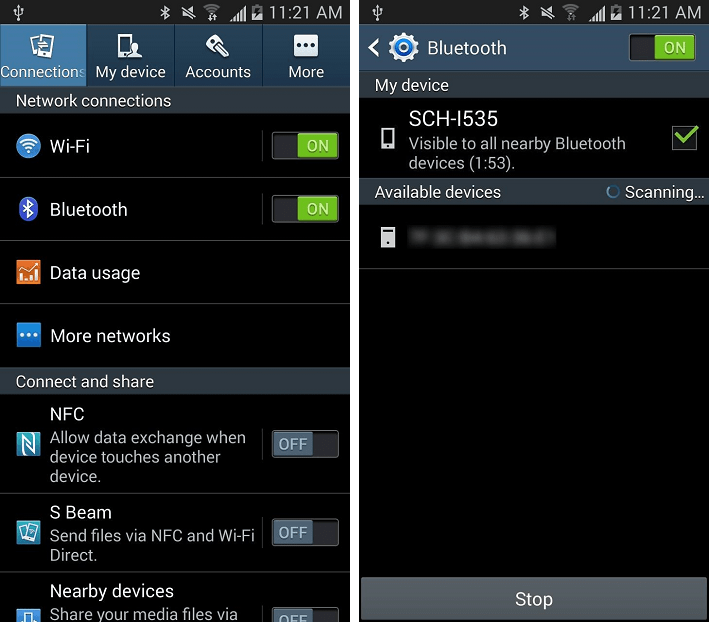




 C:11:4F:85-n Car537", use the "i" argument to specify the interface name of our bluetooth adapter, use the "a" argument to specify the MAC address of the device, and use "n" to specify the desired Bluetooth device name.

