


BadB
Professional
- Messages
- 2,568
- Reaction score
- 2,827
- Points
- 113
One of the best ways to protect yourself from hacking is to keep your system up to date and keep an eye out for new vulnerabilities and patches that fix them.
And so the beast from which we will tame today is Windows-Exploit-Suggester.
To run it, we need Python and the xlrd additional module can be installed as follows.
Python code:
The essence of the utility is extremely simple, based on the system information file (I'll tell you where to get it a little later), the program finds out the state of our system: installed patches and so on. Then he searches popular resources for the presence of exploits for these patches and then displays all this to us in a cute list with links to resources with information.
Also, this utility can be used during the security audit process to check the state of the system.
The work comes down to 2 simple steps:
Step number 1:
We need to get the systeminfo.exe file.This is extremely simple, run the console as administrator and type systeminfo.exe there
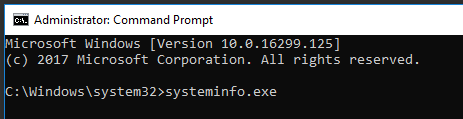
We copy the received information and save it as a txt file and call it whatever we want. (just don't forget the path where you saved it.)
After you have downloaded the utility from Github, unpack it and proceed to the second step.
Step number 2:
We also open the command line and write the following
The code:

This command will update the library of known exploits. By default, the Date-mssb.xls file will be saved to C: \ Users \ USERNAME
Next, run the check with the following command:
The code:
In order not to register file paths, you can simply drag them into the command line window.
You end up with something like:

Press the ENTER button and wait for the utility to finish.
The output will be the following listing:
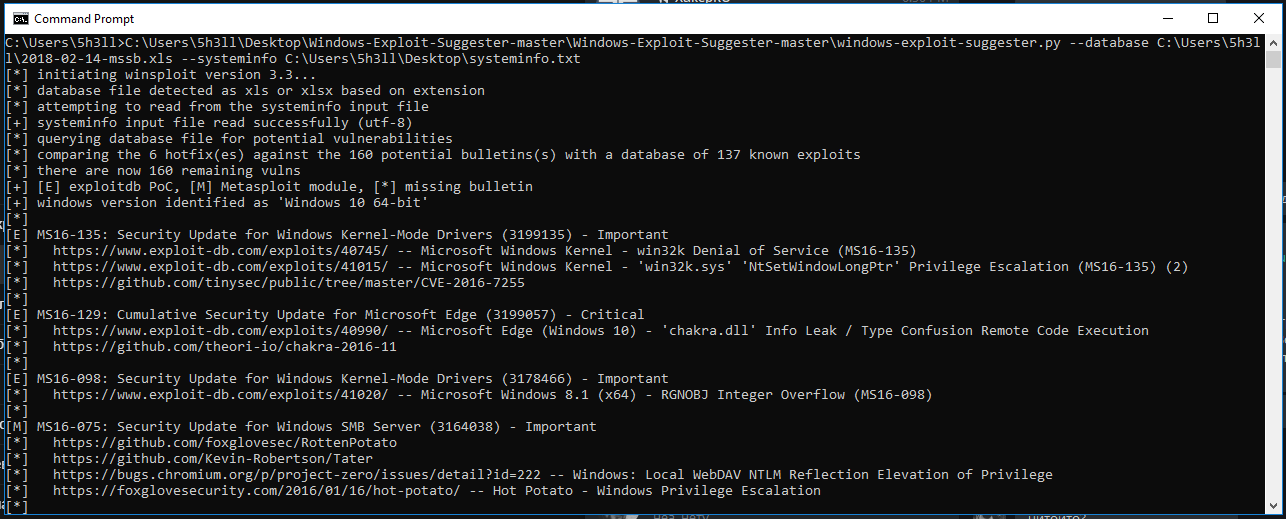
Then we look, we study.
And so the beast from which we will tame today is Windows-Exploit-Suggester.
To run it, we need Python and the xlrd additional module can be installed as follows.
Python code:
Python:
pip install xlrd --upgradeThe essence of the utility is extremely simple, based on the system information file (I'll tell you where to get it a little later), the program finds out the state of our system: installed patches and so on. Then he searches popular resources for the presence of exploits for these patches and then displays all this to us in a cute list with links to resources with information.
Also, this utility can be used during the security audit process to check the state of the system.
The work comes down to 2 simple steps:
Step number 1:
We need to get the systeminfo.exe file.This is extremely simple, run the console as administrator and type systeminfo.exe there
We copy the received information and save it as a txt file and call it whatever we want. (just don't forget the path where you saved it.)
After you have downloaded the utility from Github, unpack it and proceed to the second step.
Step number 2:
We also open the command line and write the following
The code:
Code:
C: \ Users \ DoFile Path \ windows-exploit-suggester.py --updateThis command will update the library of known exploits. By default, the Date-mssb.xls file will be saved to C: \ Users \ USERNAME
Next, run the check with the following command:
The code:
Code:
C: \ ToFile Path \ windows-exploit-suggester.py --database C: \ ToFile Path \ 2018-02-14-mssb.xls --systeminfo C: \ ToFile Path \ systeminfo.txtIn order not to register file paths, you can simply drag them into the command line window.
You end up with something like:
Press the ENTER button and wait for the utility to finish.
The output will be the following listing:
Then we look, we study.