


Mutt
Professional
- Messages
- 1,457
- Reaction score
- 1,266
- Points
- 113
Hello friends, today I will introduce you to a whole group of tools developed by AngelSecurityTeam.
The review will not contain a complete list of new products, I chose those with which it was interesting to get acquainted.
The arsenal also includes utilities for listing subdomains and searching for admin panels.
The tools are provided solely as part of security awareness and research.
We will work with Kali Linux.
Cam-Hackers

I have already done a separate article about this tool, you can familiarize yourself with the link- https://teletype.in/@h4ckers_zone/uZKtAwEeL
Installation:
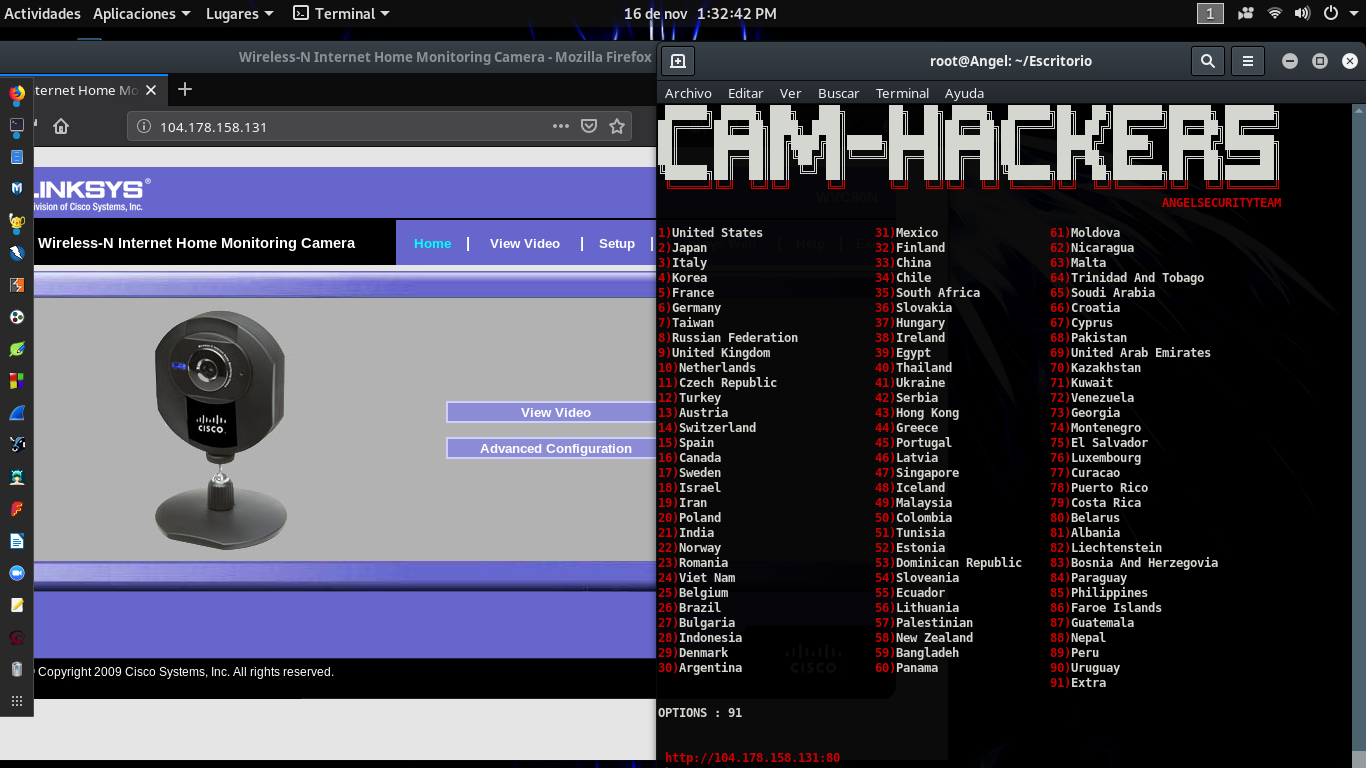
The interface of this tool is extremely simple and intuitive.
Well, we are moving on to the second tool.
BackHack

The tool is designed to generate backdoor.
This and the following tools combine the use of the ngrok service and your own small server.
Do not rush to download it. there is a drawback - in its pure form it will not be missed by AV.
Installation:
First of all, we start the Server.py server (and work with the rest of the tools in the same way).

Choose for which OS to generate backdoor.
Windows will need the mingw64 package installed.
The output file will always have the same name, but there is a plus - it can be renamed.
Without interrupting the operation of the tool, we substitute the new file name in the link that we send to the tested object.
It is possible to interrupt (ctrl + c) if necessary and select a listener, the exit command is required to complete the work completely.
Let's move on to a more complex tool for fishing attacks.
Recreator-Phishing

(Checked on vk)
Installation:
For Termux:
The site created by the utility is very realistic, since the utility copies the html page, thereby making the phishing page a complete clone of the original.
The review will not contain a complete list of new products, I chose those with which it was interesting to get acquainted.
The arsenal also includes utilities for listing subdomains and searching for admin panels.
The tools are provided solely as part of security awareness and research.
We will work with Kali Linux.
Cam-Hackers
I have already done a separate article about this tool, you can familiarize yourself with the link- https://teletype.in/@h4ckers_zone/uZKtAwEeL
Installation:
Code:
git clone https://github.com/AngelSecurityTeam/Cam-Hackers.git
cd Cam-Hackers
chmod + x cam-hackers.py
pip3 install requests
python3 cam-hackers.py
The interface of this tool is extremely simple and intuitive.
- Launching the application
- Choosing the country we need
- We get a list of addresses
- Paste the address into the address bar of the browser
Well, we are moving on to the second tool.
BackHack
The tool is designed to generate backdoor.
This and the following tools combine the use of the ngrok service and your own small server.
Do not rush to download it. there is a drawback - in its pure form it will not be missed by AV.
Installation:
Code:
git clone https://github.com/AngelSecurityTeam/BackHAck.git
cd BackHAck
chmod + x install.sh
bash install.sh
python Server.py
python3 backhack.py
First of all, we start the Server.py server (and work with the rest of the tools in the same way).
Choose for which OS to generate backdoor.
Windows will need the mingw64 package installed.
The output file will always have the same name, but there is a plus - it can be renamed.
Without interrupting the operation of the tool, we substitute the new file name in the link that we send to the tested object.
It is possible to interrupt (ctrl + c) if necessary and select a listener, the exit command is required to complete the work completely.
Let's move on to a more complex tool for fishing attacks.
Recreator-Phishing
(Checked on vk)
Installation:
Code:
git clone https://github.com/AngelSecurityTeam/Recreator-Phishing.git
cd Recreator-Phishing
chmod + x install.sh
bash install.sh
python ServerInstall.py
python3 recreator-phishing.py
For Termux:
Code:
pkg install git
git clone https://github.com/AngelSecurityTeam/Recreator-Phishing.git
cd Recreator-Phishing
pkg install python
pkg install wget
pip3 install wget
python3 ServerInstall.py
python3 recreator-phishing.py- After installation, you need to insert the url of the login page and specify the port (8080)
- Now we select the server to create the link. There are 5 of them:
- Serveo (link will be available on the Internet)
- Ngrok (link will be available on the Internet)
- LocalXpose (link will be available ONLY on the local network)
- Localhost (the link will be available ONLY on the local network)
- Localrun (link will be available ONLY on the local network)
- If there are any dialog boxes, then answer "Yes"
- Now it is advisable to shorten the NGROK link, for example, to BitLy.com and send it to the victim.
- After the victim enters the data, an inscription will appear in red, stating that the logs are saved in the corresponding file in the directory.
- After entering the password, the SAMA page redirects the victim to the original
The site created by the utility is very realistic, since the utility copies the html page, thereby making the phishing page a complete clone of the original.
