


Carding
Professional
- Messages
- 2,870
- Reaction score
- 2,489
- Points
- 113
Software configuration errors - incorrect software configuration (excessive access rights, open ports or interfaces, etc.), as a result of which a computer system or data may be compromised. Configuring for specific platforms is the most important stage in the implementation of any software product and a condition for the success of working with it; the more difficult the solution, the higher the risk of being wrong.
Individuals or groups of intruders exploit such inconsistencies for their own purposes. Regardless of its nature, any failure leads to a weakening of the built-in defense mechanisms and makes the machine vulnerable to hacker attacks.
Classification of program configuration errors
The most common cause of software configuration errors is human error. The system administrator may not know about rarely used functions or forget to close access to the computer system, as a result of which anyone can perform any actions on his behalf.
Let's list the main mistakes that can be used by criminals for subsequent hacking.
In all of the above cases, cybercriminals will actively use the encountered problems to inject malicious code or secretly launch various applications.
Object of influence
Configuration errors can occur in any application, but the most vulnerable to attackers' actions are the parameters associated with the operation of Windows OS, server software, 1C software products and other solutions that use multilevel engineering calculations and hyperlinks.
Outdated versions of operating system components and other software, as well as the system registry are common targets. Using specialized tools, cybercriminals detect incorrectly configured network equipment and vulnerable IoT devices. The default settings are used to bypass the security mechanisms that protect smartphones.
Reasons for Configuration Errors
The main sources of configuration errors are numerous:
Some problems arise from a combination of previous actions that do not individually result in this type of problem.
Risk analysis of configuration errors
No one is immune from the occurrence of such errors. They can occur due to incorrect user actions and after hardware failures. Worse, the emerging problems can be used by intruders to infect your computer.
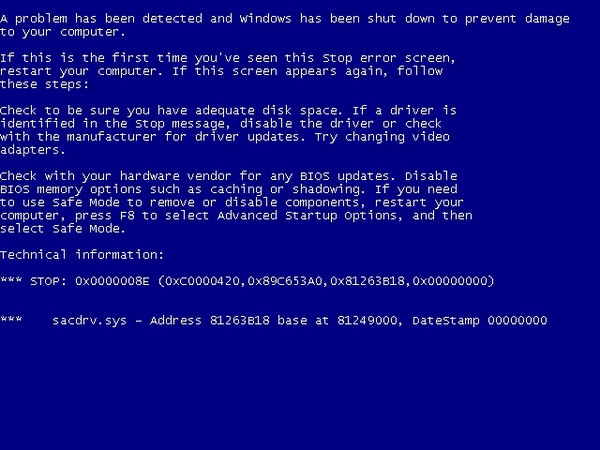
If during installation or launch a message about a detected configuration error appears (for example, the "blue screen of death" shown above), you must perform the following steps:
If the above steps do not work, you can try reinstalling the application.
It is important to carefully study the documentation for software products, especially for complex solutions for a corporate environment, and try not to overlook potentially dangerous parameters that could be exploited by attackers. It is useful for both the home user and the administrator to know what functionality of the software is redundant for his tasks and to disable the redundant ones. For example, a typical workstation does not have to serve as an HTTP server, keeping port 80 open for external connections.
Individuals or groups of intruders exploit such inconsistencies for their own purposes. Regardless of its nature, any failure leads to a weakening of the built-in defense mechanisms and makes the machine vulnerable to hacker attacks.
Classification of program configuration errors
The most common cause of software configuration errors is human error. The system administrator may not know about rarely used functions or forget to close access to the computer system, as a result of which anyone can perform any actions on his behalf.
Let's list the main mistakes that can be used by criminals for subsequent hacking.
- Boolean problems arise in the process of editing configuration parameters, due to incorrect input of variables for calculations or mismatch of individual results, which will most likely lead to malfunctions or to a complete freeze of the program.
- System errors include memory overflow, incorrect addressing, loss of data, or the appearance of references to nonexistent objects.
- Violation of data structure integrity.
- Debug switches left active for making changes to the finished product and fixing any failures.
- In Windows 10, there are flaws in text files containing information about the main configuration parameters.
- Complete absence of anti-virus programs or outdated signature databases.
In all of the above cases, cybercriminals will actively use the encountered problems to inject malicious code or secretly launch various applications.
Object of influence
Configuration errors can occur in any application, but the most vulnerable to attackers' actions are the parameters associated with the operation of Windows OS, server software, 1C software products and other solutions that use multilevel engineering calculations and hyperlinks.
Outdated versions of operating system components and other software, as well as the system registry are common targets. Using specialized tools, cybercriminals detect incorrectly configured network equipment and vulnerable IoT devices. The default settings are used to bypass the security mechanisms that protect smartphones.
Reasons for Configuration Errors
The main sources of configuration errors are numerous:
- inaccuracies in the program code, design or implementation, admitted during the development and writing of the program;
- incorrect installation of the product or non-compliance with the recommendations of the developers (for example, close running applications during the installation process or turn off the Internet);
- external factors: power outages of the computer or the equipment connected to it,
- incorrect operation of drivers or other OS components;
- overflow of the hard disk or memory, as a result of which the changes made are not completely saved;
- negligence, inexperience of users, or deliberate harm by the accomplices of the attackers;
- accidental or deliberate external interference with the aim of causing a failure and injecting third-party code, launching a malicious program.
Some problems arise from a combination of previous actions that do not individually result in this type of problem.
Risk analysis of configuration errors
No one is immune from the occurrence of such errors. They can occur due to incorrect user actions and after hardware failures. Worse, the emerging problems can be used by intruders to infect your computer.
If during installation or launch a message about a detected configuration error appears (for example, the "blue screen of death" shown above), you must perform the following steps:
- Check the compatibility of the installed software with the operating system and its components; if this is the reason for the conflict, you can try to install a different version or replace the program with an analogue.
- Try to run the application with administrator rights.
- To restart a computer; it is possible that the malfunction was of a one-time nature and after restarting the system it will not recur.
- Check the versions of the service components required for the programs to work (for example, Microsoft Visual C ++), if necessary, download them from the manufacturer's official website and reinstall them.
- Check the registry to see if the parameters associated with the problematic application match the default values.
If the above steps do not work, you can try reinstalling the application.
It is important to carefully study the documentation for software products, especially for complex solutions for a corporate environment, and try not to overlook potentially dangerous parameters that could be exploited by attackers. It is useful for both the home user and the administrator to know what functionality of the software is redundant for his tasks and to disable the redundant ones. For example, a typical workstation does not have to serve as an HTTP server, keeping port 80 open for external connections.